Watch a short briefing
Prices checked 2026-11-11. HomeServStack has no affiliate deals with any vendor named here. Totals below are our calculations from published list prices; they are not vendor quotes. We did not run paid accounts for this article (method).
Short answer: For a residential maid calendar of two to eight cleaners, start with ZenMaid Pro, and Pro Max if you need availability and PTO. For a quote-led shop that needs QuickBooks Online today, start with Jobber Connect. Trial both on the same biweekly series before you prepay annual.
Call this a labeled Tuesday, not a case study. Brennan runs a four-person residential maid shop — herself and three cleaners — almost entirely on a biweekly calendar. On published list prices, ZenMaid Pro for that roster is well under Jobber Connect’s five-user annual band. The gap looks like the decision. It is not.
MaidCentral’s Professional Cleaning Index, a vendor dataset from roughly 150,000 monthly cleanings, puts average revenue per cleaning at $217.91 in September 2026. One missed biweekly, or one payroll run you cannot trust, is larger than that plan gap. One QuickBooks sync you needed this month and did not get is larger still.
So here is the argument. Pick ZenMaid when the office is a residential maid calendar and wants payroll, and on Pro Max cleaner availability, in the same product. Pick Jobber when you quote, need QuickBooks Online today, and will live on Connect’s user bands. ZenMaid Pro stays cheaper through 12 people on our annual math; Pro Max crosses Jobber around nine. Fit still beats the cheaper sticker.
The work-start × meter framework, and the three-shop subscription table, live in the scheduling pillar. All-in bills including SMS and processing live in the cost guide. Path-by-path card rates live in the autopay guide. If the other name in your shortlist is Housecall Pro, that pairwise page is Jobber vs Housecall Pro. This page is the fork cleaning owners actually describe when they leave one of these two for the other.
This is a maid calendar versus a quote-led generalist, not a photo finish on price
ZenMaid’s own pricing page describes a product for cleaning businesses: a calendar with dispatch and map views, cleaner tools, and, as you move up the plans, payroll, Spot Finder, and cleaner availability. Jobber’s pricing page describes a field-service platform: quotes, jobs, invoices, payments, and, on Connect, automated reminders, automatic payments, checklists, time tracking and QuickBooks Online.
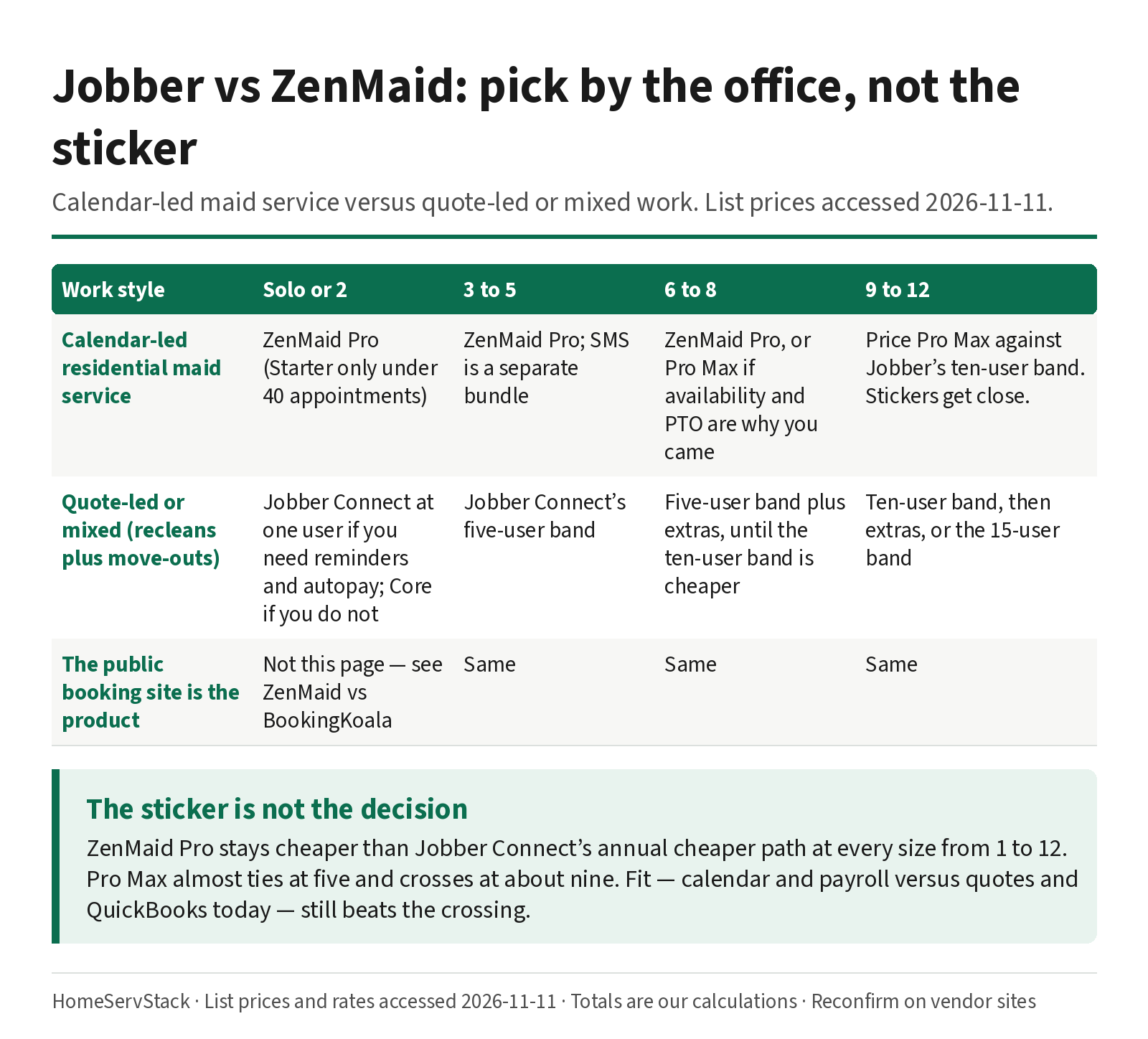
If almost every dollar you make is a recurring residential clean, and the office already books the week, you are shopping for a maid calendar. If a typical week also includes a move-out quote, a one-off deep clean, or a small commercial job that has to be approved before anyone is scheduled, you are shopping for a generalist. That is the framework. Size then tells you which plan, and which meter, you will actually pay.
| Work style | Solo or 2 | 3 to 5 | 6 to 8 | 9 to 12 |
|---|---|---|---|---|
| Calendar-led residential maid service | ZenMaid Pro (Starter only if you are under 40 appointments; details in the free-plans guide) | ZenMaid Pro; add SMS as a separate bundle | ZenMaid Pro, or Pro Max if availability and PTO are the reason you came | Price Pro Max against Jobber’s ten-user band. The stickers get close. |
| Quote-led or mixed (recleans plus move-outs or light commercial) | Jobber Connect at one user if you need reminders and autopay; Core if you do not | Jobber Connect’s five-user band | Connect, cheaper path is the five-user band plus extras until the ten-user band is cheaper | Connect at the ten-user band, then extras, or the 15-user band |
| The public booking site is the product | This is not that page. See ZenMaid vs BookingKoala. | Same | Same | Same |
What this means: the first row is a calendar decision. The second is a quote-to-cash decision. If you force a quote-led shop onto a maid calendar, you will spend the trial trying to write estimates that the product was not built to send. If you force a maid-only shop onto a generalist, you will pay for a quote pipeline you do not use, and you may miss payroll and availability tools that were the point.
Numeric break points that belong on this page: ZenMaid Starter caps you at 40 appointments a month, which is why most real books start on Pro. Jobber Core does not list automated reminders or automatic payments; those start on Connect. ZenMaid payroll is listed on Pro. Cleaner Availability is a Pro Max feature. Jobber’s QuickBooks Online sync is listed on Connect. ZenMaid’s QuickBooks line is still “coming soon.” Find a Time, on Jobber, is documented on Grow and Plus.
ZenMaid’s per-person add-ons stay cheaper on Pro through 12 people; Pro Max crosses Jobber around nine
Both products charge for people. They do not charge the same way. ZenMaid’s cost article says only the Owner profile is included in the base plan. Extra cleaners, contractors and office managers are $4 a month on Starter, $14 on Pro, and $24 on Pro Max. Only active roles are billed. Jobber sells user bands — 1, 5, 10 and 15 — and a flat $29 extra user. The cheaper Jobber path is the band that covers you, not a smaller band plus a stack of extras. At 12 users, that cheaper path is the ten-user band plus two extras, not a smaller band plus a stack. The all-in worksheet at more sizes, including SMS and processing, is in the cost guide.
Assumptions, used throughout. List prices accessed 2026-11-11. Jobber figures are Connect billed annually, on the cheaper band-or-extras path. ZenMaid figures are monthly list prices; annual plans exist on request, and those rates are not published, so we do not invent them. Headcount includes the owner. SMS, card processing and add-ons are excluded here on purpose. Totals are HomeServStack calculations, not vendor quotes.
Formulas. ZenMaid Pro = $39 + (people − 1) × $14. ZenMaid Pro Max = $49 + (people − 1) × $24. Jobber Connect annual uses the cheaper of a band and a smaller band plus $29 extras: one user, then one-plus-extras, then the five-user band, then the ten-user band, then extras on that band.
| People | ZenMaid Pro | ZenMaid Pro Max | Jobber Connect annual, cheaper path |
|---|---|---|---|
| 1 | $39 | $49 | $99 (one-user Connect) |
| 2 | $53 | $73 | $128 (one-user + one extra) |
| 3–5 | $67 / $81 / $95 | $97 / $121 / $145 | $149 (five-user band, all three rows) |
| 6 | $109 | $169 | $178 |
| 8–10 | $137 / $151 / $165 | $217 / $241 / $265 | $229 (ten-user band, all three rows) |
| 12 | $193 | $313 | $287 (ten-user band + two extras) |
What this means: on Pro, ZenMaid is cheaper at every row. The five-person gap is $54 a month, or $648 a year, our calculation. On Pro Max, the stickers almost tie at five ($145 versus $149), and Jobber’s ten-user band pulls ahead at nine ($229 versus $241) and stays ahead at 12 ($287 versus $313). That nine-person crossing is the only place the generalist wins the subscription on this table, and it only happens if you need Pro Max.
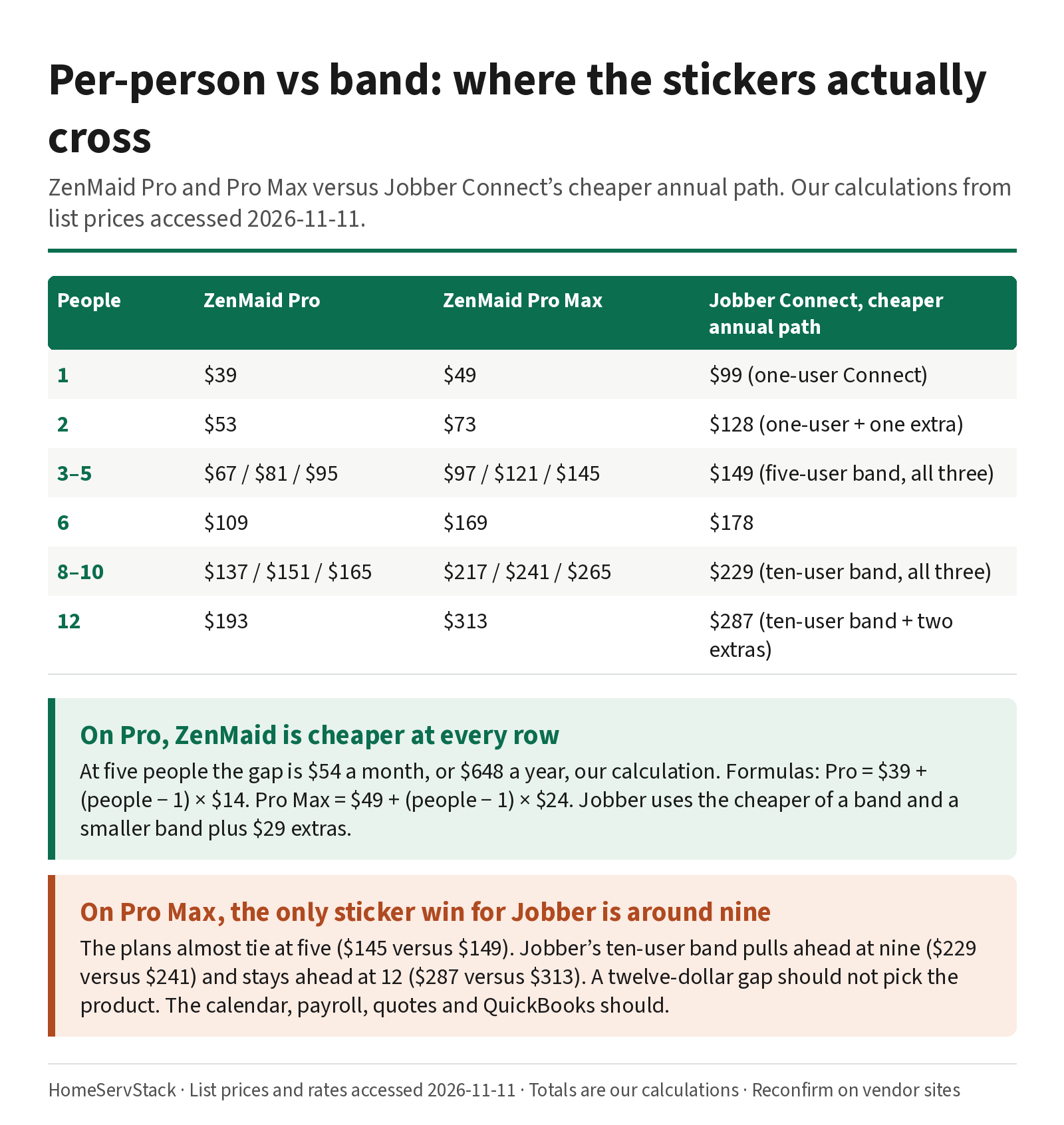
Call this a labeled shop, not a case study. Brennan’s four-person Pro calendar is the cheaper Pro row. Dana’s nine-cleaner shop, if she needs Pro Max for availability, is on the side of the table where the stickers have crossed. A twelve-dollar monthly gap should not pick the product. The next two sections should.
SMS is extra on ZenMaid. Bundles start at $14 for 125 messages, per the same cost article, and they can bill on a different cadence than the subscription. Path-by-path card rates, and what happens when a saved card declines, are in the autopay guide. Do not add them in your head and call the result a vendor price.
Frequency changes and holiday shifts are the recurring-edit test; Spot Finder is not Find a Time
The scheduling pillar already owns the skip-one-visit drill. This page goes after the edits that actually rearrange a book: a client who drops from weekly to biweekly, a holiday week, and a new recurring client you want to drop into a gap.
What good looks like. You change the frequency from a date forward. Past visits stay put. Future visits pick up the new cadence. Custom notes on a visit you already edited do not vanish. A holiday closes the right day without breaking the series, and the next regular visit is still on the calendar, still billed, still assigned. A new biweekly client can be tried in an opening, and you can see conflicts before you save.
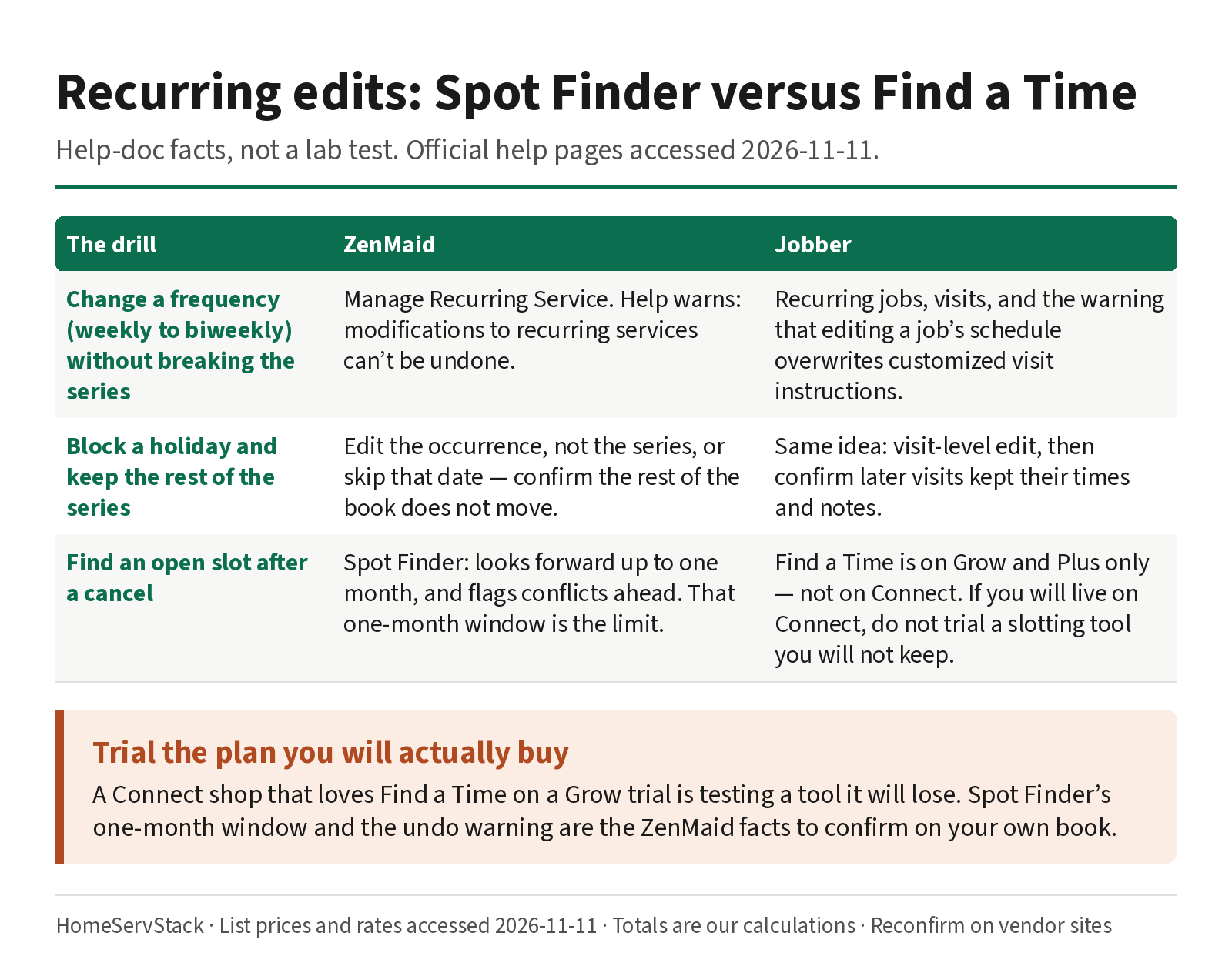
ZenMaid, per its help. The Manage Recurring Service page lets you change start and end time, frequency, day of the week, and the appointment from which the change takes effect. The same article warns, in plain language: “Modifications to recurring services can’t be undone.” If you misfire, you correct it by going through the same page again. That is the failure mode to test: make a frequency change, look at the next four visits, and confirm you can live with a tool that will not roll the edit back in one click.
Jobber, per its help. On a recurring job, Edit All Visits and then Update Incomplete Visits applies schedule changes to remaining incomplete visits. Visit-level instructions can be edited for that visit only. The Visits article is the one to read before you change a frequency: “Editing a job’s schedule generates new visits with the new job details. If you have customized visit details like instructions, these will be overwritten by the newly generated visits.” You will see a warning and have to check “I understand” before you update. The trial test is the same shape as ZenMaid’s, with a different risk: a frequency or holiday shift that regenerates visits and wipes a door-code note you had customized. Check the next visits, and the notes, after the edit.
Holidays and time off. ZenMaid documents several ways to plot time off, including the Availability feature, placeholder appointments, and tasks. Cleaner Availability — working hours and time off that prevent bookings — is a Pro Max feature. If you are on Pro, the placeholder-appointment method in the time-off article is the documented workaround, and only the Owner and Office Manager roles can manage those calendar blocks. Jobber documents events on the schedule and working hours per teammate. The staff-side pair and sick-day drills, including how time clocks behave, live in the employee scheduling guide. Here you are checking one thing: can you close Thursday for Thanksgiving without destroying Friday’s series.
Spot Finder versus Find a Time. These are the features comparison pages love to treat as twins. They are not. ZenMaid’s Spot Finder is built to place a new recurring appointment into an opening. You set a recurrence and a duration, hover openings, and the product checks the cleaner forward for conflicts. A pop-up shows a green “No conflicts” badge or a red badge with the count, and you can review each conflicting date. The same article is honest about the window: “The Spot Finder feature only displays up to a month of appointments.” A new biweekly that looks clean for four weeks can still collide in week six. Look past the first month in the trial.
Jobber’s Find a Time, on the new schedule, highlights open availability when you book a new job, request, task or event. It accounts for appointment length and drive time, and a slot is available if it falls inside working hours and is not already occupied. The same help article states the plan gate: “Find a Time is available on the Grow and Plus plans.” If you will buy Connect — and most recurring shops should price Connect first — the Grow trial’s Find a Time is not daily life. Write that down on day one.
A five-minute trial test, steal this:
- Create the same weekly series in both trials. Add a door-code note on visit three only.
- From a date forward, change it to biweekly. Check visits, billing, the pair if you assigned two cleaners, and that door-code note.
- Block a holiday Thursday. Confirm Friday is intact.
- On ZenMaid, use Spot Finder to place a new biweekly in an opening. Read the conflict badge, then look at week six yourself, because the tool’s window is a month.
- On Jobber, open Find a Time if the trial shows it, then check your intended plan. If you will buy Connect, note that this button is a Grow and Plus feature.
Payroll and PTO are why maid shops stay; quotes and QuickBooks are why they leave
This is the other half of the fork, and it is why a cheaper Pro sticker is not automatically the right Pro sticker.
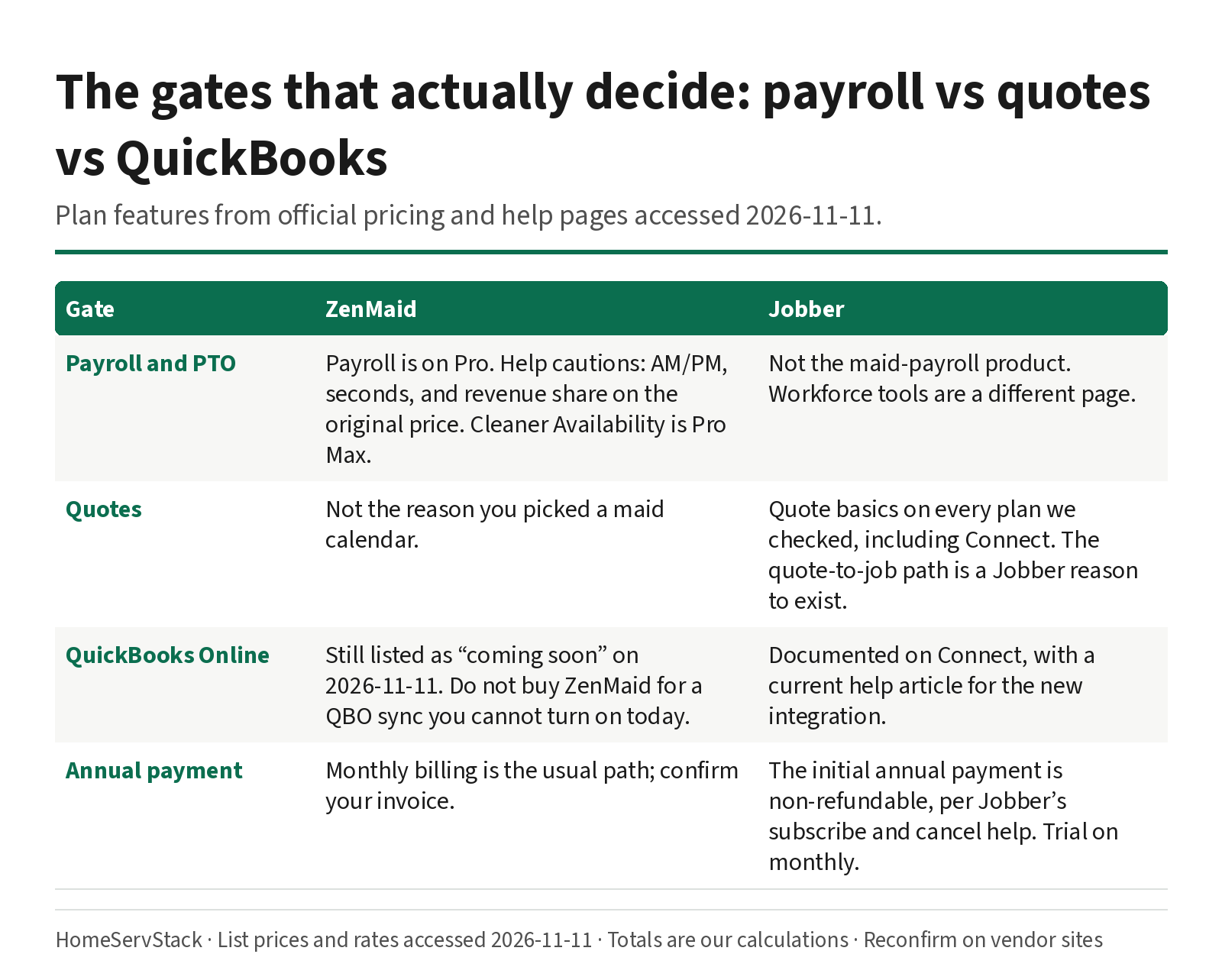
ZenMaid payroll, per its help. How to Run Payroll is a real workflow, not a marketing line: set a date range, run payroll, view scheduled hours, clocked hours, rates, wages and extras, adjust a wage per appointment, then approve. The same article publishes the failure modes. Be careful with AM/PM on the clock: entering 12:45 a.m. instead of 12:45 p.m. “can add approximately 12 extra hours to the total worked time.” Payroll includes seconds even when they are not displayed, so a total can look a few cents off. Cleaners on a revenue share are paid on the original appointment price, “not on the total appointment amount after discounts, taxes, overcharges, and tips.” Read that twice if you discount a visit and still owe the cleaner on the pre-discount number.
A 15-employee operator, u/household_solutions, left after a month and wrote: “4. When I tried using the numbers it pulled for payroll, they were incorrect and would have resulted in overpayment if I hadn’t double checked them.” (comment, 2026-09-27). That is a user report, not a test result. It is also a reason to run a known week through payroll in the trial and check it against your own spreadsheet, the way ZenMaid’s own help tells you to watch the inputs.
Availability and PTO. If you need working hours and time off to actually block bookings, that is Cleaner Availability on Pro Max. The staff-toolkit comparison, including when a second workforce app is the cheaper fix, is in the employee scheduling guide. Do not buy Pro and assume Pro Max’s availability feature came with it.
Jobber quotes, per its help. Quote Basics documents a quote you send, the client approves, and you convert to a job. Visual quotes, optional line items and some of the richer presentation sit on Grow, per Jobber’s pricing page. If your week is full of move-out estimates, this is the product. If your week is a calendar of recleans with a price the client already knows, you may be paying for a pipeline you will not open.
QuickBooks. Jobber lists QuickBooks Online sync on Connect and above, and documents the connection in its help center. ZenMaid’s pricing page, accessed 2026-11-11, still lists QuickBooks integration as coming soon. If that sync is why you are buying software this quarter, the published path is Jobber’s. It is still a trial item, not a promise: connect a sample file, sync a handful of invoices, and have your bookkeeper look at the result before you prepay. Jobber’s subscribe help is blunt: “Charges are non-refundable and will automatically renew unless cancelled before the end of the current period.” A Capterra reviewer, Chase C., Owner, dated 2026-11-10, put the practical version: “test every integration you depend on before committing to an annual plan.” (Jobber reviews).
Migration, both ways. ZenMaid’s Pro and Pro Max cards offer a free one-to-one transfer of contacts and calendar. Jobber documents client import, job import, and client export. Neither vendor should be trusted on a migration you have not watched. Export a sample in week one. If you cancel a Jobber annual term mid-year, you keep access until the end of the term, and the initial payment does not come back.
Owners switch both ways, and the pattern is size plus workflow
These are verbatim owner comments, accessed 2026-11-11. They are not test results. We did not run the payrolls or the migrations. Use them as trial prompts.
Small crews like the calendar. u/Aromatic-Way4384, a cleaning operator with a crew under five, wrote: “I use ZenMaid and LOVE IT for our crew of under 5 staff!” (comment, 2026-07-24). A Capterra reviewer titled CEO, dated 2024-12-03, who had switched from another tool, wrote: “The pricing is what made me switch to zenmaid” (ZenMaid reviews). A Capterra owner dated 2025-03-26, who had switched from Jobber, wrote: “Jobber had a lot of features missing that Zenmaid has!!” (same reviews page). That is the maid-calendar side of the fork, in the owner’s words.
Larger shops are mixed, and routing is still a hand job for some. A family cleaning business with 15 to 20 employees, u/Ok_Committee_8576, wrote: “We have been happily running most operations on ZenMaid for years at 300$ a month.” (comment, 2026-08-20). The $300 a month is their claim, not a list price; at that headcount, Pro or Pro Max plus SMS can get into that neighborhood, and we are not going to reverse-engineer their bill. In the same post they added: “One thing still being done manually every day is routing teams to jobs every day, however.” That is a 15-to-20-person shop that stayed, and still routes by hand.
Some leave. u/household_solutions, a 15-employee cleaning operator, wrote: “I tried Zen Maid for a month and completely let me down.” (comment, 2026-09-30). In a related comment they also reported field glitches and that “5. It charged for every text message that went out.” (comment, 2026-09-27). SMS being extra is consistent with ZenMaid’s published bundles. A Capterra owner dated 2025-11-12, who moved to Jobber, wrote: “I did not think it was simple to learn how to schedule clients and also did not like how the calendar looked overall.” (ZenMaid reviews).
Jobber has its own fans, and its own friction. A cleaning-company Director of Operations, on a Capterra review dated 2025-12-09, wrote: “After using Vcita and Square, after testing HouseCall Pro, Zenmaid & others, Jobber is the best bang for your buck.” (Jobber reviews). The same operator, u/household_solutions, after moving, wrote of Jobber: “There isn’t an automatic check-in text after each job is completed, and you have to manually send invoices even when the price is already set.” (comment, 2026-09-27). u/Low-Individual768, a cleaning operator with employees, stayed on ZenMaid and still wanted a Google Calendar hook: “I am using Zenmaid now, and its great, but i find that not having that google integration is making me nutty.” (comment, 2026-04-10). Jobber documents calendar syncing; whether that is the integration they wanted is a trial question, not a conclusion we will draw from a comment.
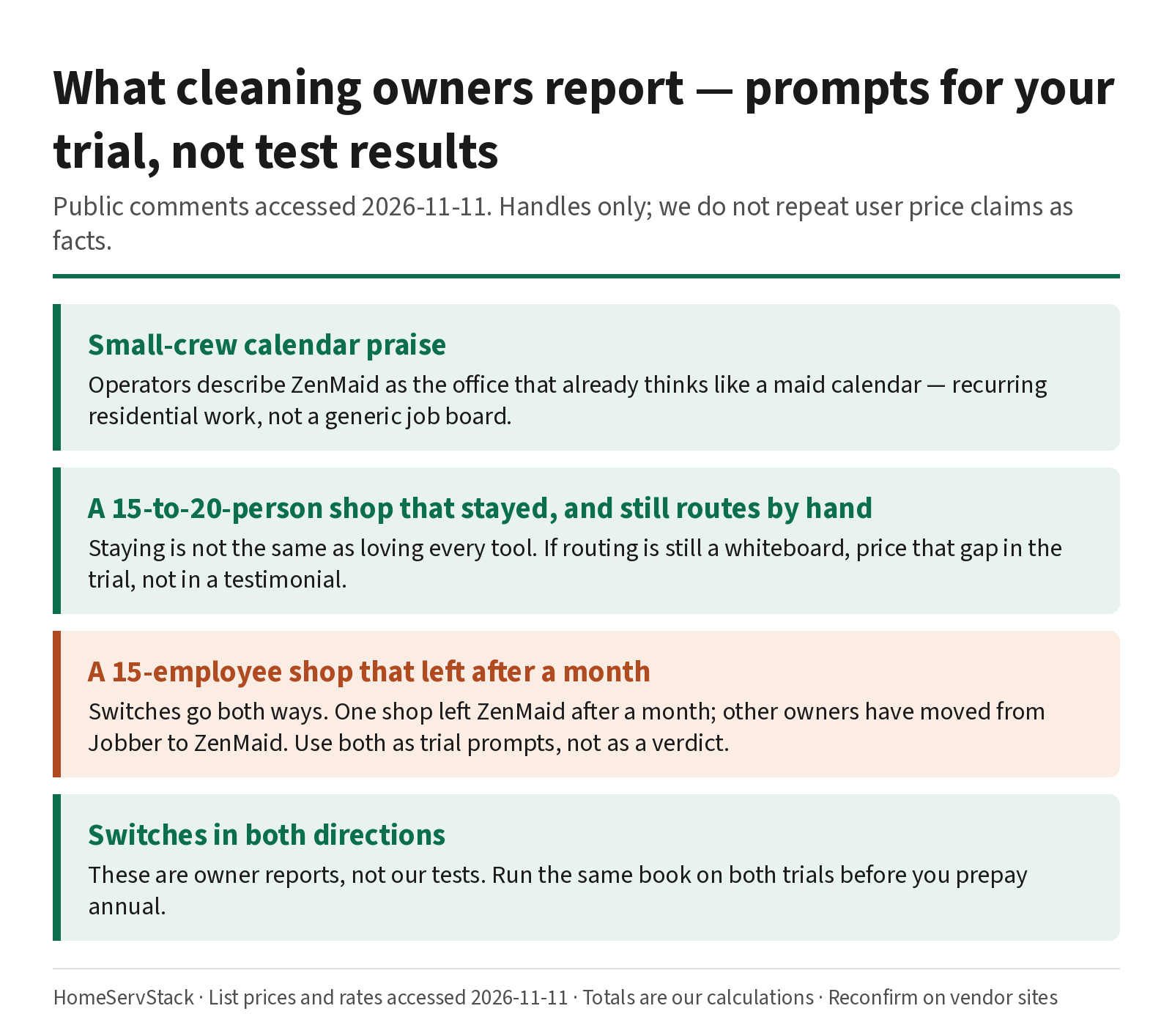
The pattern is not “ZenMaid wins” or “Jobber wins.” Small calendar-led crews tend to stay on ZenMaid and mention price and the calendar. Shops that quote, or that want QuickBooks today, or that bounced off payroll numbers, tend to look at Jobber. A 15-to-20-person family business can stay on ZenMaid and still route by hand. Your trial should look like your week, not like their comment.
A twin trial on the plan you will actually buy
Both vendors give you 14 days. Jobber’s trial runs with Grow features. ZenMaid’s trial should be checked against Pro or Pro Max, whichever you will pay for. Write the intended plan on day one.
A labeled week:
- The same biweekly, two cleaners. Create it in both. Assign two people. Add a door-code note and a pet note. Log in as each cleaner. The deep staff-side version of this drill is in the employee scheduling guide.
- A frequency change, from a date forward. Weekly to biweekly. Check the next visits, the notes, and the invoice. On ZenMaid, remember the edit cannot be undone in one click. On Jobber, watch customized visit instructions after a job-schedule edit.
- A holiday Thursday. Block it. Confirm the series on Friday. If you need Availability to do this without a placeholder appointment, you are on a Pro Max question.
- Spot Finder, and Find a Time against the plan you will buy. Place a new recurring client in an opening on ZenMaid and read the conflict badge, then look past a month. On Jobber, if Find a Time appears, confirm whether your intended plan is Grow or Plus. Connect does not get it, per Jobber’s help.
- A payroll week, or a quote. On ZenMaid, run payroll on a known week and check it against your own numbers, including a discounted visit if you use revenue share. On Jobber, send a move-out quote for the same client without breaking the reclean, and notice what sits on Grow rather than Connect.
- QuickBooks and an export. If you use QuickBooks Online, connect a sample on Jobber and have your bookkeeper look. On ZenMaid, treat “coming soon” as not available today. Export a client list from both and open the file. Then look at Jobber’s non-refundable annual language before you prepay.
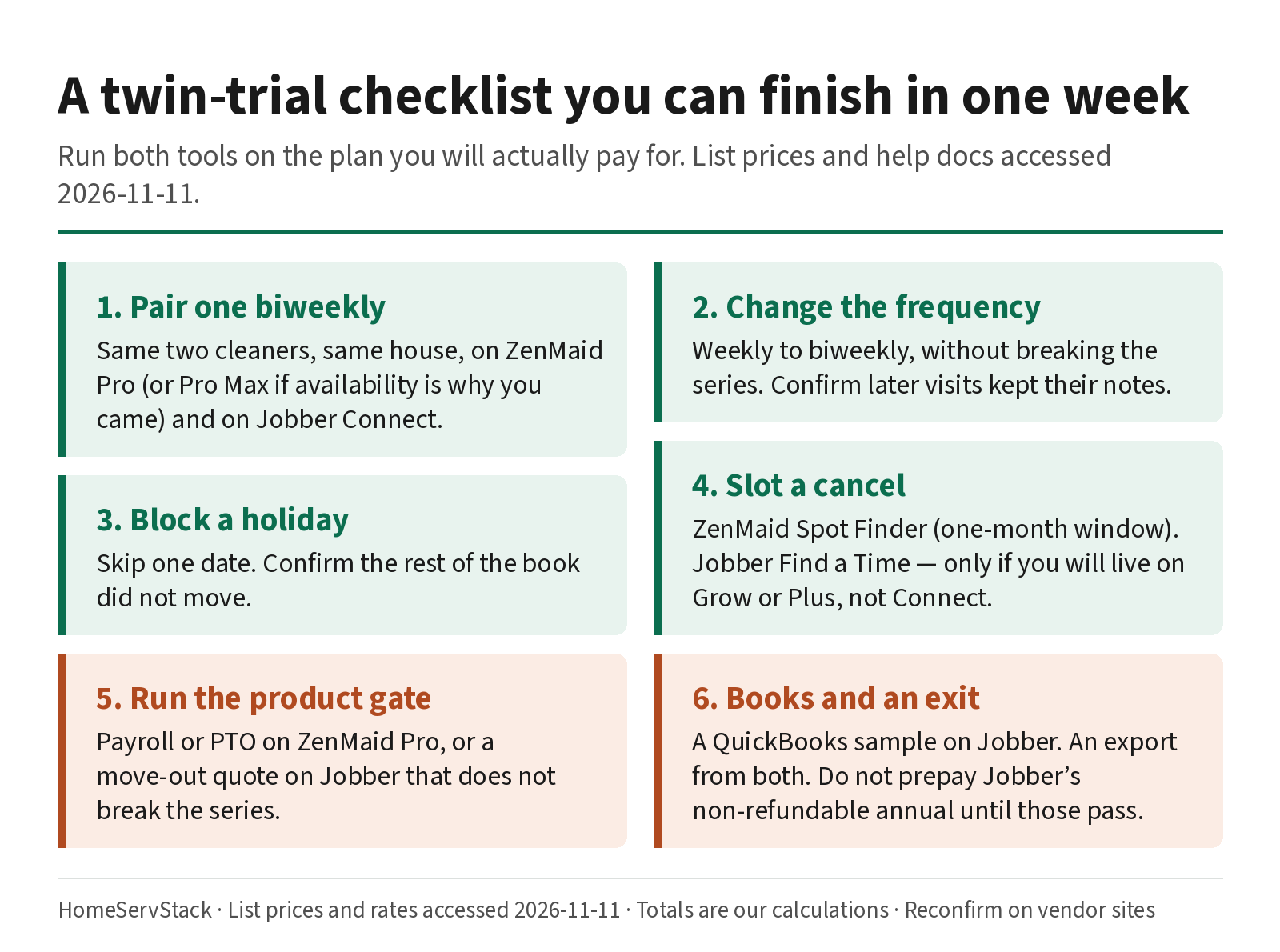
If you only have an afternoon, do steps 2, 4, 5 and 6. Do not prepay a Jobber annual term on a Grow demo you will not buy.
Verdicts, and who should skip which tool
- Calendar-led residential maid service, about two to eight cleaners. ZenMaid Pro, priced with every active profile, plus an SMS bundle if you text. Move to Pro Max if cleaner availability and PTO tracking are why you came. Skip ZenMaid if you write custom quotes all week, or you need QuickBooks Online this month.
- Quote-led or mixed work, and you want reminders and autopay. Jobber Connect, at your real user count, on the cheaper band-or-extras path. Use the Grow trial to see visual quotes and Find a Time, then default to Connect in production unless you have a written reason to need Grow. Skip Jobber Core if reminders or automatic payments are the point of buying software; those start on Connect.
- Nine to twelve people, and you think you need ZenMaid Pro Max. Run the table. If the calendar, payroll and availability are still the product, pay the modest premium and stay. If you also quote and need QuickBooks, the generalist has caught up on price and is ahead on those two gates.
- You depend on a cleaner availability calendar that blocks bookings. That is ZenMaid Pro Max, per the help article. Skip buying ZenMaid Pro for this feature. It is not on Pro.
- Skip this two-way page if the public storefront is the product (ZenMaid vs BookingKoala), or if the other generalist in your shortlist is Housecall Pro (Jobber vs Housecall Pro).
- Skip a prepaid Jobber annual term until a month-to-month period has passed the frequency-change, quote, and QuickBooks tests. The charge is non-refundable.
Ways this decision goes wrong
- Treating the cheaper Pro sticker as the verdict. On Pro, ZenMaid wins every row through 12. The product still has to schedule a frequency change, run a payroll week, and live without QuickBooks for now.
- Budgeting Find a Time on Connect. Jobber’s help puts it on Grow and Plus. The trial will show it. Production Connect will not.
- Buying ZenMaid Pro for Cleaner Availability. That feature is Pro Max. Placeholder appointments are the documented workaround on lower plans, and they are extra work.
- Starting on ZenMaid Starter with a real book. The 40-appointment cap, and when a free or cheap plan is actually enough, belong in the free-plans guide. Most four-person reclean books are already a Pro conversation.
- Prepaying Jobber annually after a Grow demo. You will live on Connect unless you have a reason not to. Read the non-refundable line first.
- Skipping the payroll check, or the QuickBooks sample, because the calendar looked fine. Those are the reports that show up after the office has already moved.
- Using this page to decide Jobber versus Housecall Pro. That is a different fork, with a different mid-plan story.
How we researched this
On 2026-11-11 we re-fetched Jobber and ZenMaid pricing, ZenMaid’s cost, Spot Finder, frequency-edit, payroll, availability and time-off help, and Jobber’s Connect, recurring-job, visits, new-schedule (Find a Time), quote, subscribe, cancel and QuickBooks help. Every subscription figure is a published list price or a HomeServStack calculation from those prices, labeled as such. We also read public owner comments from Reddit (via the Arctic Shift archive) and Capterra, accessed the same day. Quotes are verbatim, with handles only. User-stated prices are their claims, not our list prices.
We did not run paid production accounts for this article. We did not invent a ZenMaid annual rate. We have no affiliate relationships with any vendor named here. We do not crown a single winner; we segment by work style and roster size.
Glossary
- Per-person add-on. ZenMaid’s meter: the owner is in the base plan, and every other active profile is $4, $14 or $24 a month depending on Starter, Pro or Pro Max.
- Seat band. Jobber’s meter: published user counts at 1, 5, 10 and 15, plus a $29 extra user. The cheaper path is the band that covers you.
- Billed annually. A monthly-equivalent Jobber price that assumes you prepay twelve months. ZenMaid’s published cards are monthly; annual plans are available on request, rates not published.
- Spot Finder. ZenMaid’s tool for placing a new recurring appointment into an opening, with forward conflict checks and a one-month display window.
- Find a Time. Jobber’s new-schedule tool for booking a new job, request, task or event into open availability, including drive time. Documented on Grow and Plus, not on Connect.
- Cleaner Availability. ZenMaid Pro Max feature for working hours and time off that prevent bookings.
- Manage Recurring Service. ZenMaid’s page for frequency, day, time and the appointment from which a change takes effect. Edits cannot be undone in one click.
- Coming soon. On ZenMaid’s pricing page as of 2026-11-11, the status of QuickBooks integration. Treat it as not available today.
Corrections and updates
- 2026-11-11: Re-scoped from a three-way Jobber vs ZenMaid vs Housecall Pro comparison to a pairwise Jobber vs ZenMaid page, around the query “Jobber vs ZenMaid.” The previous three-way slug was retired (it is no longer a live URL). Housecall Pro comparisons now live at Jobber vs Housecall Pro. Added the per-person versus band crossover through 12 people, Spot Finder versus Find a Time (including the Grow and Plus gate), payroll and Pro Max availability, QuickBooks “coming soon,” and sourced owner comments on switches in both directions. Prices re-checked 2026-11-11.
- 2026-11-10: First published as a three-way comparison. Superseded by the rewrite above.
Related guides
- Best scheduling software for cleaning businesses — the work-start × meter shortlist this fork sits under.
- How much cleaning business software costs — all-in bills, SMS, processing, annual break-even.
- Cleaning business autopay and card on file — path-by-path rates, decline and retry, skip-week billing.
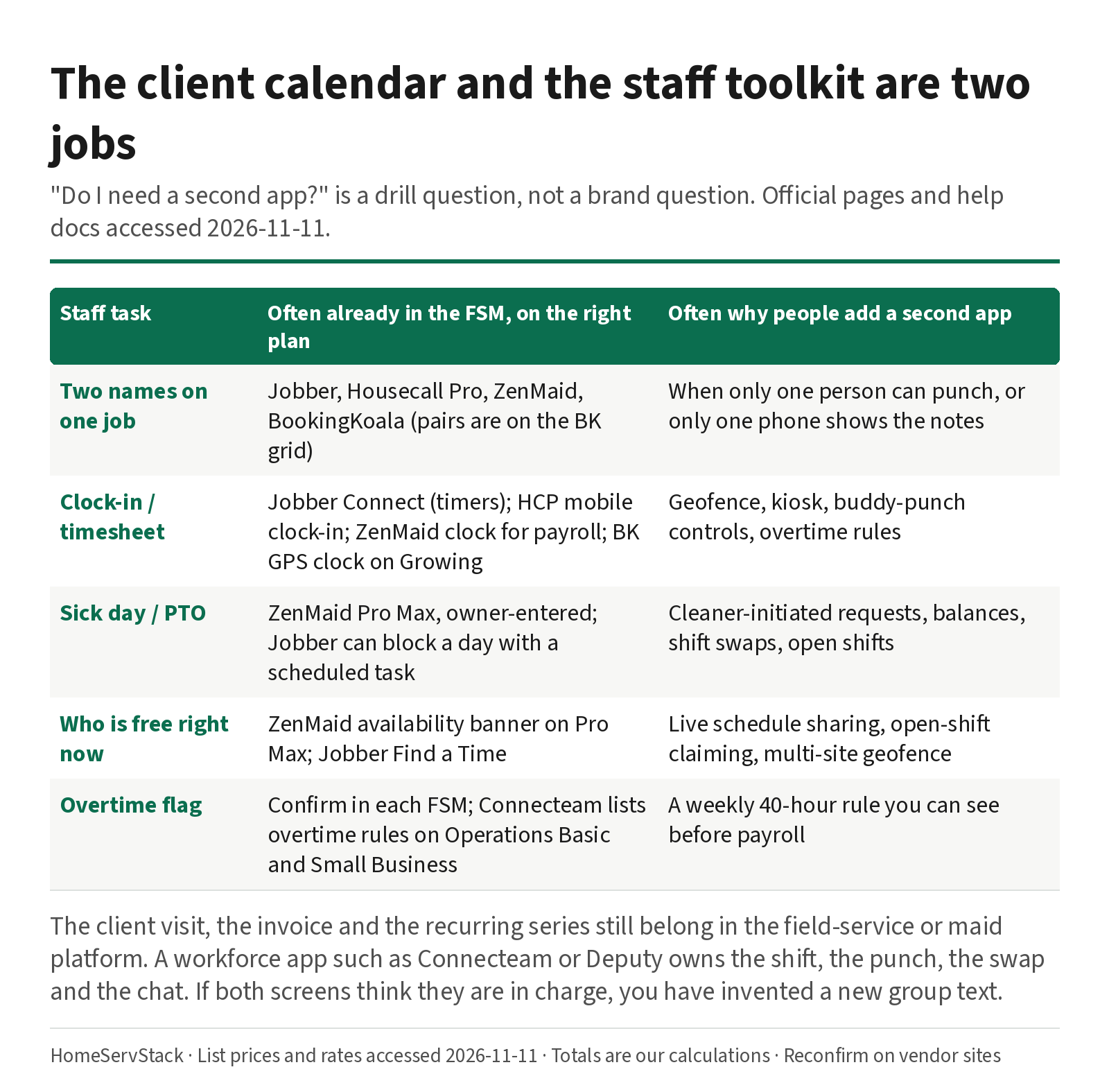
- Cleaning employee scheduling and time-clock apps — the staff-side pair and sick-day drills, and when a second workforce app belongs beside the calendar.
- Jobber vs Housecall Pro for cleaning — the other generalist fork, if Housecall Pro is still in the running.
- ZenMaid vs BookingKoala — office calendar versus storefront, if a maid-specific tool is still in the running.
Frequently asked questions
Is Jobber or ZenMaid better for a cleaning company?
For a residential maid calendar of about two to eight cleaners, start with ZenMaid Pro, and Pro Max if you need cleaner availability and PTO tracking. For a quote-led or mixed shop that needs QuickBooks Online today, start with Jobber Connect, priced on the cheaper band-or-extras path. The ZenMaid Pro sticker is cheaper through 12 people on our annual math; Pro Max crosses Jobber around nine users. Run both 14-day trials on the same biweekly series before you prepay.
How much do Jobber and ZenMaid cost for five users?
From list prices accessed 2026-11-11, Jobber Connect with five users is $149 a month billed annually. ZenMaid Pro is $39 plus four extra people at $14, or $95 a month, our calculation; Pro Max is $49 plus four at $24, or $145. SMS bundles on ZenMaid start at $14 for 125 messages and are not in the base price. All-in totals including processing live in our cost guide.
At how many cleaners does Jobber become cheaper than ZenMaid?
On ZenMaid Pro, the per-person meter stays cheaper than Jobber Connect's annual bands through 12 people in our calculations ($193 versus $287 at 12). On Pro Max, Jobber's ten-user band at $229 undersells ZenMaid at nine people ($241) and stays cheaper through 12 ($287 versus $313). Fit still decides it. Payroll, PTO, quotes and QuickBooks are not in those stickers.
Does ZenMaid integrate with QuickBooks?
ZenMaid's pricing page, accessed 2026-11-11, still lists QuickBooks integration as coming soon. Jobber lists QuickBooks Online sync on Connect and above, and documents the setup in its help center. If you need that sync this month, Jobber has the published path. Confirm it with a sample file in the trial, and do not prepay Jobber's annual term until the bookkeeper has looked at the result.
What is the difference between ZenMaid Spot Finder and Jobber Find a Time?
ZenMaid's Spot Finder, per its help article, finds open slots for new recurring appointments and checks the cleaner forward for conflicts. It displays up to a month of appointments. Jobber's Find a Time, documented on the new-schedule overview, highlights open availability including drive time when you book a new job, request, task or event. Jobber's help states Find a Time is available on the Grow and Plus plans, not on Connect. Do not treat a Grow-trial Find a Time demo as Connect daily life.
Does ZenMaid include payroll and PTO?
ZenMaid lists payroll on Pro and above, and documents how to run it, including cautions about AM/PM clock errors and revenue-share on the original appointment price. Cleaner Availability — working hours and time off that block bookings — is a Pro Max feature, per ZenMaid's help. Lower plans can still block a day with placeholder appointments, which is a workaround, not the same tool. Jobber tracks time on Connect; it does not list a built-in payroll product on the pricing page we fetched.
Sources
- Jobber Pricing — Accessed
- Jobber Help: The Connect Plan — Accessed
- Jobber Help: Create a Recurring Job — Accessed
- Jobber Help: Visits — Accessed
- Jobber Help: Schedule Overview (New Schedule), including Find a Time — Accessed
- Jobber Help: Quote Basics — Accessed
- Jobber Help: How to Subscribe — Accessed
- Jobber Help: Cancel Your Jobber Subscription — Accessed
- Jobber Help: How to Connect Jobber and QuickBooks Online (new integration) — Accessed
- ZenMaid Pricing — Accessed
- How Much Does ZenMaid Cost? (ZenMaid Help) — Accessed
- Spot Finder Feature (ZenMaid Help) — Accessed
- How to Edit the Frequency of a Recurring Service (ZenMaid Help) — Accessed
- How to Run Payroll in ZenMaid (ZenMaid Help) — Accessed
- Cleaner Availability Feature (ZenMaid Help) — Accessed
- How to Schedule Time Off in ZenMaid (ZenMaid Help) — Accessed
- MaidCentral: Professional Cleaning Index (PCI) Report, Cleaning Industry Statistics 2026 — Accessed
- O*NET OnLine: Local Wages for Maids and Housekeeping Cleaners (BLS OEWS data) — Accessed
- Reddit r/cleaningbusiness: ZenMaid alternatives and employee routing (u/Ok_Committee_8576) — Accessed
- Reddit r/cleaningbusiness: How cleaning-business owners with a team schedule (u/household_solutions) — Accessed
- Reddit r/cleaningbusiness: Help automating scheduling and payroll (u/household_solutions) — Accessed
- Reddit r/cleaningbusiness: Jobber alternatives (u/Aromatic-Way4384) — Accessed
- Reddit r/cleaningbusiness: Which programs to use (u/Low-Individual768) — Accessed
- Capterra: ZenMaid reviews (Owner, 2025-03-26; Owner, 2025-11-12; CEO, 2024-12-03) — Accessed
- Capterra: Jobber reviews (Director of Operations, 2025-12-09; Chase C., Owner, 2026-11-10) — Accessed
Was this helpful?
One tap, no account, no personal data. We only keep a yes or no, counted with the other votes on this page.
Keep reading
More in Cleaning Software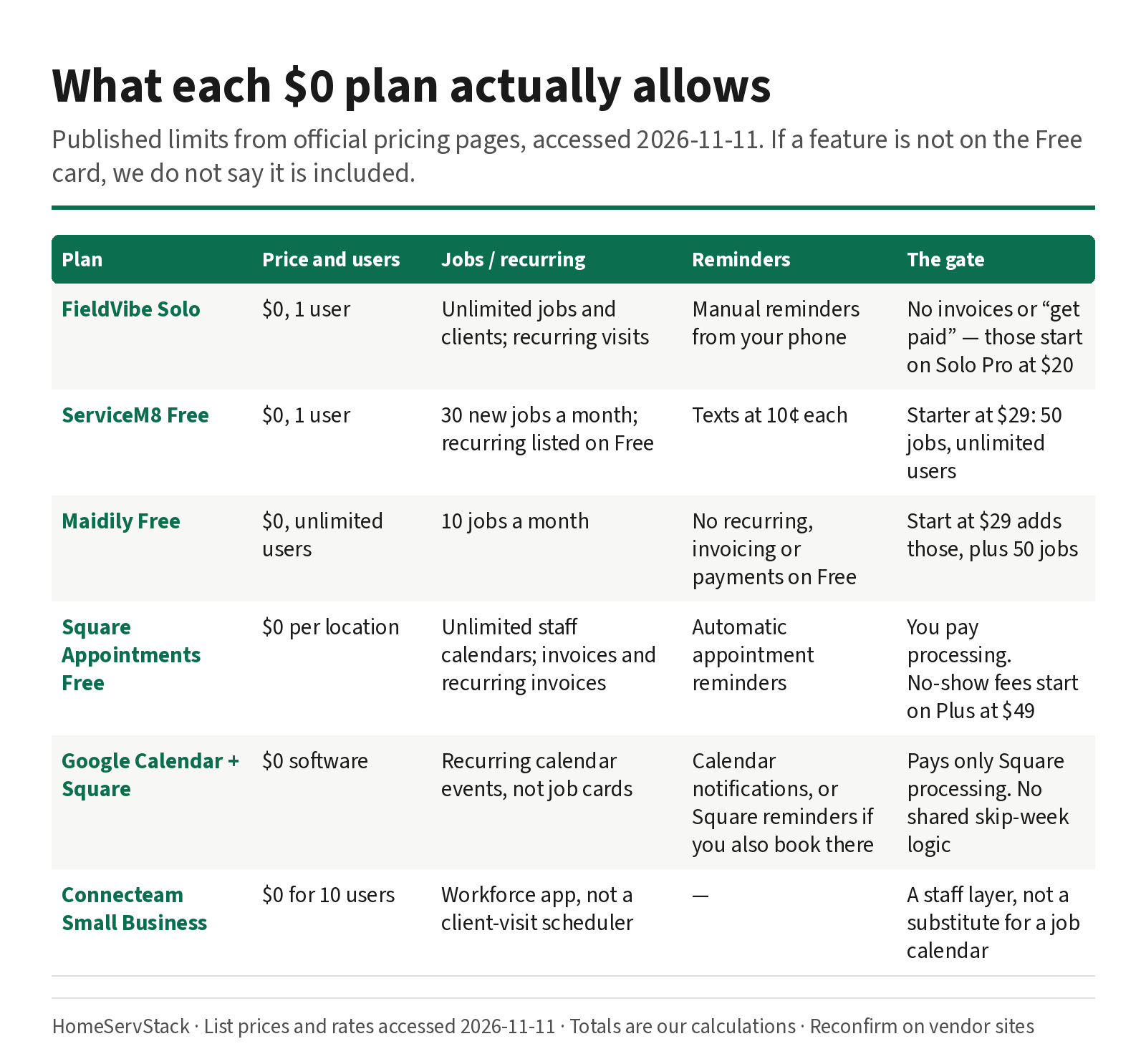
Free Cleaning Business Software: What Each $0 Plan Actually Allows
What free cleaning business software actually allows — FieldVibe, ServiceM8, Square, Maidily — and the limits that tell you it's time to pay.
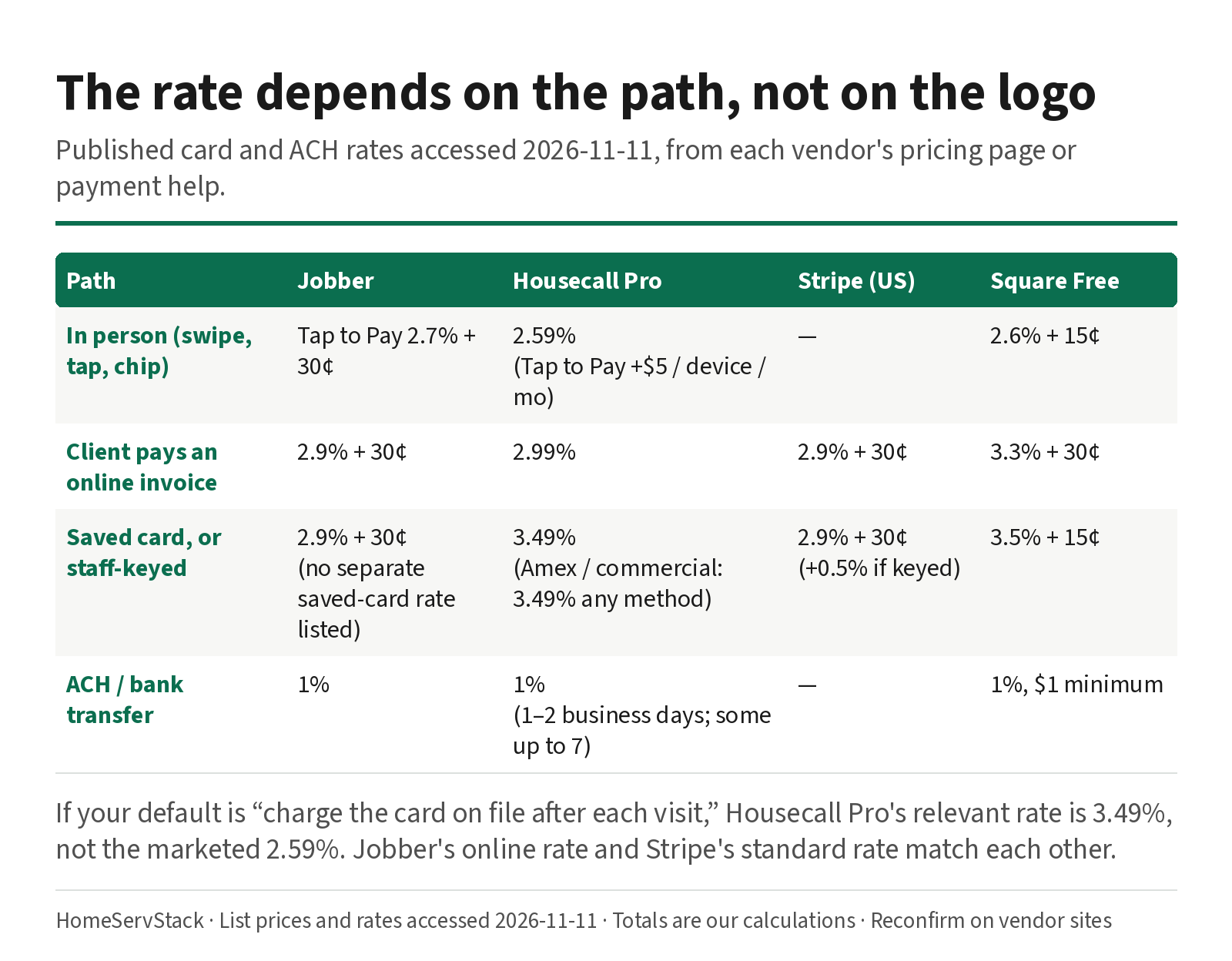
Cleaning Business Autopay: Card-on-File Rates, Declines, and Skip-Week Billing
Autopay and card-on-file rates for cleaning businesses, plus what Jobber, Housecall Pro and ZenMaid do when a card declines or a week is skipped.
Cleaning Employee Scheduling and Time Clock Apps: When You Need a Second Tool
When a cleaning company needs a staff scheduling or time-clock app beside its FSM, with sick-day and two-cleaner drills.
Comments
Share a correction or an operator experience. Comments are plain text, held for review, and appear only after they are approved. A lasting email is required and is never shown. We may send a confirmation link once mail is configured.
No approved comments yet.