Watch a short briefing
Prices and plan limits checked 2026-11-11. HomeServStack has no affiliate deals with any vendor named here. Totals are our calculations from published rates; they are not vendor quotes. We did not run paid accounts for this article (method).
Short answer: Yes, several vendors publish a $0 plan. FieldVibe Solo is free for one user, with unlimited jobs and manual reminders. ServiceM8 Free allows one user and 30 jobs a month. Maidily Free allows unlimited users and 10 jobs. Square Appointments Free is $0 per location, with reminders and online booking; you still pay card processing. Google Calendar is free and will not invoice. Each plan has a graduation trigger, mapped below.
“Free cleaning business software” is a real search, and a real product, and a trap when the $0 card is missing the one thing your Thursday depends on. FieldVibe Solo will schedule unlimited jobs and will not, on the published Free card, send an invoice or take a card — those features start on Solo Pro at $20. Maidily’s Free plan stops at 10 jobs and does not list invoicing, payments or recurring scheduling; those start at $29. A missed visit is not theoretical. MaidCentral’s September 2026 average job, across about 150,000 monthly cleanings in its customer base, is $217.91. One forgotten clean pays for months of a $20 plan.
So here’s the argument. Free software is worth using until a published limit or a missing feature costs you a visit, an unpaid invoice, or a second login the plan will not allow. Know those limits — and the first paid step after each one — before you build a week’s habits around a $0 card.
The solo subscription math for paid Jobber, ZenMaid and Housecall Pro plans, including what we would budget for a one-person shop, lives in the cost guide. The 40-appointment cap on ZenMaid Starter is covered in the scheduling guide. This page is the $0 matrix, and the triggers that mean you should start paying.
Free is real, and every $0 plan breaks at a different place
A labeled hypothetical, because this is the usual mess. You have a phone calendar, a notes app, and a growing list of biweekly homes. A client texts to skip next Tuesday. You move the date in one place and forget the other. They are still expecting you, or they think you are coming and you are not. Nobody is billed correctly. The software did not fail, because there was no software — or there was a free tool you used as a calendar and never as a billing system.
The median hourly wage for maids and housekeeping cleaners is $17.07 (O*NET, BLS OEWS). An hour spent reconstructing a skipped week from text messages has a labor cost near that wage, and that is before a missed $217.91-class visit. Free is the right starting price. It is the wrong ending price the day a published cap, or a feature the Free card does not include, is the reason a Thursday went sideways.
The decision framework for this page is a limits matrix × graduation trigger. Rows are the $0 plans we could verify. Columns are what you can actually do: users, jobs, recurring visits, reminders, invoices, payments, a second person. The trigger is the first cell that will not hold your week. The next paid step is sitting next to it, at a published price.
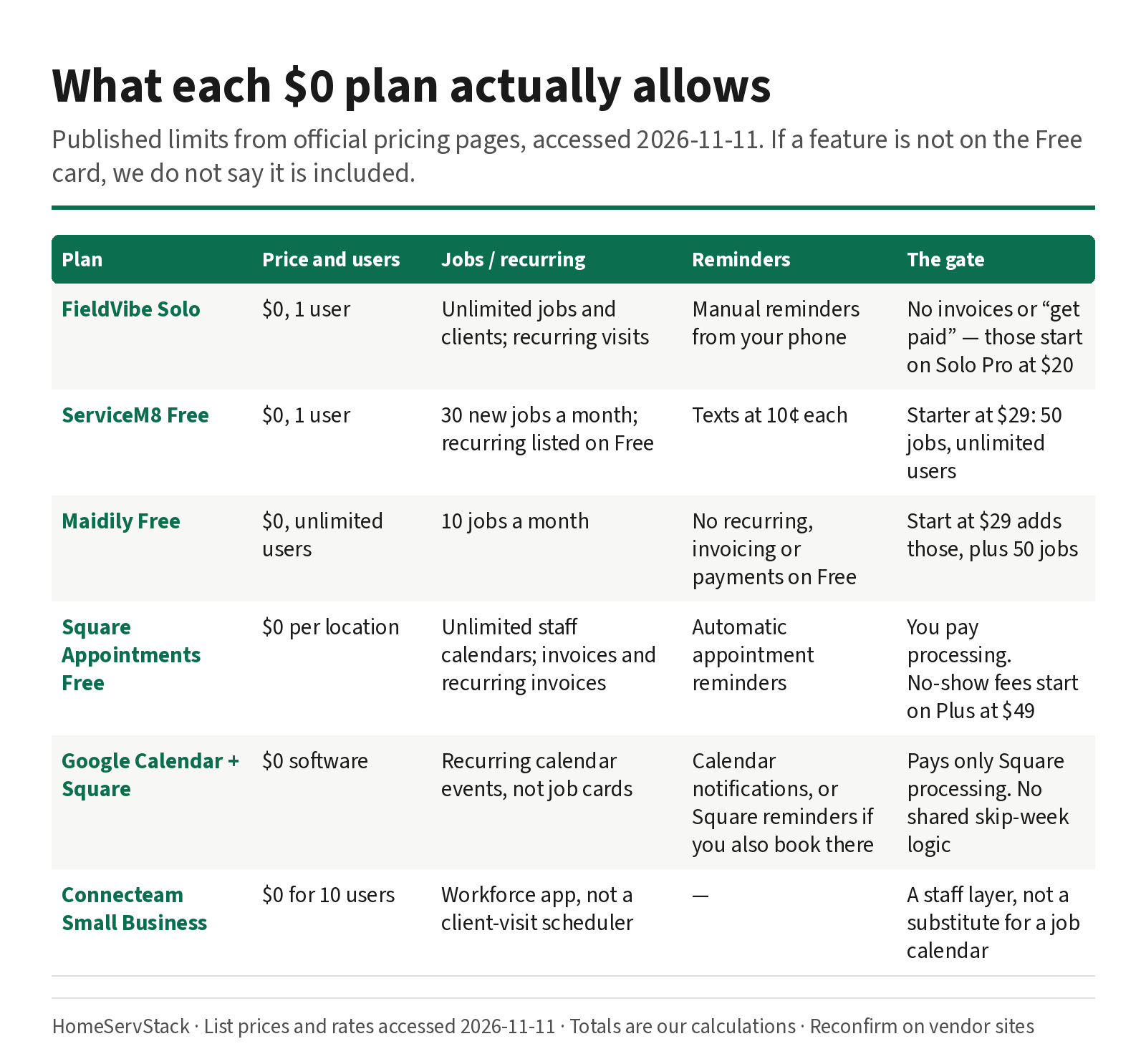
What each $0 plan actually allows
Official limits, from each vendor’s pricing page, accessed 2026-11-11. If a feature is not on the Free card in that table, we do not say it is included.
| Plan | Price | Users | Jobs / visits | Recurring | Reminders | Invoices and getting paid | First paid step |
|---|---|---|---|---|---|---|---|
| FieldVibe Solo | $0, free forever, no card to sign up | 1 | Unlimited jobs and clients | One-time and recurring visit scheduling | Manual text and WhatsApp reminders from your own phone | Not on Solo. Quotes, invoices and “get paid” start on Solo Pro | Solo Pro $20 (1 user, 400 automated reminders/month in the US and Canada) |
| ServiceM8 Free | $0 | 1 | 30 new jobs per month | Listed with essential features on the Free card | Texts at 10¢ each, the same rate as paid plans | Essential features are listed on Free; confirm invoicing and payments inside the trial | Starter $29 (unlimited users, 50 jobs) |
| Maidily Free | $0 | Unlimited | 10 jobs per month | Recurring scheduling is listed on Start, not on Free | Dedicated SMS number is an add-on from Start, at $10 | Invoicing and payments are listed on Start, not on Free. Online booking, a mobile app and customer management are on Free | Start $29 (50 jobs, invoicing, payments, recurring, two-way messaging) |
| Square Appointments Free | $0 per location | Unlimited staff calendars | Not a job-credit cap on the page we opened | Invoices and recurring invoices are listed on Free | Appointment reminders (automatic text and email) are listed on Free | Yes, at Square’s Free processing rates | Plus $49 per location (lower online rate, no-show fees, 500 included texts) |
| Google Calendar + Square | $0 software | As many calendars as you set up by hand | No job cap | Recurring events, yes; they are calendar events, not job cards | Calendar notifications, not a dedicated business number | Payments through Square, not through the calendar | The first operations tool you actually need, often FieldVibe Solo Pro or Square Plus |
| Connecteam Small Business | $0 for up to 10 users | 10 | This is a workforce app (chat, schedules, time clock), not a client-visit scheduler | Not the product | Not the product | Not the product | Use it as a staff layer, if at all; the crew dispatch guide is where that comparison lives |
What this means: two “free cleaning apps” can be opposite products. FieldVibe Solo is a one-person operations calendar that will not invoice. Maidily Free will take a booking and will not, on the published Free card, run a recurring series or a card charge. Square Free will remind and invoice, and will charge you processing on every payment. ServiceM8 Free is a small-job, one-login slice of a full field-service product. Pick the row that matches the job you need done at $0, not the logo that ranks for “free.”
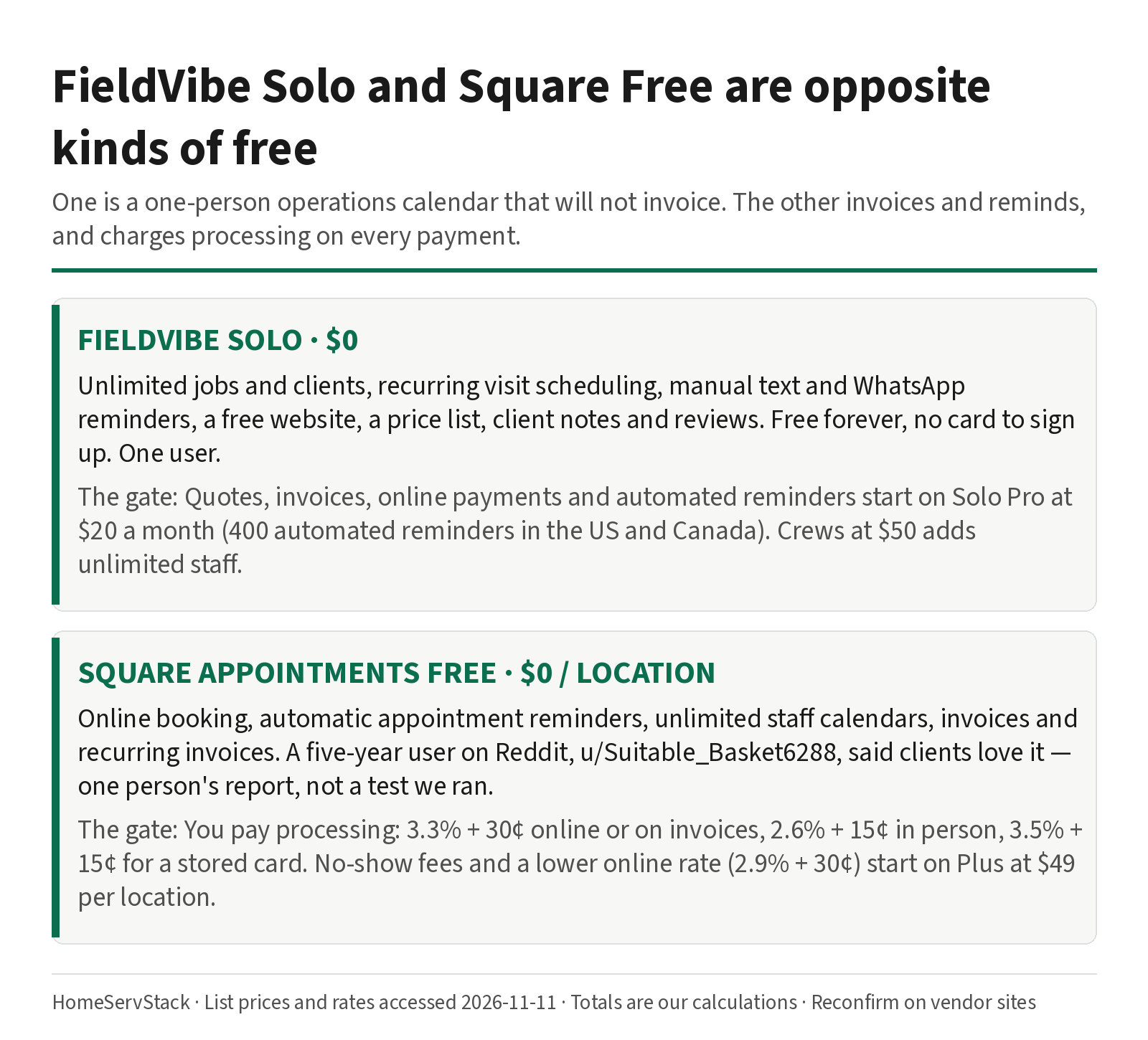
FieldVibe Solo: actually free, with a paid gate behind it
FieldVibe’s own FAQ is unusually direct: “Yes! FieldVibe is completely free forever for one-person service businesses. There are no hidden fees, trial expirations, or credit card requirements to sign up.” The Free Solo plan, as listed, includes unlimited jobs and clients, one-time and recurring visit scheduling, manual text and WhatsApp reminders, a free website to capture work requests, a services and products price list, client history and notes, and collecting client reviews.
The next sentence on the same page is the gate. Solo Pro at $20 a month “adds automated reminders, quotes, invoices, online payments, time tracking, revenue tracking, tasks, and multi-device access,” with 400 automated reminders a month in the US and Canada (150 global). Crews at $50 adds unlimited staff, roles and permissions, and 1,000 automated reminders (US and Canada).
Skip FieldVibe Solo if you need a quote, an invoice, or a card charge inside this app. That is Solo Pro, and $20 is the published price, not a surprise. Skip it if you are about to hire; one user is the limit.
Square Appointments Free: free software, not free payments
Square’s Free Appointments plan is $0 per location. The pricing page lists an online booking site, appointment reminders, and unlimited staff calendars on that Free card. Invoices and recurring invoices are also listed on Free. Cancellation policy and no-show fees start on Plus, at $49 per location.
You pay Square’s published processing, from Square’s fees article: on Free, 2.6% + 15¢ for tap, dip or swipe; 3.3% + 30¢ for online or invoices; 3.5% + 15¢ for manual entry or card on file; 1% ACH with a $1 minimum. The full path-by-path comparison with Jobber and Housecall Pro is in the autopay guide. Here, the only number we need is what a solo month costs in fees.
A labeled model, the same 22 visits we use for a one-person shop in the cost guide, at MaidCentral’s $217.91 ticket: Square Free online or invoice processing is $164.80 for the month, our calculation (22 × (217.91 × 3.3% + 30¢)). In person, on the 2.6% + 15¢ rate, it is $127.94. The software fee is still $0.
A cleaner, u/Suitable_Basket6288, wrote in November 2024: “I use Square appointments. My clients love it, I love it.” And: “Have been using it for 5 years and never had an issue!!” (comment). That is one person’s five-year report, right at our two-year cutoff for fresh evidence, and it is not a test we ran.
Skip Square Free if you need no-show fees (Plus), a lower online rate (Plus is 2.9% + 30¢), or a cleaning-specific dispatch tool with cleaner GPS and a skip-one-visit workflow the scheduling guide describes. Square is a bookings-and-payments product that happens to work for some solos, not a maid-service operations suite.
ServiceM8 Free and Maidily Free: the cap is the plot
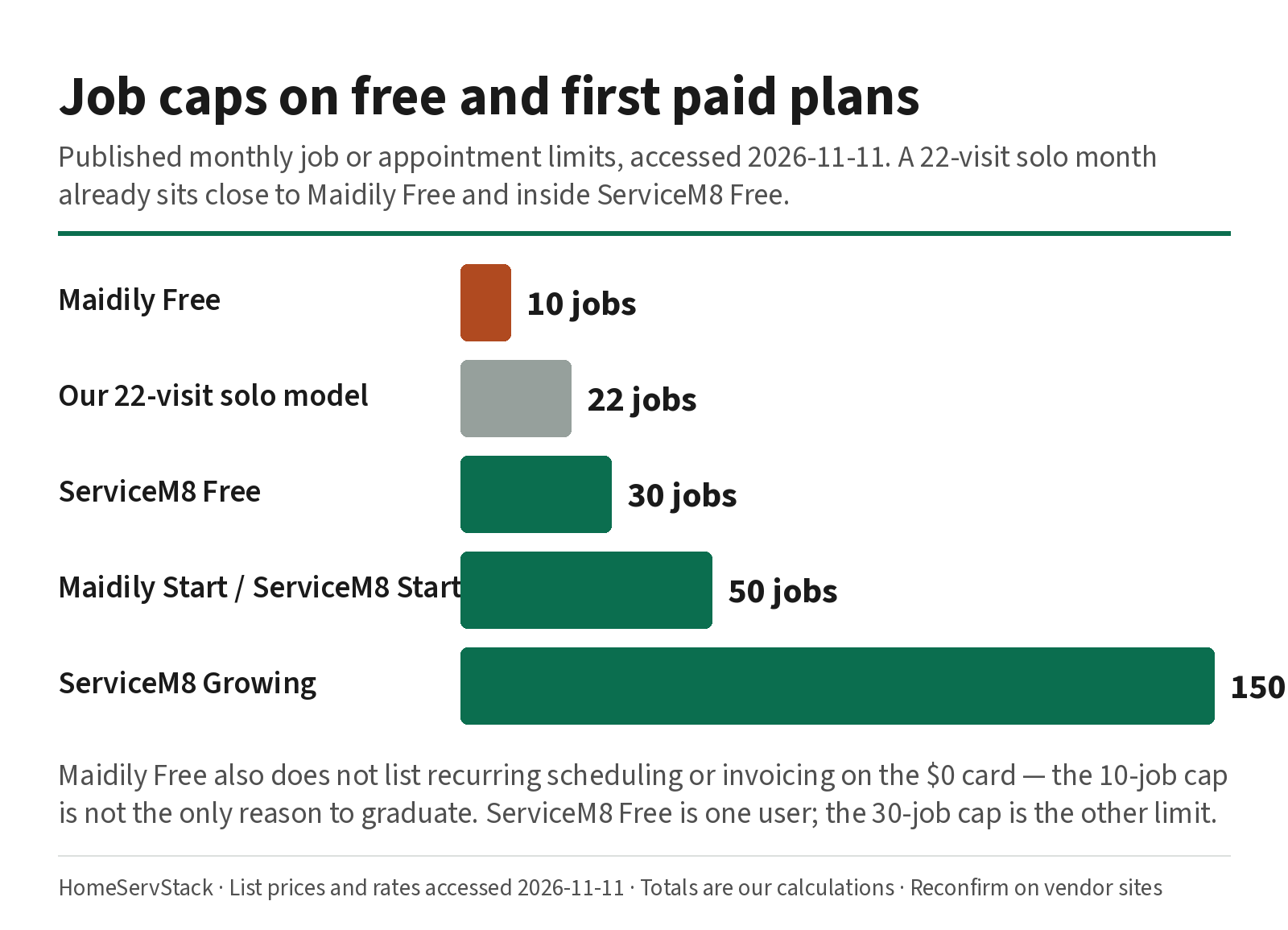
ServiceM8 Free is one user and 30 new jobs a month, at $0, with essential features — including recurring, on the published Free card — and a 14-day trial on paid plans. Starter is $29 for 50 jobs and unlimited users. Growing is $79 for 150. Texts are 10¢ each on every tier. If a recurring visit uses a job credit, 30 jobs is a tight month; the credit rule is discussed in the scheduling guide, and you should confirm it in the account. Skip ServiceM8 Free if you will book more than 30 new jobs, or if a helper needs a login.
Maidily Free is the opposite shape: unlimited users, 10 jobs a month, online booking, a mobile app and customer management, at $0. Start at $29 adds 50 jobs, invoicing and payments, recurring scheduling, and two-way messaging, with a $3 add-on per extra 50 jobs and a $10 dedicated SMS number. Grow is $49 for 150 jobs. Skip Maidily Free if you need a recurring series or a card charge this month — those are not on the Free card we read — or if 10 jobs is already your quiet week.
The DIY stack is Google Calendar plus Square, and it costs processing
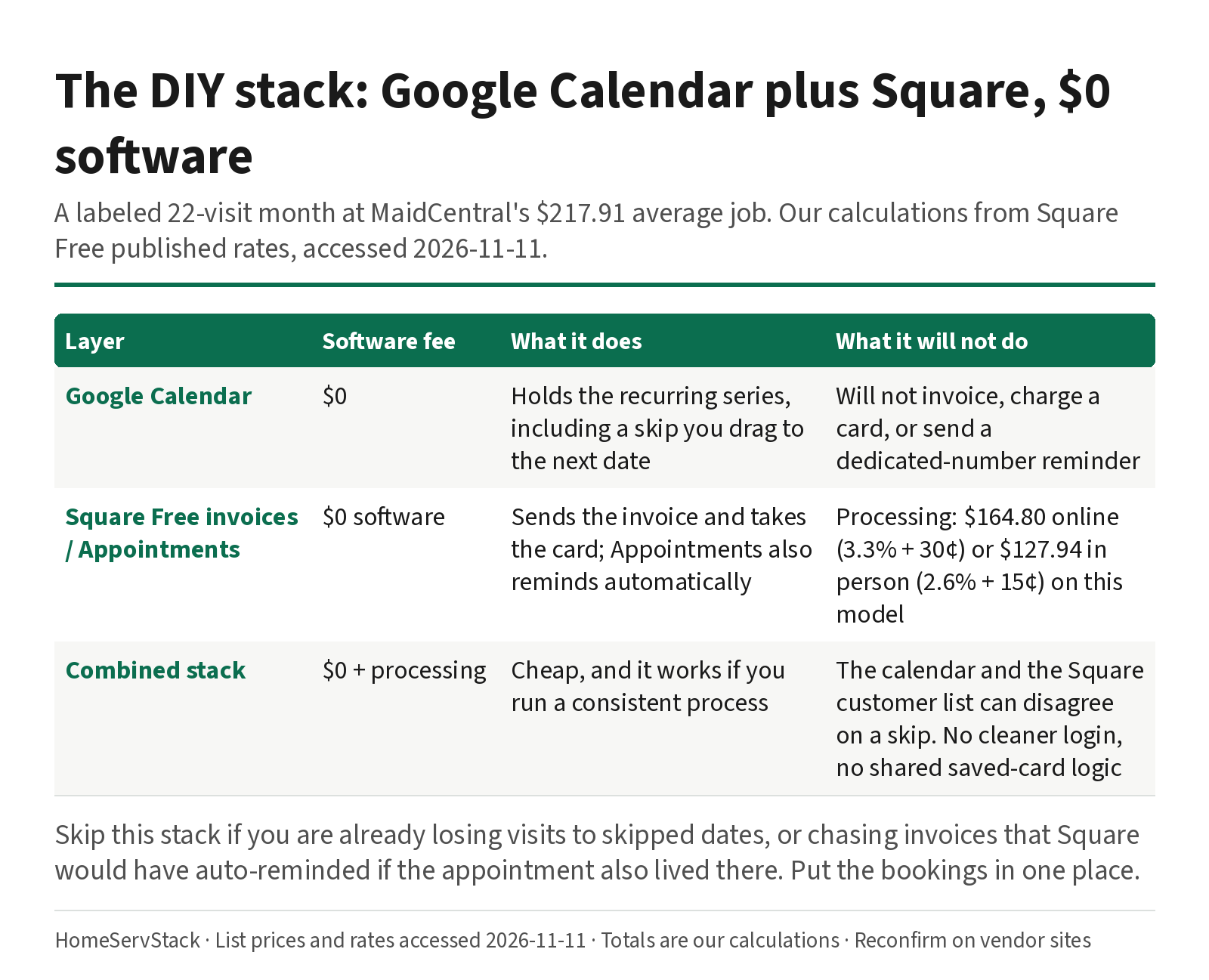
A lot of one-person shops already live here, whether they call it a stack or not. Google Calendar holds the recurring series, including a skip you drag to the next date. Square Free sends the invoice and takes the card. The software bill is $0. The processing bill, on the 22-visit model above, is $164.80 if those invoices are paid online at the Free rate.
What this stack will not do: a dedicated-number reminder that goes out without you tapping send in FieldVibe’s manual style (Square Free does have automatic appointment reminders, if you book in Square rather than only in the calendar). A skip-week test that also stops a saved-card charge in the same system. A cleaner login with its own day sheet. A record of the series that survives when your personal calendar and your Square customer list disagree.
A cleaning-company owner, u/MissRaleigh, who runs on Google Sheets, a texting app and QuickBooks, wrote: “As the company grew, having clear processes mattered more than having everything inside one expensive platform.” (comment, 2026-09-29). She is past solo, and the point still holds at one person: a cheap stack with a process beats a paid platform you do not run consistently. The graduation is the day the process needs a feature the stack does not have.
Skip the DIY stack if you are already losing visits to skipped dates, or already chasing invoices that Square would have auto-reminded if the appointment also lived there. Put the bookings in one place.
Graduation triggers: the day $0 starts to cost you
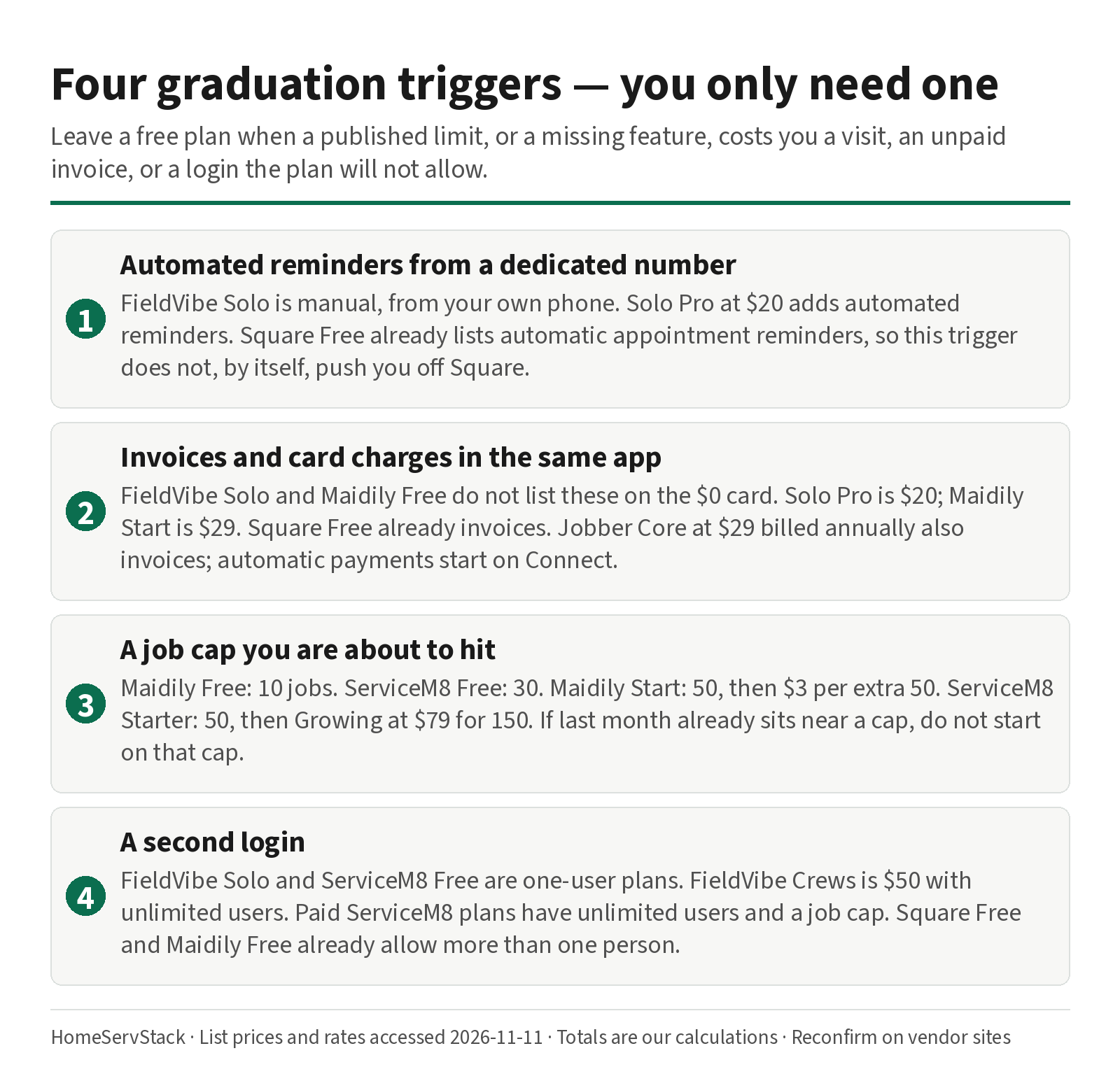
These are the four triggers we can cite from the tables above. You only need one of them to be true.
1. You need automated reminders from a dedicated number. FieldVibe Solo is manual, from your own phone. Solo Pro at $20 adds automated reminders (400 a month in the US and Canada). Square Free already lists automatic appointment reminders, so this trigger does not, by itself, push you off Square. It does push you off a pure Google Calendar.
2. You need invoices and card charges in the same app as the calendar. FieldVibe Solo and Maidily Free do not list these on the $0 card. Solo Pro is $20; Maidily Start is $29. Square Free already invoices. Jobber Core, at $29 a month billed annually, also invoices and takes online payments, but automatic payments and automated reminders start on Connect, at $99 billed annually for one user — details in the cost guide and the autopay guide.
3. You are about to hit a job cap. Maidily Free: 10. ServiceM8 Free: 30. Maidily Start: 50, then $3 per extra 50. ServiceM8 Starter: 50, then Growing at $79 for 150. ZenMaid Starter, which is not free, caps appointments at 40 — the conversion into a client count is in the scheduling guide, and is not repeated here. If your last thirty days already sit near a cap, do not start a free plan that uses that cap.
4. You are hiring a second login. FieldVibe Solo and ServiceM8 Free are one-user plans. FieldVibe Crews is $50 with unlimited users. Any paid ServiceM8 plan has unlimited users, with a job cap. Square Free and Maidily Free already allow more than one person, which is why a “free” first hire is possible on those two and not on the other two. Housecall Pro Basic is $59 billed annually for one user; a second user is an Essentials conversation ($149 for five), in the cost guide.
A lawn operator’s version of a trigger is worth hearing, even though it is not a cleaning tool. u/The_Realtree, on Yardbook, wrote: “Yardbook takes $0.00 as a subscriber, so once the processing fees outweigh the subscriber rate, that’s a good time to go ahead and subscribe, as you then start to save money.” (comment, 2025-03-09). The Yardbook-versus-Jobber math belongs in that comparison. The shape of the trigger is the same: leave free when a published number (a fee, a cap, a missing invoice) is larger than the first paid step.
What the first paid step costs, and who should skip it
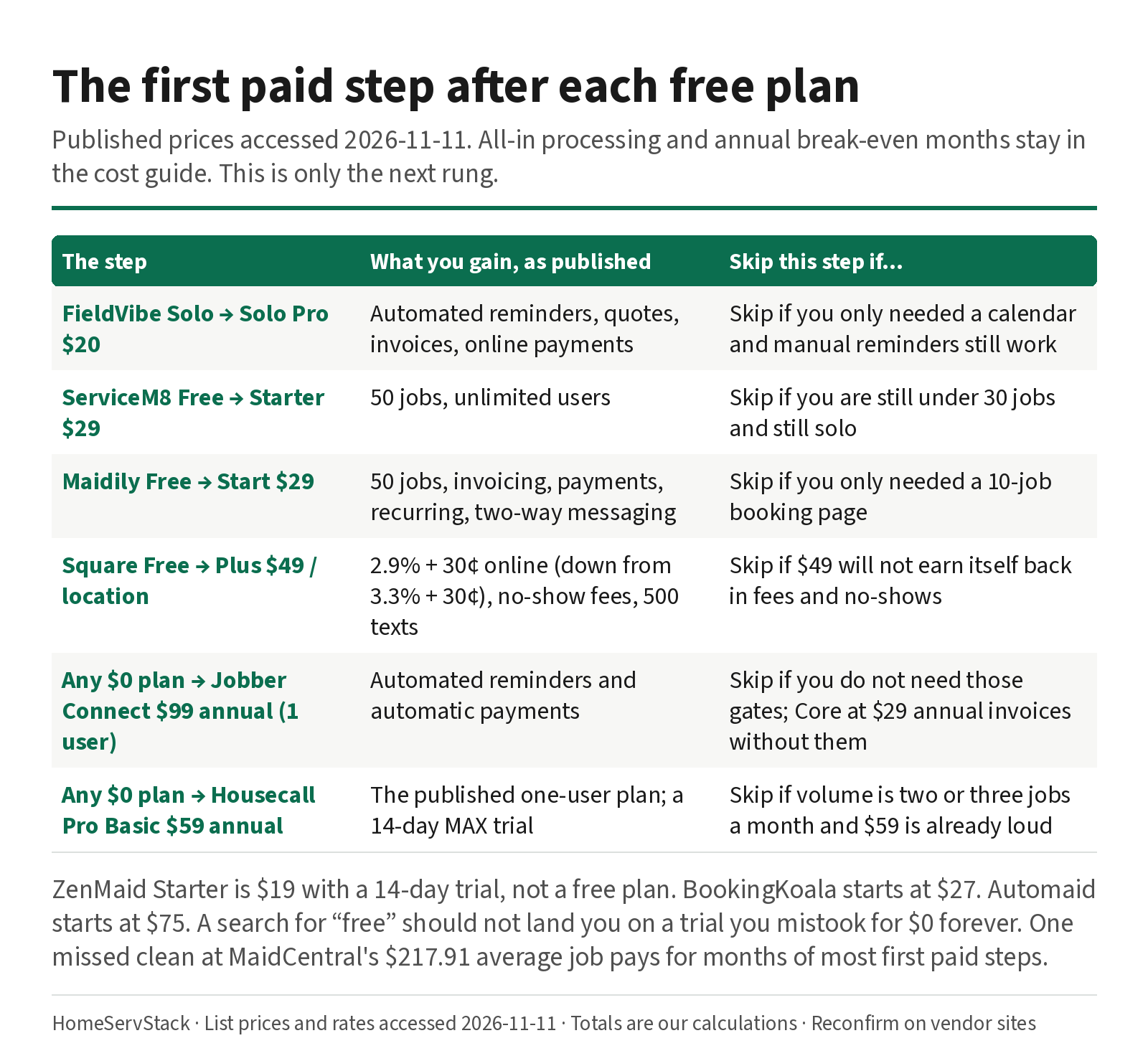
Published first paid steps, accessed 2026-11-11. All-in processing at a crew size, and annual break-even months, stay in the cost guide. This table is only the next rung.
| If you are on… | First paid step | What you gain, as published | Skip this step if… |
|---|---|---|---|
| FieldVibe Solo | Solo Pro, $20 | Automated reminders, quotes, invoices, online payments | You only needed a calendar, and manual reminders still work |
| ServiceM8 Free | Starter, $29 | 50 jobs, unlimited users | You are still under 30 jobs and still solo; stay free |
| Maidily Free | Start, $29 | 50 jobs, invoicing, payments, recurring, two-way messaging | You only needed a 10-job booking page |
| Square Free | Plus, $49 per location | 2.9% + 30¢ online (down from 3.3% + 30¢), no-show fees, 500 included texts | The $49 will not earn itself back in lower fees and no-shows on your actual volume |
| Google Calendar only | Square Free, $0 + processing, or FieldVibe Solo, $0 | A place to invoice, or a place to run a job list | You can still see every visit without either |
| Any $0 plan, and you now quote and autopay | Jobber Connect, $99 billed annually (one user) | Automated reminders and automatic payments | You do not need those gates; Core at $29 billed annually invoices without them |
| Any $0 plan, and you want a published one-user FSM with routes later | Housecall Pro Basic, $59 billed annually | The one-user published plan; a 14-day MAX trial | Volume is two or three jobs a month and a $59 seat is already loud |
BookingKoala starts at $27 for five providers, not at $0, and native apps start on Growing at $57. Automaid starts at $75. Neither is a free-plan option. ZenMaid Starter is $19 with a 14-day trial, not a free plan. We mention them so a search for “free” does not land you on a trial you mistook for $0 forever.
A week on the free plan, then decide
Pick one $0 plan, or the DIY stack, not four. Day one: put your real recurring clients on it, including at least one biweekly with a note (gate code, pet, parking). Day two: skip one visit and see whether the next one keeps the note. Day three: send whatever reminder the plan actually allows — manual on FieldVibe Solo, automatic on Square Free — and see if it went out the way you thought. Day four: invoice a test visit, if the plan can invoice; if it cannot, that is data, not a defect. Day five, if you are close to hiring, add a second login and watch whether the plan refuses. If a trigger already fired, price the first paid step against one visit at your own average, or against the $217.91 MaidCentral figure, and move. If the week was clean, stay free, and re-run the same week the month you approach a cap.
How we researched this
On 2026-11-11 we re-fetched official pricing pages for FieldVibe (including the “Is FieldVibe really free?” FAQ), Square Appointments, Square’s fees article, ServiceM8, Maidily, ZenMaid, Jobber, Housecall Pro, BookingKoala, Automaid and Connecteam, plus MaidCentral’s PCI report and O*NET’s BLS wage table. Every $0 limit and every first-paid price in the tables comes from those pages. The $164.80 and $127.94 processing totals are HomeServStack calculations from Square’s published Free rates, on a 22-visit month at a $217.91 ticket.
Owner comments are verbatim, with handles only, from the Arctic Shift Reddit archive, accessed the same day. The Yardbook quote is from a lawn operator and is used only as a graduation-trigger shape; Yardbook is not a cleaning-software recommendation on this page. We did not run paid or free production accounts for this article. We did not invent a feature on a Free card that the official table does not list. No affiliate relationships. We do not pick a single “best free app”; we map limits to triggers.
Glossary
- Free plan. A published $0 tier with no required monthly software fee. It still has limits, and payments may still carry a processor rate.
- Free trial. A short period on a paid plan (Jobber, ZenMaid and Housecall Pro publish 14 days) that is not a free plan. It ends, or it converts.
- Manual reminders. Messages you send yourself, often from your own phone. FieldVibe Solo’s published reminder style.
- Automated reminders. Messages the software sends on a schedule, often from a dedicated number. FieldVibe Solo Pro and Square Free (appointment reminders) publish this; FieldVibe Solo does not.
- Job cap. A monthly limit on new jobs or appointments. Maidily Free 10, ServiceM8 Free 30, ZenMaid Starter 40 (a paid plan).
- User cap. A limit on logins. FieldVibe Solo and ServiceM8 Free: 1. Square Free and Maidily Free: not a one-person cap.
- Graduation trigger. The first published limit, or the first missing feature, that makes the $0 plan more expensive than the first paid step.
- DIY stack. Two or more free tools used together, typically a calendar plus a payments tool, with no shared skip-week or saved-card logic unless you build it.
- Processing. The processor’s percentage and cents on a payment, owed even when the software is $0.
Corrections and updates
- 2026-11-11: Rewritten around the query “free cleaning business software,” with a verified limits matrix for FieldVibe Solo, ServiceM8 Free, Maidily Free, Square Appointments Free, a Google Calendar plus Square DIY stack, and Connecteam as a workforce-only note. Added graduation triggers, first-paid-step verdicts, sourced owner comments, and labeled processing math on Square Free. ZenMaid is treated as a paid Starter plan at $19, not a free plan. Solo paid-plan worksheets for Jobber, ZenMaid and Housecall Pro now live in the cost guide and are not repeated here.
- 2026-11-10: First published as a staged “best software for solo cleaners” guide. Superseded by the rewrite above.
Related guides
- How much cleaning business software costs — all-in paid plans at 1 to 20 people, including the one-person paid options this page graduates into.
- Cleaning business autopay and card on file — Square, Jobber and Housecall Pro processing rates, declines, and skip-week billing.
- Best scheduling software for cleaning businesses — which paid tool to trial once a free plan’s trigger has fired, by where your work starts.
Frequently asked questions
Is there free software for a solo house cleaner?
Yes. FieldVibe Solo is free for one user, with unlimited jobs and clients, recurring visit scheduling, and manual reminders; quotes, invoices and 'get paid' start on Solo Pro at $20 a month. ServiceM8 Free allows one user and 30 new jobs a month. Maidily Free allows unlimited users and 10 jobs a month; invoicing, payments and recurring scheduling start on Start at $29. Square Appointments Free is $0 per location, with online booking, appointment reminders and unlimited staff calendars; you still pay card processing. Google Calendar is free and will not invoice or charge a card.
What is the best free app for a solo house cleaner?
It depends which limit you will hit first. FieldVibe Solo if you want an operations calendar for one person and can invoice some other way. Square Appointments Free if clients already book and pay on Square, and you want automatic reminders without a monthly software fee. ServiceM8 Free if your month stays under 30 new jobs and you will remain a single login. Maidily Free if you need a booking page and will stay under 10 jobs. Many solos start with Google Calendar plus Square Free, and pay only processing.
When should a solo cleaner leave a free plan?
Leave when a published cap or a missing feature is costing you a visit or an unpaid invoice. Typical triggers: you need automated reminders from a dedicated number (FieldVibe Solo is manual), you need invoices and card charges inside the same app (FieldVibe Solo and Maidily Free do not list them), you are about to pass 10 jobs (Maidily) or 30 jobs (ServiceM8), or you are hiring a second login on a one-user plan. Price the next plan against one missed clean at your own average, or against MaidCentral's September 2026 average job of $217.91.
Does ZenMaid still have a free plan?
Not on the pricing page we opened on 2026-11-11. ZenMaid Starter is $19 a month for the owner, with a 40-appointment cap; extra people are $4 a month. A 14-day trial is published. Older comments about a 'free version' describe a plan that is no longer the published entry tier.
How much does a Google Calendar plus Square setup cost?
The software is $0. You still pay Square's published processing: 3.3% + 30¢ on Free for online or invoice cards, 2.6% + 15¢ in person, or 3.5% + 15¢ for a stored card. On a labeled model of 22 visits at MaidCentral's $217.91 average job, online-invoice processing is $164.80 for the month, our calculation. Square Plus at $49 per location lowers the online and invoice rate to 2.9% + 30¢ and adds no-show fees.
What happens when a solo cleaner hires a first helper?
It depends on the $0 plan. FieldVibe Solo and ServiceM8 Free are one-user plans; the next published steps are FieldVibe Crews at $50 (unlimited users) and a paid ServiceM8 plan (unlimited users, a job cap). Square Appointments Free lists unlimited staff calendars at $0. Maidily Free lists unlimited users, with a 10-job cap. Do not assume a free plan will absorb a second login without reading that plan's user limit.
Sources
- FieldVibe Pricing — Accessed
- Square Appointments Pricing — Accessed
- Square Support: Learn about Square fees — Accessed
- ServiceM8 USA Pricing — Accessed
- Maidily Pricing — Accessed
- ZenMaid Pricing — Accessed
- ZenMaid Help: How Much Does ZenMaid Cost? — Accessed
- Jobber Pricing — Accessed
- Housecall Pro Pricing — Accessed
- BookingKoala Pricing — Accessed
- Automaid (formerly Launch27) Pricing — Accessed
- Connecteam Pricing — Accessed
- MaidCentral: Professional Cleaning Index (PCI) Report, Cleaning Industry Statistics 2026 — Accessed
- O*NET OnLine: Local Wages for Maids and Housekeeping Cleaners (BLS OEWS data) — Accessed
- Reddit r/housekeeping: Square Appointments (u/Suitable_Basket6288) — Accessed
- Reddit r/cleaningbusiness: Help! Automating scheduling and payroll (u/MissRaleigh) — Accessed
- Reddit r/LawnCarePros: Yardbook vs Jobber (u/The_Realtree) — Accessed
Was this helpful?
One tap, no account, no personal data. We only keep a yes or no, counted with the other votes on this page.
Keep reading
More in Cleaning Software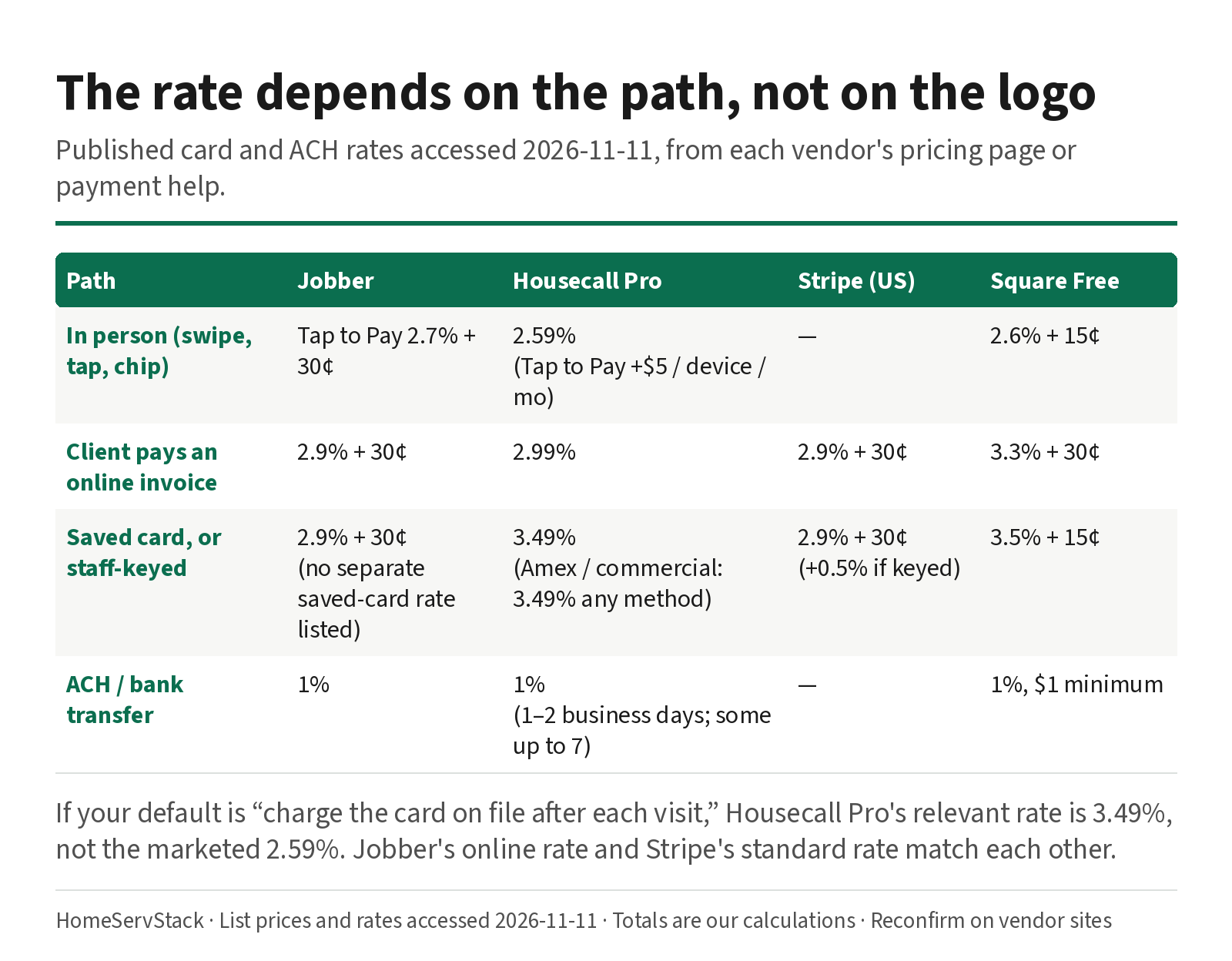
Cleaning Business Autopay: Card-on-File Rates, Declines, and Skip-Week Billing
Autopay and card-on-file rates for cleaning businesses, plus what Jobber, Housecall Pro and ZenMaid do when a card declines or a week is skipped.
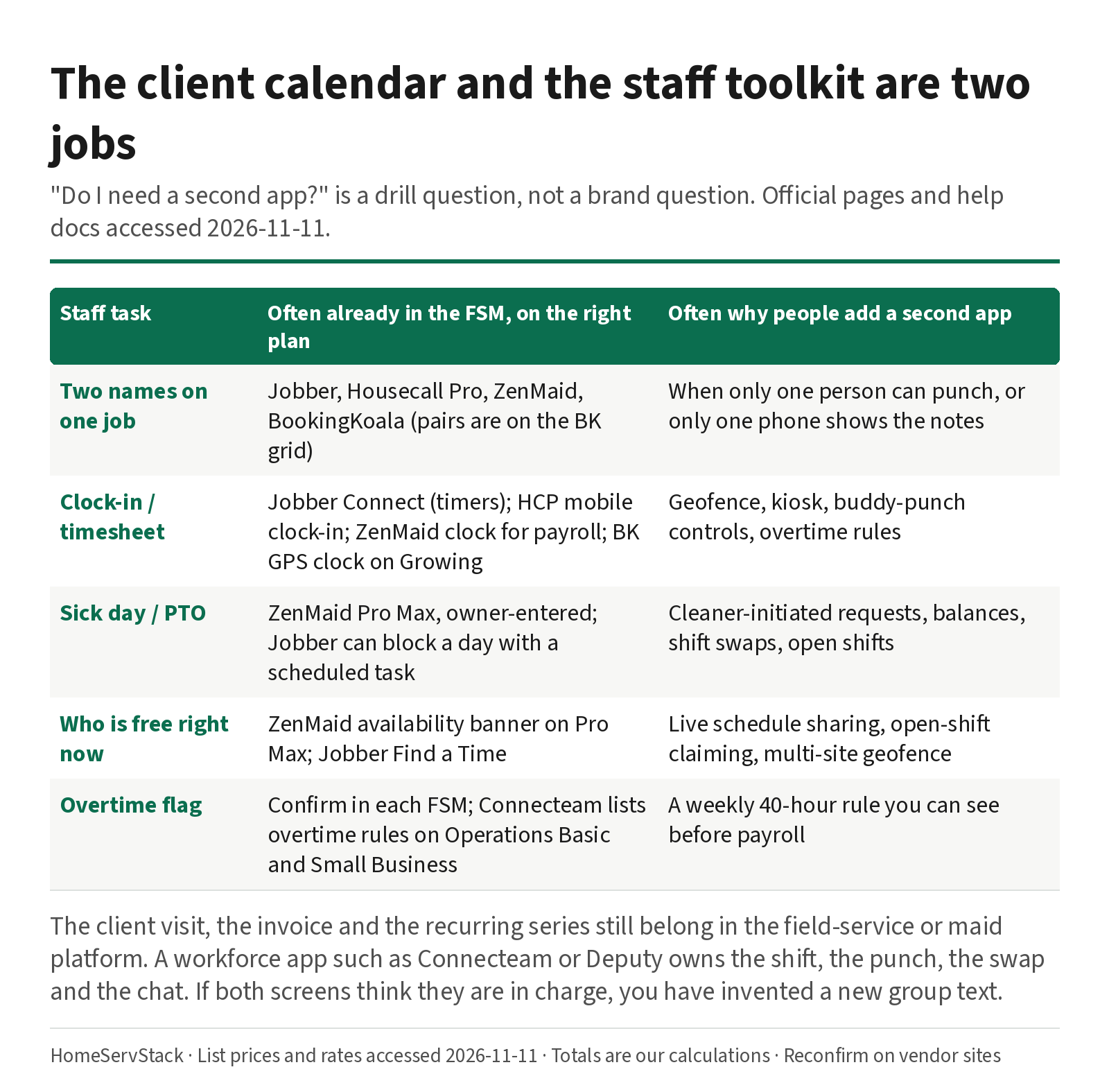
Cleaning Employee Scheduling and Time Clock Apps: When You Need a Second Tool
When a cleaning company needs a staff scheduling or time-clock app beside its FSM, with sick-day and two-cleaner drills.
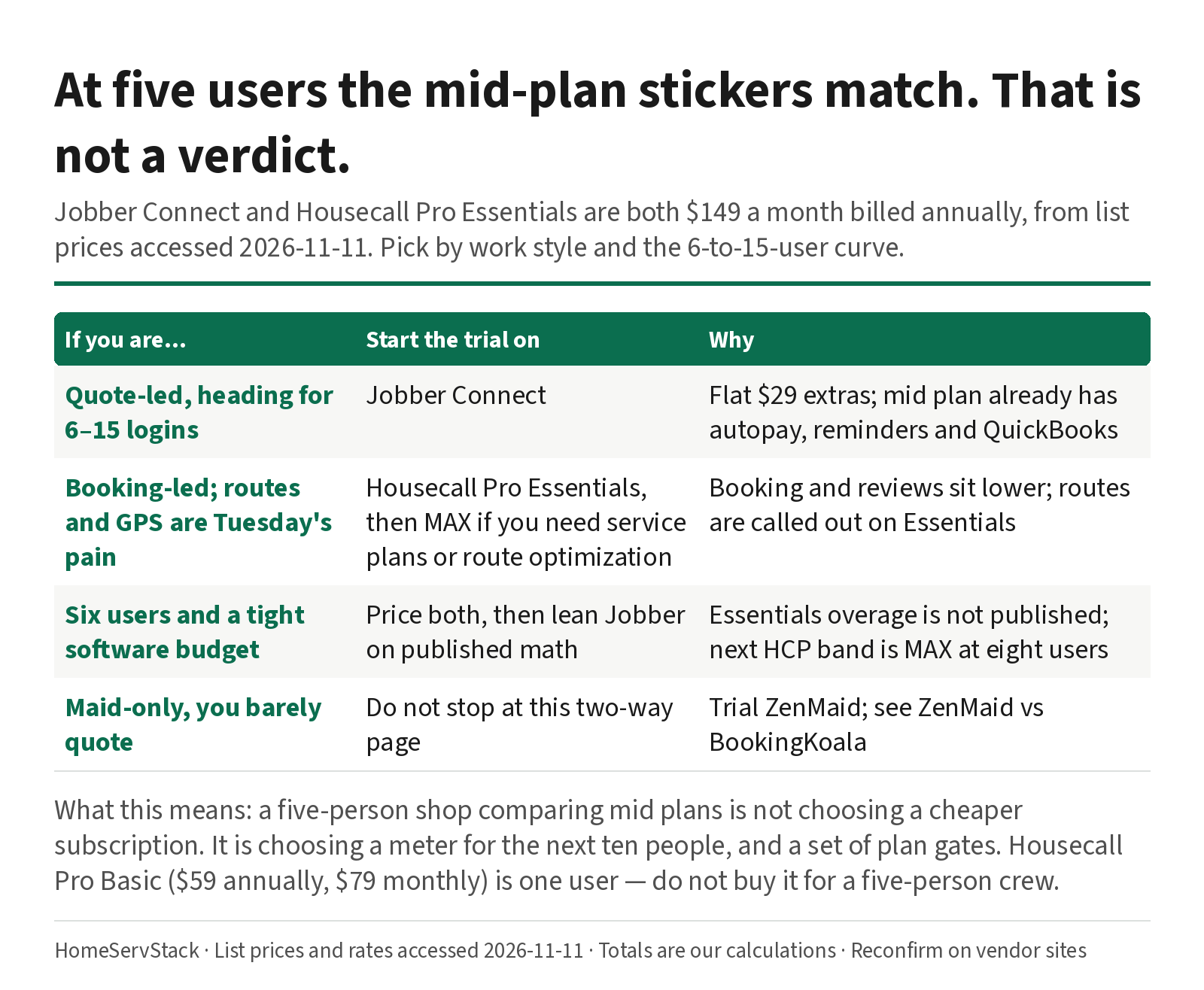
Jobber vs Housecall Pro for Cleaning: Same $149 at Five Users, Different After That
Jobber and Housecall Pro both cost $149 at five users annually. The 6–15 user curve, card rates, routes, and QuickBooks decide it.
Comments
Share a correction or an operator experience. Comments are plain text, held for review, and appear only after they are approved. A lasting email is required and is never shown. We may send a confirmation link once mail is configured.
No approved comments yet.