Watch a short briefing
Prices checked 2026-11-11. HomeServStack has no affiliate deals with any vendor named here. This guide is built from vendor pricing pages, help-center docs, published industry data and public owner threads; we did not run paid accounts for it (method below).
Short answer: For a calendar-led maid service with 2–10 cleaners, start with ZenMaid. Quote-led or mixed shops should trial Jobber or Housecall Pro, which cost the same $149 a month (billed annually) at five users. Brands that sell online fit Automaid (formerly Launch27) or BookingKoala. Solo cleaners can start free on FieldVibe.
That’s the shortlist. For a starting point from the same model-by-size table, take the which-software quiz. The harder question is which one survives your actual week, and the subscription is the wrong place to look. A recurring residential clean brought in $217.91 on average in September 2026, across the roughly 150,000 monthly cleanings in MaidCentral’s benchmark (MaidCentral PCI). One forgotten visit or one client who can’t see when you’re coming next costs more than most plan gaps.
So here’s the argument of this guide. Choose by where your work starts (the office calendar, an online booking form, or a quote) and by the meter the vendor charges on (seats, jobs, providers, or flat tiers). The plan price is the smallest number in the decision.
Shortlist at a glance
Published facts only, from each vendor’s pricing page (accessed 2026-11-11). “Starting price” is the lowest published plan, not the plan most cleaning shops end up on. The three-shop table further down shows that.
| Tool | Best for | Starting price | Free trial / free plan | Mobile app |
|---|---|---|---|---|
| Jobber | Quote-led and mixed shops, ~5–15 people | Core $29/mo billed annually, 1 user | 14-day free trial, no card | Yes (Jobber app) |
| ZenMaid | Calendar-led maid services, ~2–10 cleaners | Starter $19/mo, owner only | 14-day free trial | Yes; cleaner GPS from Pro |
| Housecall Pro | Quote-led multi-crew shops | Basic $59/mo billed annually ($79 monthly), 1 user | 14-day free trial of MAX, no card | Yes |
| ServiceM8 | Many logins, moderate visit counts | Free (1 user, 30 jobs); Starter $29 | Free plan, plus 14-day trial | Yes (iOS, Android) |
| Automaid | Booking-led brands | Base $75/mo | 14-day trial | Cleaner and admin apps on Plus |
| BookingKoala | Booking-led brands that want a site too | Starter $27/mo, 5 providers | Free trial (30 days shown) | Provider web dashboard on Starter; mobile apps from Growing |
| FieldVibe | Solo cleaners, small crews | Solo $0, 1 user | Free plan, no card | Yes (iOS, Android, web) |
The plan price is the smallest number on your bill
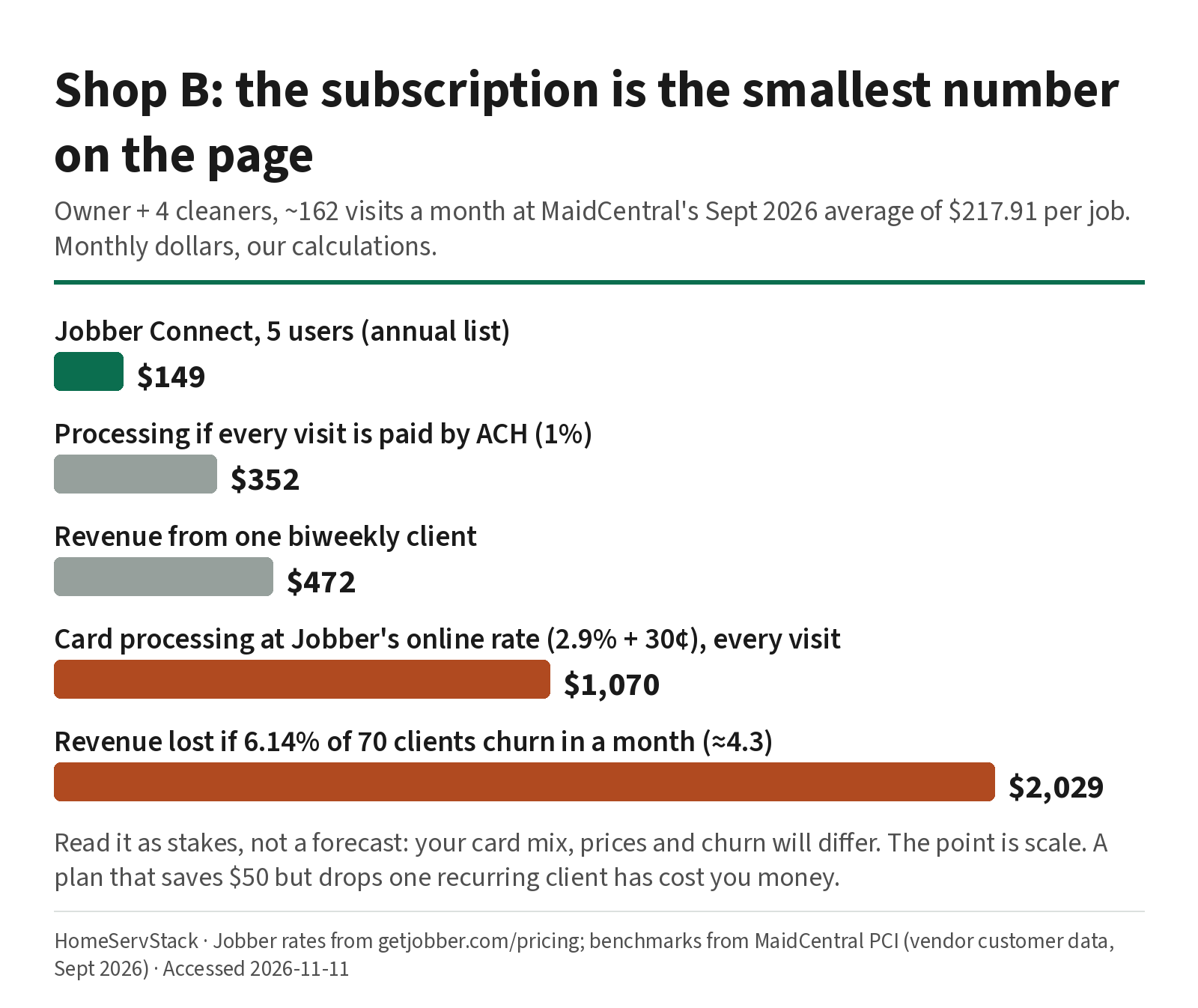
Let’s put numbers on a mid-size shop. Shop B is our model five-person business: an owner who still cleans plus four cleaners, about 70 recurring homes. Say 50 are biweekly, 10 weekly and 10 monthly. That’s about 162 visits a month (52 weeks ÷ 12 months gives 2.17 visits per biweekly client and 4.33 per weekly one).
Using MaidCentral’s average job value from above and published rates, here’s that shop’s month. These are our calculations, not vendor quotes.
| Line item (Shop B, per month) | How we got it | Amount |
|---|---|---|
| Jobber Connect, 5 users, billed annually | Jobber pricing | $149 |
| Processing if every visit is paid by ACH | 162 visits × average job × 1% | ≈ $352 |
| Processing if every visit is paid by card at Jobber’s online rate | 162 × (average job × 2.9% + $0.30) | ≈ $1,070 |
| Revenue from one biweekly client | 2.17 visits × average job | ≈ $472 |
| Revenue walking out at MaidCentral’s churn rate | 70 clients × 6.14% ≈ 4.3 clients | ≈ $2,029 |
The software line is real money, but it’s the smallest one. Payment rails and client retention are the big ones. Card rates also differ by how the card is charged: Jobber’s own pricing page says automatic payments on recurring work charge “your client’s credit card” at card rates, and other vendors price saved-card charges differently. So how you set up autopay matters more than a plan gap. Jobber and Housecall Pro both list ACH at 1% (Housecall Pro lists cards from 2.59% on its pricing page). Moving even part of a recurring base to bank payments saves more than any plan switch would.
We are not saying software cuts churn by some percentage. Nobody has published a credible number for that, and we won’t make one up. The claim is narrower: the jobs scheduling software does (reminders, reschedules, the right cleaner at the right door) sit right next to the biggest money line in a recurring cleaning business.
Labor points the same way. MaidCentral’s dataset shows technician turnover of 131.1% a year. A 2022 ARCSI benchmarking study found that finding and keeping a trained workforce was the top challenge for more than 40% of participating residential cleaning companies (ISSA summary). That’s older data, but it’s the most recent public association summary we could find. High turnover changes which pricing model is cheap.
For scale, the BLS counts about 1.33 million maid and housekeeping cleaner jobs in 2025, with 182,400 self-employed, and projects almost flat growth to 2035 (BLS projections). That category includes hotel housekeeping, so treat it as context. In a flat market you grow by keeping clients and filling routes.
Start with where your work comes from
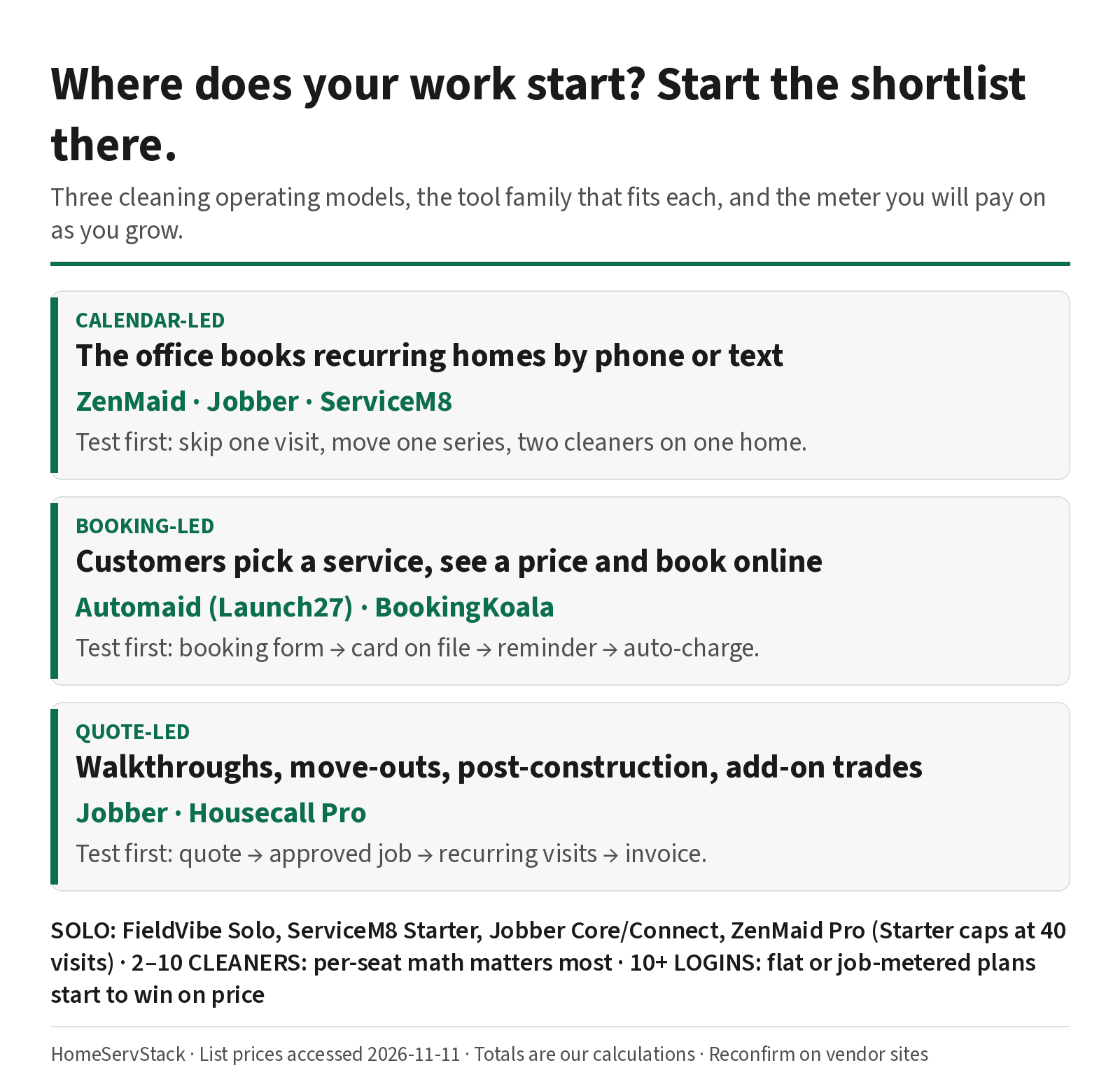
Most cleaning businesses run one of three operating models, even if they’ve never named it.
Calendar-led. The office (often the owner’s phone) books recurring homes by call or text. The pain is moving visits around: skips, holiday shifts, two-cleaner jobs, sick days.
Booking-led. Customers choose a service, see a price and book online, often with a card on file. The website is the sales engine. Automaid has been Launch27’s name since May 20, 2026 (PR Newswire).
Quote-led. Walkthroughs, move-outs, post-construction, carpet or window add-ons. Work begins as an estimate and only then becomes recurring.
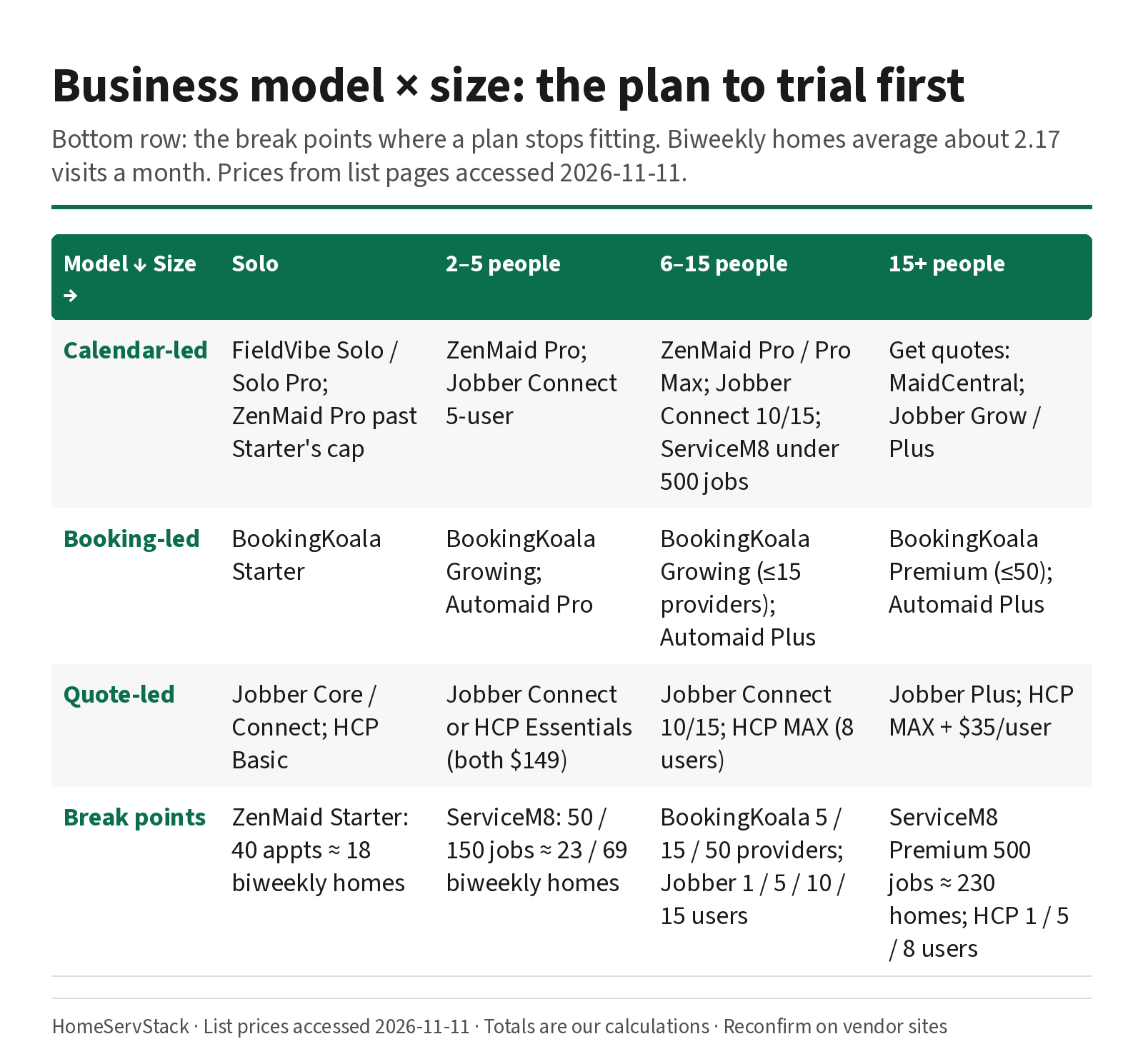
Now cross the model with your size. Each cell names the plan to trial first, and the bottom row shows the break points where a plan stops fitting.
| Model ↓ / size → | Solo | 2–5 people | 6–15 people | 15+ people |
|---|---|---|---|---|
| Calendar-led | FieldVibe Solo or Solo Pro; ZenMaid Pro once Starter’s cap bites | ZenMaid Pro; Jobber Connect (5 users) | ZenMaid Pro or Pro Max; Jobber Connect (10/15 users); ServiceM8 if visits stay under 500 | Get quotes: MaidCentral; Jobber Grow or Plus |
| Booking-led | BookingKoala Starter | BookingKoala Growing; Automaid Pro | BookingKoala Growing (up to 15 providers); Automaid Plus | BookingKoala Premium (up to 50); Automaid Plus |
| Quote-led | Jobber Core or Connect; Housecall Pro Basic | Jobber Connect or Housecall Pro Essentials (tie on price) | Jobber Connect (10/15 users); Housecall Pro MAX (8 users) | Jobber Plus; Housecall Pro MAX plus $35 per user |
| Break points | ZenMaid Starter: 40 appointments ≈ 18 biweekly homes | ServiceM8: 50 / 150 jobs ≈ 23 / 69 biweekly homes | BookingKoala: 5 / 15 / 50 providers; Jobber: 1 / 5 / 10 / 15 users | ServiceM8 Premium: 500 jobs ≈ 230 biweekly homes; HCP: 1 / 5 / 8 users |
Mixed shops are normal. If 80% of revenue is recurring residential and 20% is move-outs, you’re calendar-led with a quoting side. Buy for the 80%. If your real headache is payroll and time-off approvals rather than client visits, a staff app may be the better first buy. Jobber’s own Academy roundup (2026-10-14) says Jobber has no PTO approval workflow (Jobber Academy).
Then match the meter to how you’ll grow
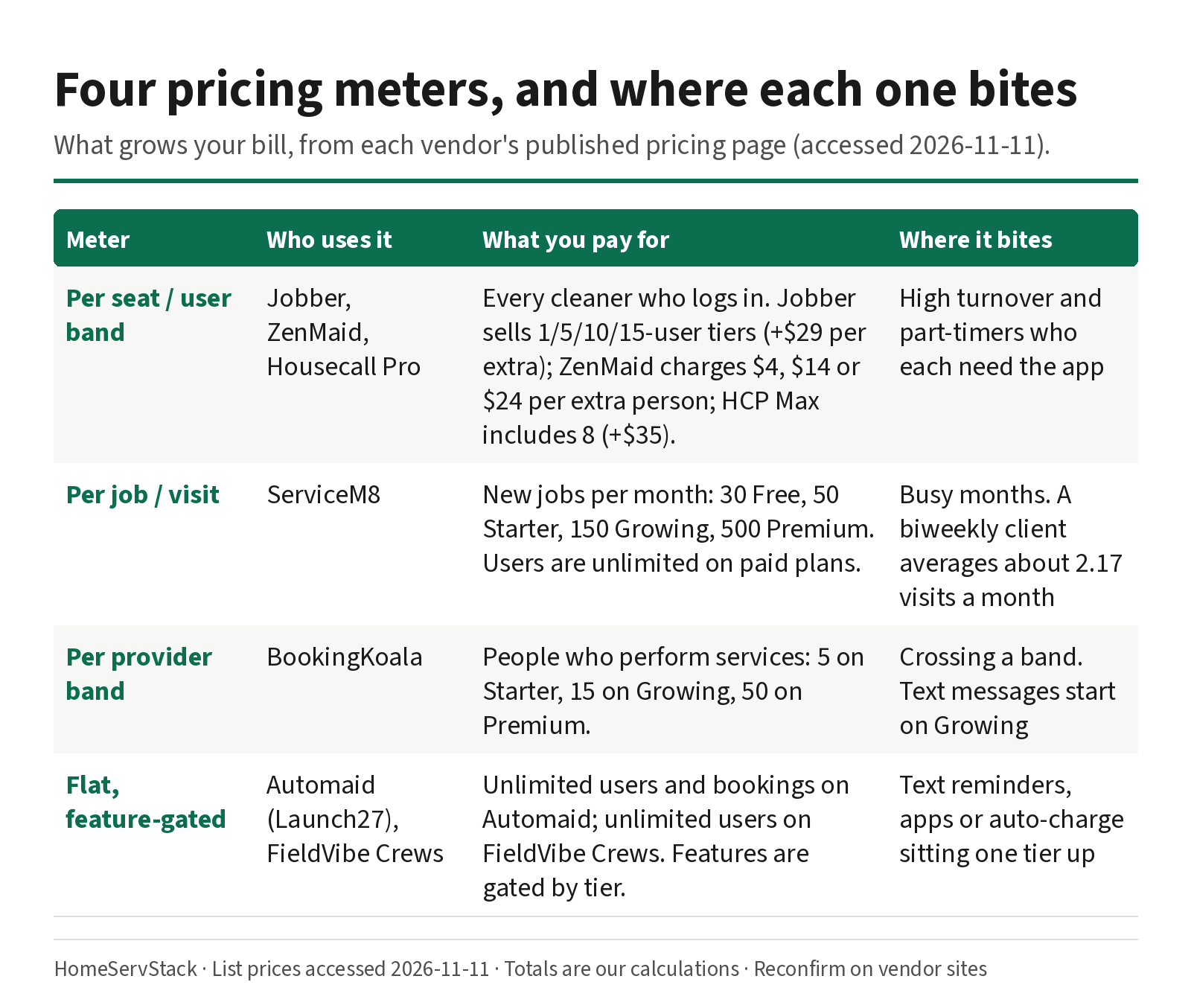
Every vendor meters something. The meter decides what your bill does when you hire, when a cleaner quits, and when you sign a big recurring client.
| Meter | Who uses it | What you pay for | Where it bites |
|---|---|---|---|
| Per seat / user band | Jobber, ZenMaid, Housecall Pro | Each person who logs in | Turnover, part-timers who each need the app |
| Per job / visit | ServiceM8 (also Maidily) | New jobs each month | Busy months, lots of small recurring homes |
| Per provider band | BookingKoala | People who do the work | Crossing a band |
| Flat, feature-gated | Automaid, FieldVibe Crews | A tier; users unlimited | The one feature you need sitting a tier up |
Per seat. Jobber sells user bands. Connect is $99 for one user, $149 for five, $229 for ten and $299 for fifteen when billed annually, with extra users at $29 each. Jobber counts a user as “anyone who accesses your account at the office or in the field to view or manage the team’s schedule” (Jobber pricing). ZenMaid includes only the owner; each extra person costs $4, $14 or $24 a month on Starter, Pro and Pro Max (ZenMaid help). Housecall Pro sells three bands: Basic (1 user), Essentials (5 users) and MAX (8 users, plus $35 per extra user). Its page lists $59, $149 and $299 a month billed annually, or $79, $189 and $329 month to month. Some versions of the plan cards switch to a “$XX” placeholder after you pick an industry, so confirm your quote. We couldn’t find a published extra-user price for Essentials.
At MaidCentral’s turnover rate, a ten-cleaner team replaces about 13 cleaners a year. Seat pricing doesn’t charge for leavers, but every hire is a seat to add, an app to set up and a login to remove.
Per job. ServiceM8 gives paid plans unlimited users and meters new jobs instead: 30 on Free, 50 on Starter ($29), 150 on Growing ($79), 500 on Premium ($149) and 1,500+ on Premium Plus ($349) (ServiceM8 pricing). ServiceM8 says each new job card uses a credit, and its recurring feature re-creates the job for each occurrence, so plan on every visit counting. Over the limit, it gives a 7-day grace period before you need to upgrade.
Per provider. BookingKoala meters the people who perform services: 5 on Starter ($27), 15 on Growing ($57), 50 on Premium ($197) (BookingKoala pricing). Team members count as providers. SMS notifications, native mobile apps (customers and providers) and GPS with clock-in all start on Growing, per the official compare table. Starter still includes a provider web dashboard and browser “Mobile Access.”
Flat, feature-gated. Automaid lists unlimited users and bookings. You pay by features: Base $75 (email reminders), Pro $150 (text reminders, QuickBooks, Google Calendar), Plus $299 (automatic card charging, pre-authorization, cleaner and admin mobile apps) (Automaid pricing). FieldVibe Crews is $50 with unlimited users and 1,000 automated reminders a month in the US (FieldVibe pricing).
What three model shops would actually pay
Here are three shapes of cleaning business, costed at published list prices (annual billing where offered). Subscription only; SMS bundles and processing come on top.
- Shop A, solo: one owner-cleaner, 22 biweekly homes, about 48 visits a month.
- Shop B, small team: owner plus four cleaners, about 162 visits a month (the shop from the stakes table).
- Shop C, twelve logins: owner, office manager, ten cleaners, about 300 visits a month.
| Tool | Shop A (solo) | Shop B (5 people) | Shop C (12 logins) |
|---|---|---|---|
| Jobber | Core $29 (no automated reminders); Connect $99 | Connect 5-user $149 | Connect 10-user $229 + 2 × $29 = $287 |
| ZenMaid | Pro $39 (Starter’s cap is too small) | Pro $39 + 4 × $14 = $95 | Pro $193; Pro Max $313 |
| Housecall Pro | Basic $59 | Essentials $149 (5 users) | MAX $299 + 4 × $35 = $439 |
| ServiceM8 | Starter $29 (50 jobs, tight) | Premium $149 (over 150 jobs) | Premium $149 (500 jobs) |
| Automaid (Launch27) | Base $75 | Pro $150; Plus $299 for apps and auto-charge | Plus $299 |
| BookingKoala | Starter $27 (no SMS, no mobile apps) | Growing $57 | Growing $57 |
| FieldVibe | Solo $0; Solo Pro $20 | Crews $50 | Crews $50 |
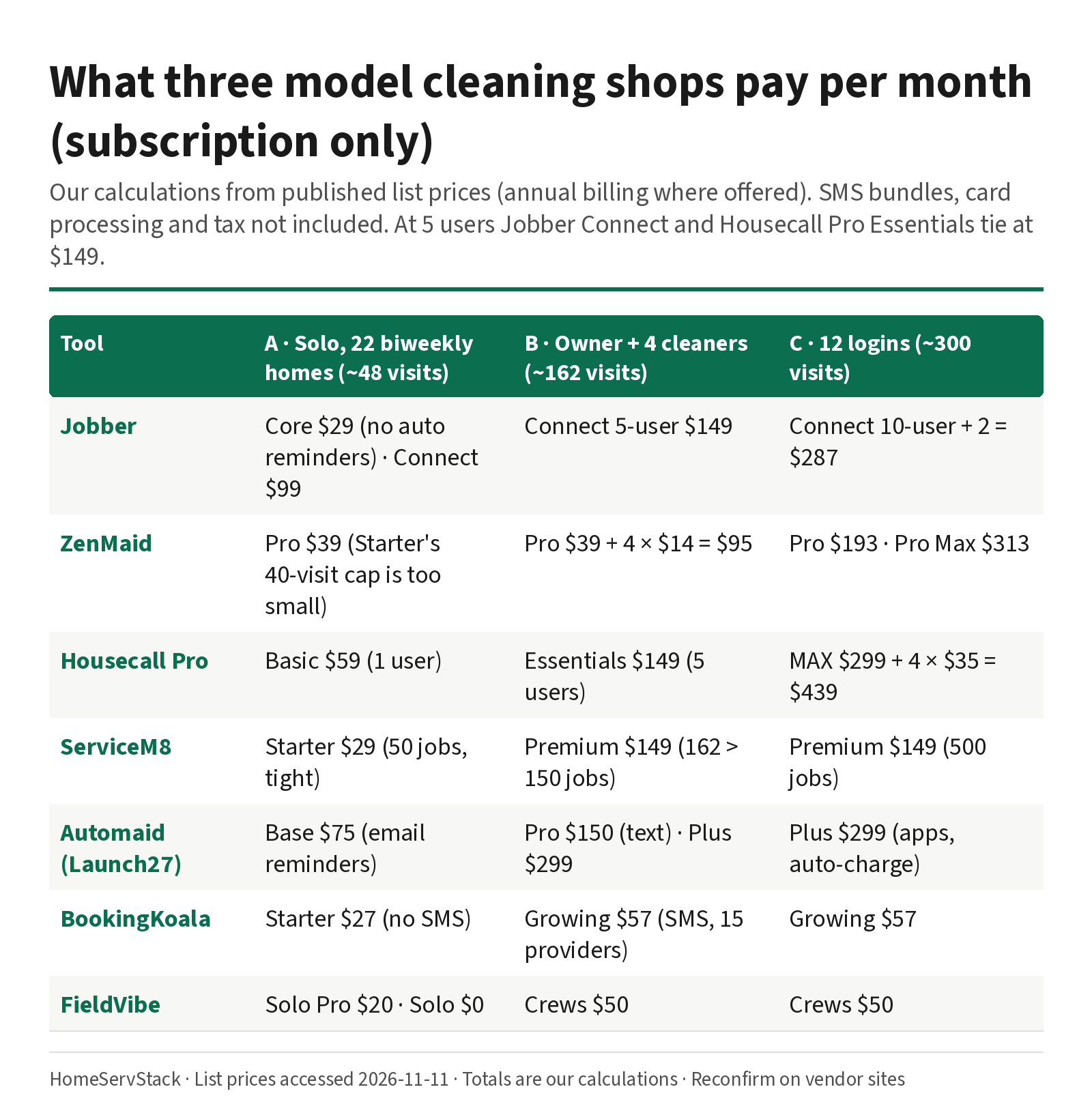
Reading Shop A. A solo cleaner at 48 visits a month has already outgrown ZenMaid Starter and ServiceM8 Free, and sits just under ServiceM8 Starter’s 50. FieldVibe’s free plan has unlimited jobs but manual reminders; Solo Pro ($20) adds 400 automated reminders a month in the US. Jobber Core is cheap, but automated client reminders start on Connect. For one person, a $20–$40 tool that sends reminders usually beats a $99 platform. Our solo cleaner guide goes deeper on that stage.
Reading Shop B. This is where the meters split, and where two big platforms tie. Jobber Connect and Housecall Pro Essentials both cost $149 a month billed annually for five users. So the choice between them comes down to fit, not price: Essentials lists routes and employee GPS, while Jobber’s Connect lists automated reminders, automatic payments and checklists. Our Jobber vs Housecall Pro guide works through that pair. ZenMaid’s $95 looks cheapest among the cleaning-first tools, but texts are billed separately, with bundles from $14 per 125. One reminder per visit means two bundles, about $28 more. ServiceM8 jumps from $79 to $149 because 162 visits is over Growing’s 150. BookingKoala Growing ($57) stays cheap while you have 15 or fewer providers, and it is the first plan that lists the native mobile apps.
Reading Shop C. At twelve logins, flat and job-metered plans pull ahead on price. Jobber’s ten-user Connect band plus two extra users comes in just $12 under its fifteen-user band. Housecall Pro MAX is $439. ZenMaid Pro is $193 before texting. FieldVibe Crews stays $50 and ServiceM8 Premium $149, but check whether their crew tools fit how you dispatch before you count the price as a win.
Annual or monthly? Most vendors discount annual billing, and Jobber says its annual payment is non-refundable if you cancel mid-year (Jobber pricing). A Capterra review dated 2026-11-10, from a property-management owner (not a cleaner) who prepaid and then found a missing integration, put the lesson as: “test every integration you depend on before committing to an annual plan.” (Jobber reviews on Capterra). Pay monthly through the trial; our seats, caps and fees breakdown has the break-even months per vendor.
The workflow that decides whether a tool fits: skip one visit
Feature grids say “recurring jobs: ✓” for every product here. That checkmark tells you nothing about what happens when a client texts “can you skip next Thursday?” This is the workflow where cleaning software earns its fee or doesn’t. We describe what each vendor’s own docs say; we did not run these tests ourselves.
What good looks like: one visit moves or disappears, the client gets one correct message, the old reminder never goes out, and every other visit keeps its own notes (gate codes, “dog in the laundry room,” extra oven clean).
Jobber. Jobber’s Visits help article (updated 2026-10-30) is unusually clear. Editing a visit changes only that visit; “Save and update future visits” is a separate button. When you reschedule a visit, Jobber prompts you to notify the client, and for recurring jobs that prompt “applies only to the individual visit you changed.” It also cancels reminders tied to the old time. The trap is in a warning box: editing the job’s schedule “generates new visits,” and customized visit details like instructions “will be overwritten.” Jobber makes you tick “I understand” first. A tired dispatcher at 9 p.m. ticks boxes.
ZenMaid. ZenMaid’s help article (2026-05-14) sends you to Actions → Manage recurring service, where the next six months of appointments are listed with a pencil icon each. Edits made there only affect that appointment, and frequency changes are a separate flow. The documented gotcha is mundane: close the pop-up without saving and nothing changes.
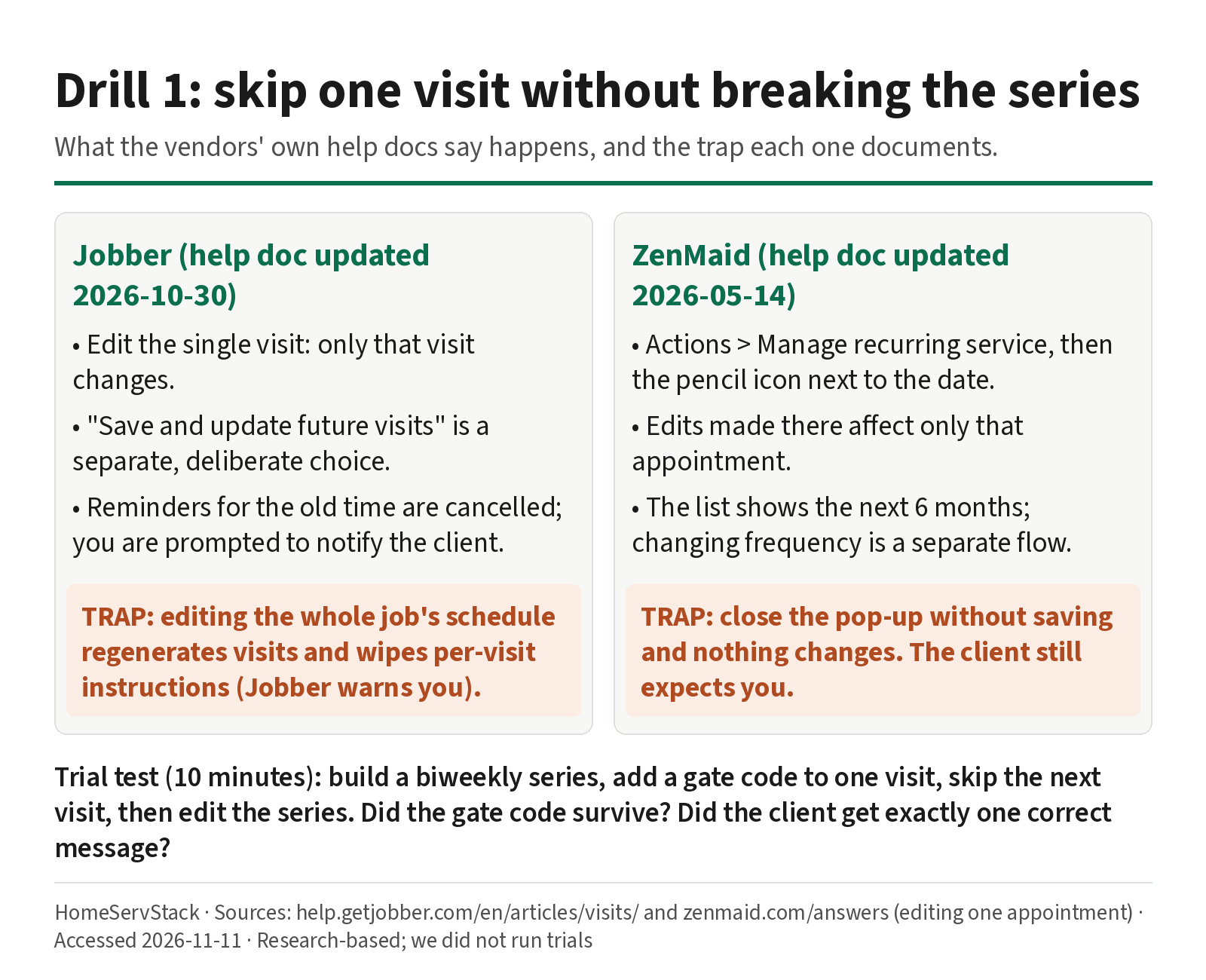
Trial test (10 minutes): build a biweekly series, add a gate code to one future visit, skip the visit before it, then change the series time. Did the gate code survive? Did the client get exactly one message, with the right date?
Two cleaners on one home. Pairs are normal in residential cleaning. Jobber assigns team members per visit and turns names red on a conflict (Jobber Visits); grouping people into named crews is listed under Plus. BookingKoala lists “Individuals, Teams & Pairs,” and FieldVibe lists multi-staff jobs on Crews. Test it: take one cleaner off a single visit and make sure the other’s series is untouched.
Two more drills, in brief
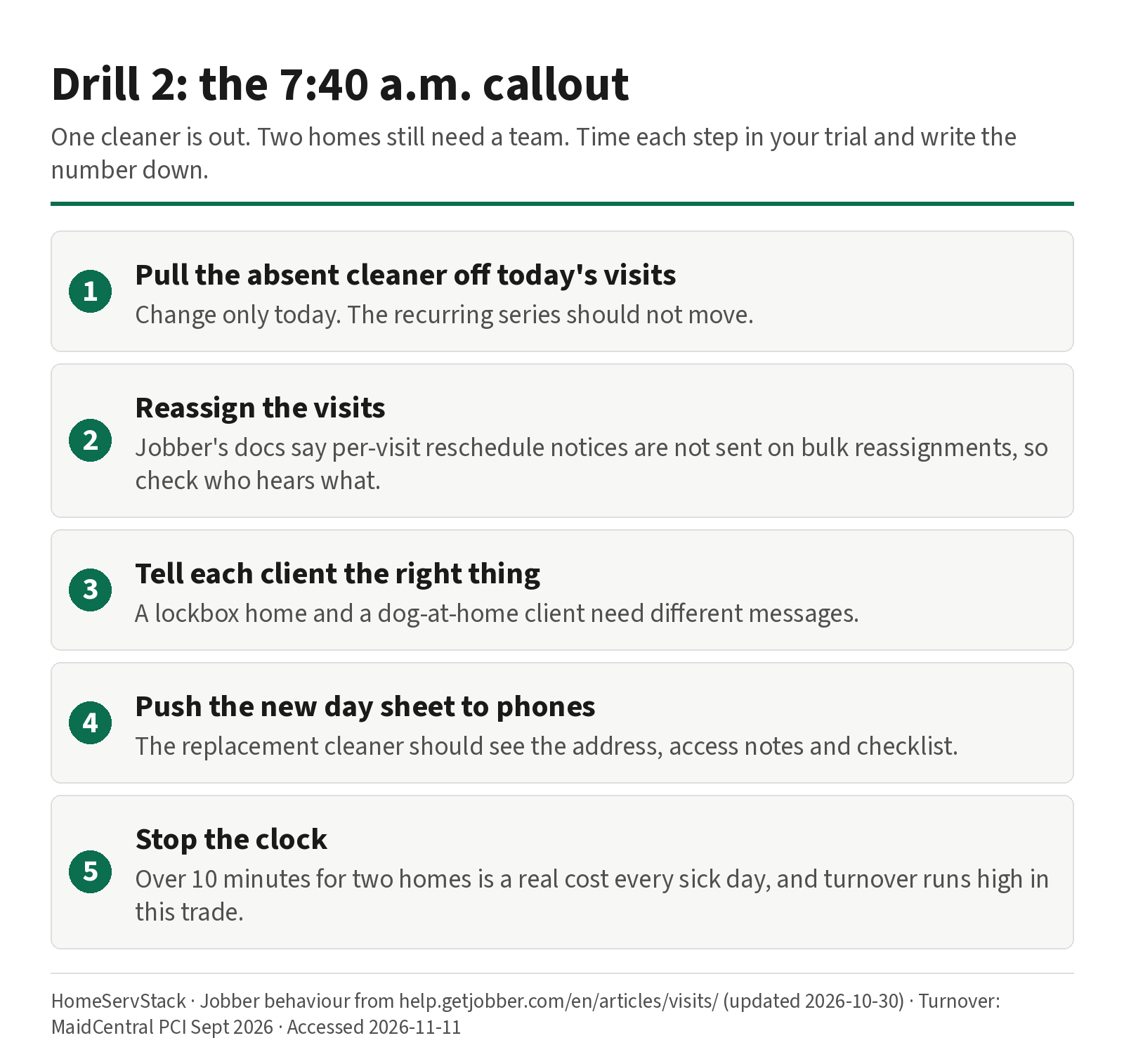
- The early-morning sick call. Jobber’s docs say its reschedule notice “is only for visits moved individually, not on bulk reassignments,” so bulk-moved clients may hear nothing unless you message them. Time how long it takes to move two homes. Our crew dispatch guide covers this drill.
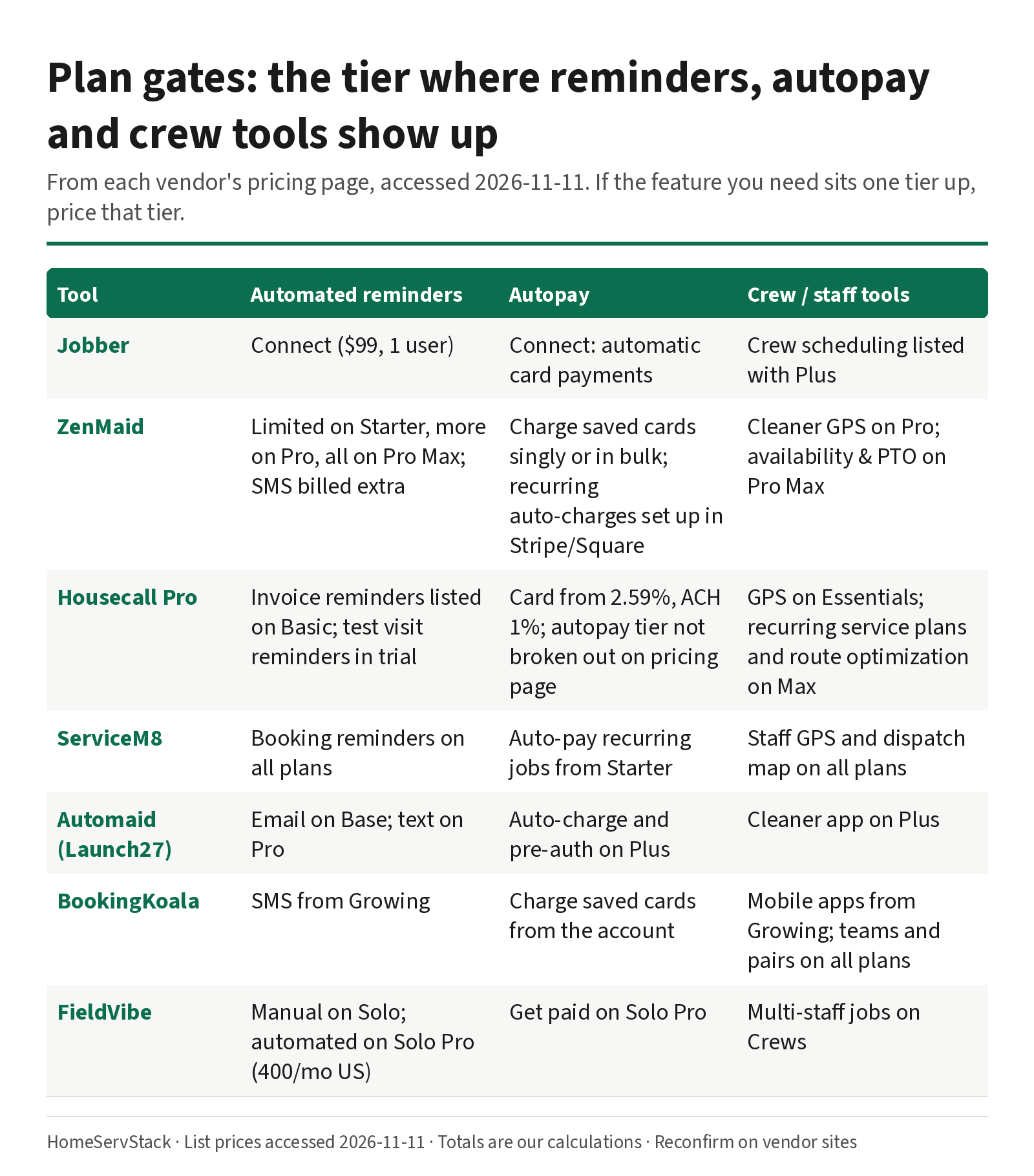
- Autopay on recurring visits. Jobber lists automatic payments on Connect and up; ServiceM8 lists auto-pay for recurring jobs from Starter; Automaid’s auto-charge is on Plus. ZenMaid’s help center says recurring or automated charges “must be configured directly in Stripe or Square”; in ZenMaid you charge saved cards one by one or in bulk (ZenMaid help). More in our recurring invoices guide.
What owners actually complain about
Pricing pages show the vendor’s best case. Owner threads show the week. We read every comment below verbatim through the Arctic Shift public Reddit archive, accessed 2026-11-11, and Capterra’s public review pages on the same date. These are individual accounts, not surveys. When someone names a dollar figure, that’s their bill or their impression, not a list price from our price file.
ZenMaid at mid-size is split. A family cleaning business with 15–20 employees wrote, “We have been happily running most operations on ZenMaid for years at 300$ a month.” That’s their bill, not a published plan. The same owner added, “One thing still being done manually every day is routing teams to jobs every day, however.” (u/Ok_Committee_8576). A different 15-person shop left after a month for Jobber’s top tier. u/household_solutions wrote, “When I tried using the numbers it pulled for payroll, they were incorrect and would have resulted in overpayment if I hadn’t double checked them,” and “I couldn’t mark cleaners as “off” on a particular day, so I still had to keep an additional calendar.” Texts were billed per message, and “The software glitched pretty often in the field.” (comment, and the switch). We did not run those payroll numbers. ZenMaid’s payroll help (updated 2026-03-17) already warns that an AM/PM clock-in error can add about twelve hours, and recommends “Reset and Recalculate” (payroll help). Official pricing puts payroll on Pro, and Cleaner Availability plus PTO tracking on Pro Max: full days or specific hours, set by the owner, not the cleaner (availability help, 2026-07-01). We don’t know which plan she was on. A crew of under five sits on the other side: “I use ZenMaid and LOVE IT for our crew of under 5 staff!” (u/Aromatic-Way4384). Payroll and time-off depth lives in our crew dispatch guide.
Housecall Pro’s booking is praised; the recurring view, QuickBooks sync and data export are not. In a commercial-cleaning thread, u/polloshermanoman wrote that Housecall Pro “has the best booking system out there,” then: “You can’t see how many recurring jobs there are, just the repeated instances of it and it gets clunky fast.” (comment). Two separate businesses in a September 2025 r/smallbusiness thread said they had to turn QuickBooks sync off. One wrote, “In our case the transition is borderline crippling from accounting and customer list perspectives.” (u/nomsain919). Another: “we did have to disable quickbooks. It completely messed us up last year.” (u/These-Acanthisitta99). A two-year customer in a contractors’ thread, trade not stated, wrote: “HCP will not export your historical data in a usable format.” (u/AnxiousWay6424). None of the operators we read mentioned routing either way. Our Jobber vs Housecall Pro guide works through that pair.
BookingKoala and Automaid (formerly Launch27) win on booking, and lose on setup and the cleaner side. The official compare table lists “Mobile APPs & APP Notifications” on Growing and Premium, not on Starter. That matches u/Jiffs81, a roughly one-year user, who wrote in August 2026 that the provider app “doesn’t work on the basic plan, even though it did for the last year.” (comment). Setup and texting are the other sore spots. u/Key_Cucumber_7633 wrote, “Booking Koala was atrocious at setting up and integrating everything. Pathetic customer service response team.” And: “And don’t even ask about setting up twilio…” (comment). A Capterra reviewer titled CEO (2025-12-02) wrote, “I did not like how difficult it was to set up on the back end.” (BookingKoala reviews). Another, titled Director (2025-11-11), “spent an entire weekend learning, before deciding to stick with zenmaid.” (ZenMaid reviews). On the cleaner side, u/DaniDisaster424, who has worked with several Canadian cleaning companies, wrote of both BookingKoala and Launch27: “Neither allow for cleaners to input their availability on anything other than a weekly basis which is a HUGE pain.” (comment).
The three threads from the last update still hold, now from the full comments. A three-year ZenMaid owner, u/Low-Individual768, wrote, “I am using Zenmaid now, and its great, but i find that not having that google integration is making me nutty.” She also felt Jobber and Housecall Pro were “very expensive,” around $200+ a month with even one employee: her impression, not a list price. (comment). In a September 2026 payroll thread, u/MissRaleigh, who runs on Google Sheets, a texting app and QuickBooks, wrote: “As the company grew, having clear processes mattered more than having everything inside one expensive platform.” (comment). A general tools thread still says: test rescheduling and customer notes first. Several people there build competing software, so weigh that accordingly. (thread).
Notice what doesn’t come up: feature counts. The complaints are about rescheduling, client visibility, payroll numbers, the cleaner’s app, accounting sync and price creep.
Verdicts by segment, and who should skip each tool
No single winner, on purpose. Here’s the call for each tool, with the condition that should make you walk away.
Jobber: best for quote-led and mixed shops with 5–15 people. Quotes, recurring jobs, visits, invoices and autopay in one place, with some of the clearest recurring-visit docs in the category. Skip it if you never quote, you’re solo and won’t use more than reminders, or you need PTO approvals inside the scheduler.
ZenMaid: best starting point for calendar-led residential maid services with 2–10 cleaners. Built for cleaning, with checklists, cleaner GPS, payroll and Spotfinder (for slotting new recurring clients) on Pro. Cleaner Availability and PTO tracking sit on Pro Max, per the pricing page. Mid-size shops are split: one 15–20 person family business is still happy on it, routing by hand; another 15-person shop left after a month (owner evidence). Skip it if you’ll stay under ~18 biweekly clients on Starter (you’ll hit the cap), you need QuickBooks today (the pricing page still says “coming soon”), you want card autopay run inside the scheduler rather than set up in Stripe or Square, or you need cleaners to request their own time off (the help center says only the owner can set it).
Housecall Pro: best for quote-led, multi-crew shops whose pricing page lists routes and GPS. Essentials lists routes and employee GPS at the same five-user price as Jobber Connect; MAX adds recurring service plans and route optimization. That’s the official feature list; none of the operators we read mentioned routing either way. The complaints they did make (recurring jobs shown as single visits, QuickBooks sync, data export) are in the owner evidence. Skip it if you’ll grow past five users soon but aren’t ready for MAX (we found no published Essentials extra-user price), you’re a pure maid service that doesn’t need its home-services breadth, or you depend on a clean QuickBooks sync or a usable data export.
ServiceM8: best for teams with lots of logins and moderate visit counts. Unlimited users on paid plans, with GPS, dispatch map and reminders on all of them. Skip it if you run many small recurring homes. Visit volume, not headcount, will set your tier.
Automaid (formerly Launch27): best for booking-led brands that sell online. Unlimited users and bookings, with conflict prevention from Base. Skip it if you need a cleaner app or auto-charging but won’t pay for Plus, or if cleaners need to enter availability beyond a weekly pattern (owner evidence).
BookingKoala: best for booking-led brands that want the site, booking form and payments in one. Cheap up to 15 providers on Growing, which is also the first plan that lists native mobile apps. Skip it if you’re about to pass 15 providers (the next published tier is $197), most of your work comes from quotes, you need cleaners to set availability more than a week at a time, or a long setup and Twilio texting would be a problem (see owner evidence).
FieldVibe: best for solo cleaners and small crews who want to start cheap. Free Solo plan with unlimited jobs; Crews at $50 with unlimited users. Skip it if you need cleaning-specific features like payroll or booking-form pricing.
More head-to-heads: Jobber vs ZenMaid, Jobber vs Housecall Pro, and ZenMaid vs BookingKoala.
Five ways cleaning owners pick wrong
- Pricing the entry tier. The feature you need (automated reminders, autopay, the cleaner app) often sits one tier up. Price that tier.
- Counting cleaners instead of visits. On job-metered plans, a busy biweekly round grows the bill faster than hiring does.
- Ignoring processing. Ask every vendor for its ACH rate and its saved-card rate, and whether autopay can run on bank payments.
- Prepaying before the drills. Annual plans are often non-refundable. Run the skip test on the trial first.
- Editing the series when you meant one visit. The docs warn you; the habit has to come from you. Train whoever books on “this visit only” vs “all future visits” before go-live.
A 10-day trial plan
- Day 1: Pick the two tools that match where your work starts and the meter that fits your growth. Not five.
- Days 1–2: Import 10 real clients with their real notes: gate codes, pets, add-ons.
- Days 2–3: Run the skip-one-visit test and the two-cleaner test. Screenshot what the client and the cleaner see.
- Day 4: Run a sick-call reassignment and time it.
- Days 5–7: Turn on reminders for those 10 clients. Count how many messages go out and what they’d cost after the trial.
- Day 8: Run autopay on a test card, including one that declines.
- Days 9–10: Put your real numbers into the three-shop table above and decide monthly vs annual.
How we researched this
What we did. On 2026-11-11 we re-read the pricing pages for Jobber, ZenMaid, Housecall Pro, ServiceM8, Automaid (Launch27), BookingKoala, FieldVibe, Connecteam, Square, MaidCentral, Swept and Maidily, plus Jobber and ZenMaid help-center articles on recurring visits, card charging, payroll and cleaner availability. We re-checked BookingKoala’s official plan-comparison table for which plans include native mobile apps, GPS and SMS. Every price on this page comes from one dated price file we keep for all our guides. We used MaidCentral’s PCI report (September 2026 data) for average job value, churn and turnover. Those figures come from a software vendor’s own customers, and MaidCentral appears in our “also considered” list, so we label them that way. We added the 2022 ARCSI summary on workforce challenges and BLS/O*NET data for market size and wages (median $17.07 an hour for the occupation, per O*NET). We read public owner comments on Reddit verbatim through the Arctic Shift public archive, and public Capterra reviews, all accessed 2026-11-11, for real-world pain points. Promoters, vendor staff and comments older than about two years were flagged and not used as evidence.
What we did not do. We did not open paid accounts or run trials for this version. Every software behavior in the workflow section comes from the vendor’s own documentation. Owner comments are labeled as individual accounts. Every total is our arithmetic on published list prices. Where a vendor doesn’t publish a price, we say so instead of copying a third-party number.
How we judged. We didn’t rank tools on a single score, because the right tool depends on your operating model. We segmented by where work starts and by size, and judged each tool on recurring-visit handling, multi-cleaner and same-day dispatch, the reminder and autopay tier, and how the pricing meter behaves as you grow.
Conflicts. None. No affiliate links, no sponsored placements. Byline: HomeServStack Editorial.
Glossary
- Visit: one trip to a client’s home. Jobber’s term; a recurring job generates many visits.
- Job / job credit: ServiceM8’s unit of billing. Each new job card uses one credit, and recurring jobs re-create themselves for each occurrence.
- Appointment: ZenMaid’s word for a visit. Starter caps how many you can book each month.
- User / seat: a person who logs in. Jobber counts anyone who views or manages the schedule.
- Provider: BookingKoala’s unit: a person who performs the service.
- Recurring series: the rule that generates future visits. Editing it can overwrite one-off notes.
- ACH: a bank-to-bank payment. Usually far cheaper than card processing for recurring clients.
- Annual prepay: a discounted price paid upfront for the year, often non-refundable.
Corrections and updates
- 2026-11-11 (third update): Correction: BookingKoala’s official compare table lists “Mobile APPs & APP Notifications” on Growing ($57) and Premium, not on Starter ($27). Starter includes a Provider/Team web dashboard and browser Mobile Access. This matches an August 2026 operator report that the provider app had left the basic plan. Qualification: Housecall Pro’s “best for routing” line is now tied to the official feature list (Essentials lists Routes and Employee GPS; route optimization is on MAX), not to operator comments. Added operator reports on HCP’s recurring-jobs view, QuickBooks sync and data export. ZenMaid official docs put payroll on Pro and Cleaner Availability / PTO tracking on Pro Max; mid-size evidence is mixed (a 15–20 person shop still happy, routing by hand; a 15-person shop that left after a month). Method note updated: Reddit comments were read verbatim through the Arctic Shift public archive, accessed 2026-11-11. Added sourced user-evidence quotes and their source URLs.
- 2026-11-11 (second update): Correction: Housecall Pro’s official pricing page publishes Basic at $59 and Essentials at $149 a month billed annually ($79 and $189 month to month), in its plan cards and embedded plan data. We had listed both as “custom / not published.” Shop A and Shop B are recalculated; at five users Housecall Pro Essentials now ties Jobber Connect at $149. Also added: a shortlist table, an “also considered” box, a model-by-size table and figure, and ZenMaid’s documented autopay setup. The sick-call, autopay and annual-prepay sections were shortened to pointers to our deeper guides. Jobber’s ten-user Connect band ($229 annually) was re-checked in the page’s plan data.
- 2026-11-11: Rewritten around a decision framework (where work starts × pricing meter), with cost models for three shop sizes, industry benchmarks, doc-sourced workflow behavior and owner evidence. Correction: our earlier version priced Jobber at twelve users at $352–$357 a month. Jobber now publishes a ten-user Connect band, which puts twelve users at $287.
- 2026-11-10: Housecall Pro Basic and Essentials marked custom / not published after a re-check (superseded by the correction above).
- 2026-11-09: First published.
Frequently asked questions
What is the best scheduling software for a cleaning business?
ZenMaid for calendar-led residential maid services with 2–10 cleaners; Jobber or Housecall Pro for quote-led or mixed shops; Automaid (formerly Launch27) or BookingKoala for brands where customers book and pay online; FieldVibe for solo cleaners starting free. Then price each on the meter it charges by (seats, jobs, providers or flat tiers) at your real headcount and visit count.
How much does cleaning scheduling software cost for an owner plus four cleaners?
From list prices accessed 2026-11-11: Jobber Connect (5 users) and Housecall Pro Essentials (5 users) are both $149/mo billed annually ($199 and $189 month to month). ZenMaid Pro is $39 plus 4 × $14 = $95/mo before SMS. FieldVibe Crews is $50/mo. ServiceM8 is $79 up to 150 new jobs a month and $149 up to 500. Card processing is separate and often costs more than the subscription.
Does ZenMaid charge per cleaner?
Yes. ZenMaid's help center says only the owner profile is included. Each extra cleaner, contractor or office manager costs $4/mo on Starter, $14/mo on Pro or $24/mo on Pro Max. Starter also stops new bookings past 40 appointments a month until you upgrade, and SMS is billed separately.
Is Jobber Core enough for a recurring cleaning round?
Usually not. Core ($29/mo billed annually, one user) covers scheduling, quotes, invoices and online payments. Jobber's pricing page lists automated client reminders, automatic payments and checklists on Connect and above, which most recurring residential rounds want.
Do recurring visits count against ServiceM8's job limit?
Plan on it. ServiceM8 says each new job card uses a job credit, and its recurring feature re-creates the job for each occurrence. A biweekly client averages about 2.17 visits a month, so 150 jobs covers roughly 69 biweekly clients. Confirm how your account counts recurring jobs before you pick a tier.
Should I pay annually for cleaning software?
Only after a real trial. Jobber's annual payment is non-refundable if you cancel mid-year. Our break-even math on Jobber Connect (five users) is about nine months: $1,788 prepaid versus $199 a month with no commitment. If you might switch before then, pay monthly.
Sources
- Jobber Pricing — Accessed
- Jobber Help Center: Visits (updated 2026-10-30) — Accessed
- Jobber Academy: Best Scheduling Software for Cleaning Businesses in 2026 — Accessed
- ZenMaid Pricing — Accessed
- ZenMaid Help: How Much Does ZenMaid Cost? — Accessed
- ZenMaid Help: Editing One Appointment in a Recurring Service — Accessed
- ZenMaid Help: Connecting a Credit Card Processor to ZenMaid — Accessed
- ZenMaid Help: Ways Customers Can Be Charged by Card in ZenMaid — Accessed
- Housecall Pro Pricing — Accessed
- ServiceM8 USA Pricing — Accessed
- Automaid (formerly Launch27) Pricing — Accessed
- Launch27 Becomes Automaid (PR Newswire, 2026-05-20) — Accessed
- BookingKoala Pricing — Accessed
- FieldVibe Pricing — Accessed
- Connecteam Pricing — Accessed
- Square Pricing (Appointments) — Accessed
- MaidCentral Pricing — Accessed
- Swept Pricing — Accessed
- Maidily Pricing — Accessed
- MaidCentral: Professional Cleaning Index (PCI) Report, Cleaning Industry Statistics 2026 — Accessed
- ISSA: ARCSI Announces Results of 2022 Residential Cleaning Benchmarking Study — Accessed
- U.S. BLS Employment Projections: Maids and Housekeeping Cleaners (37-2012) — Accessed
- O*NET OnLine: Local Wages for Maids and Housekeeping Cleaners (BLS OEWS data) — Accessed
- Reddit r/cleaningbusiness: Help! Automating scheduling and payroll — Accessed
- Reddit r/cleaningbusiness: Looking for advice on which programs to use to stay organized — Accessed
- Reddit r/cleaningbusiness: What do you use to manage your cleaning business? — Accessed
- ZenMaid Help: Cleaner Availability Feature (updated 2026-07-01) — Accessed
- ZenMaid Help: How to Run Payroll in ZenMaid (updated 2026-03-17) — Accessed
- ZenMaid Help: How to Schedule Time Off in ZenMaid — Accessed
- Reddit r/cleaningbusiness: Advice? Zenmaid alternatives and employee routing — Accessed
- Reddit r/cleaningbusiness: Cleaning business owners with a team, how do you... — Accessed
- Reddit r/cleaningbusiness: Commercial cleaning CRMs, what's the best to use — Accessed
- Reddit r/cleaningbusiness: Booking Koala vs Jobber — Accessed
- Reddit r/cleaningbusiness: Starting residential cleaning business, need advice — Accessed
- Reddit r/cleaningbusiness: Jobber alternatives for cleaning business — Accessed
- Reddit r/smallbusiness: Welcome to hell, Housecall Pro — Accessed
- Reddit r/Contractor: Is anyone using Housecall Pro, is it worth it — Accessed
- Capterra: Jobber reviews — Accessed
- Capterra: ZenMaid reviews — Accessed
- Capterra: BookingKoala reviews — Accessed
Was this helpful?
One tap, no account, no personal data. We only keep a yes or no, counted with the other votes on this page.
Keep reading
More in Cleaning Software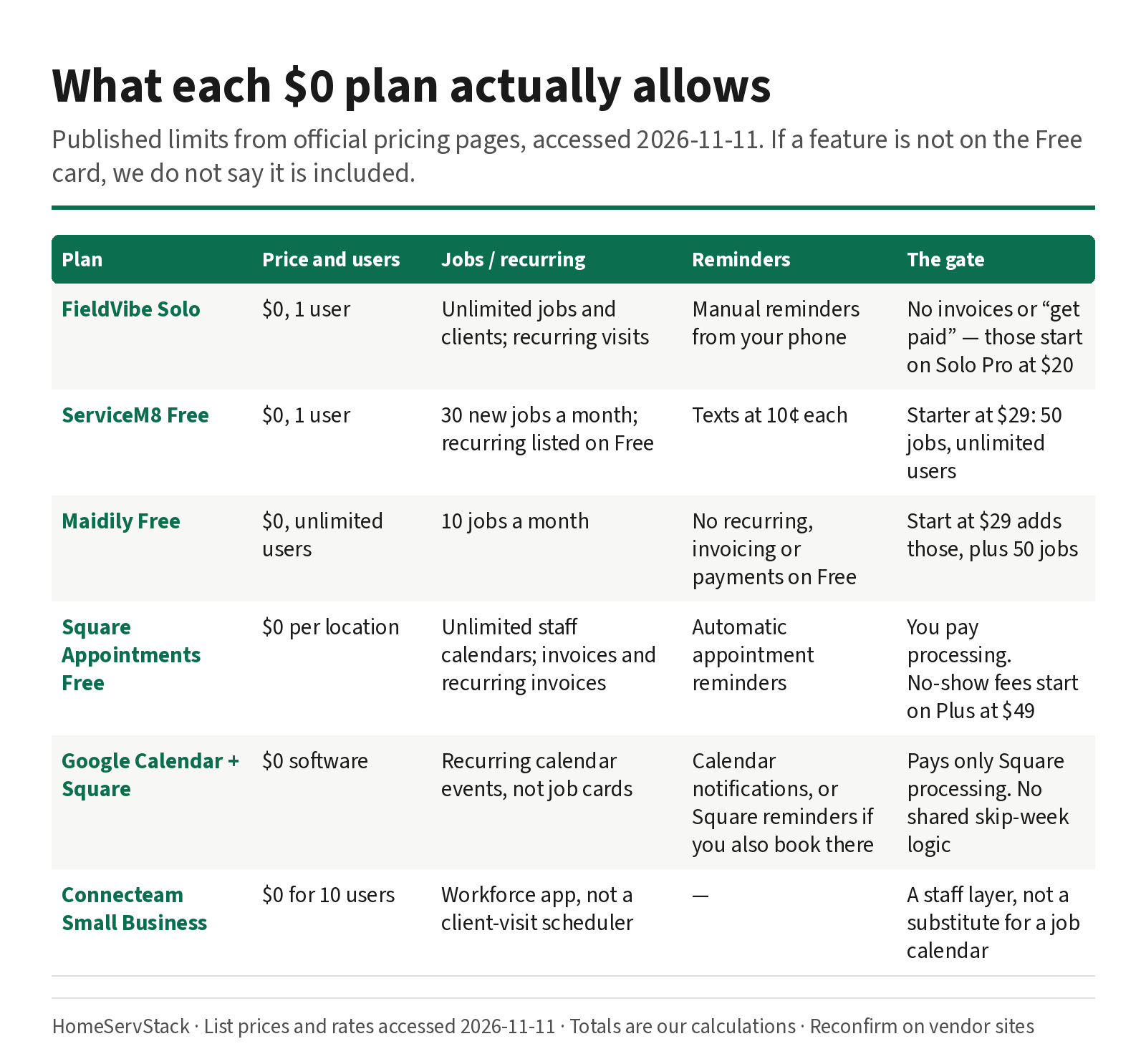
Free Cleaning Business Software: What Each $0 Plan Actually Allows
What free cleaning business software actually allows — FieldVibe, ServiceM8, Square, Maidily — and the limits that tell you it's time to pay.
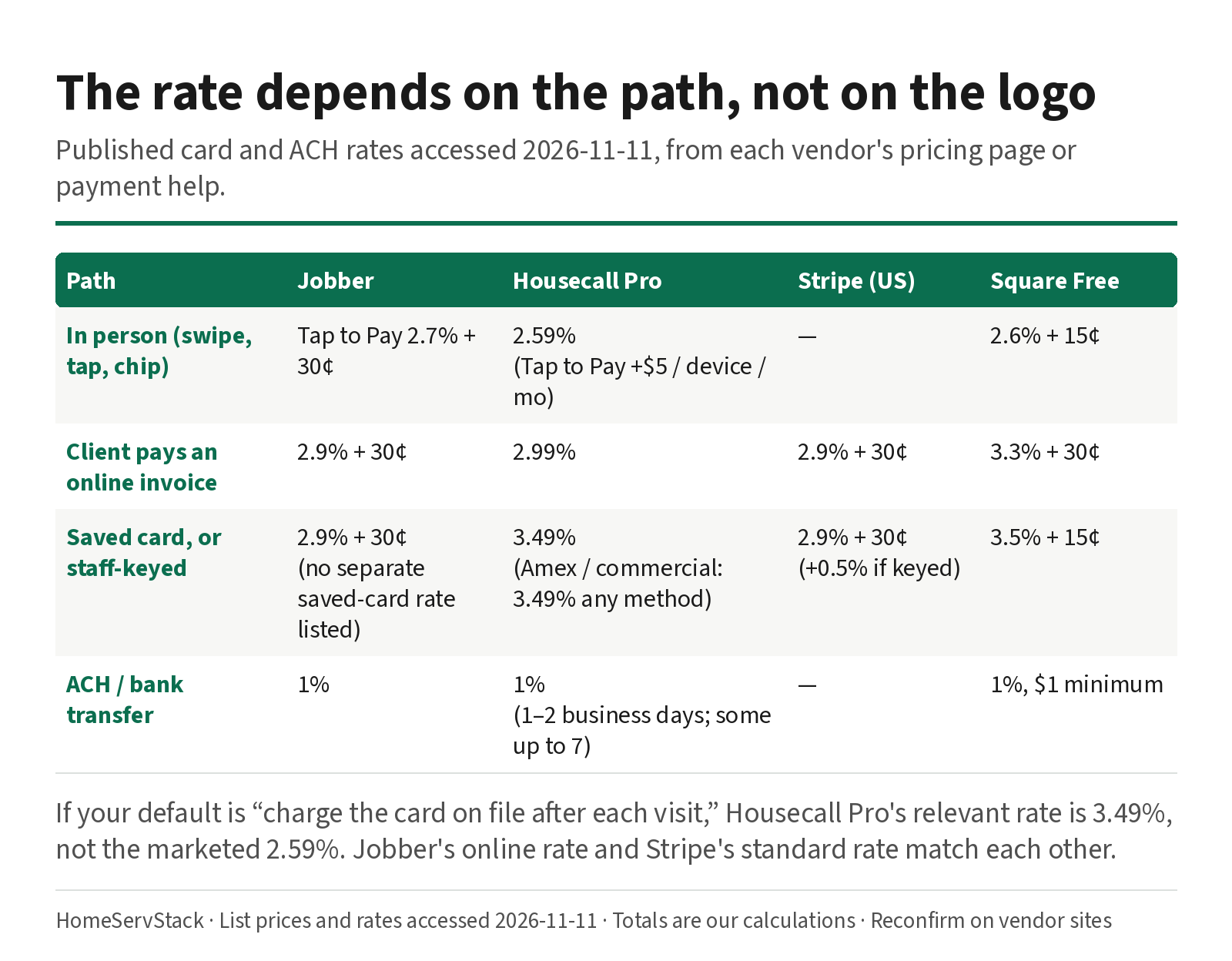
Cleaning Business Autopay: Card-on-File Rates, Declines, and Skip-Week Billing
Autopay and card-on-file rates for cleaning businesses, plus what Jobber, Housecall Pro and ZenMaid do when a card declines or a week is skipped.
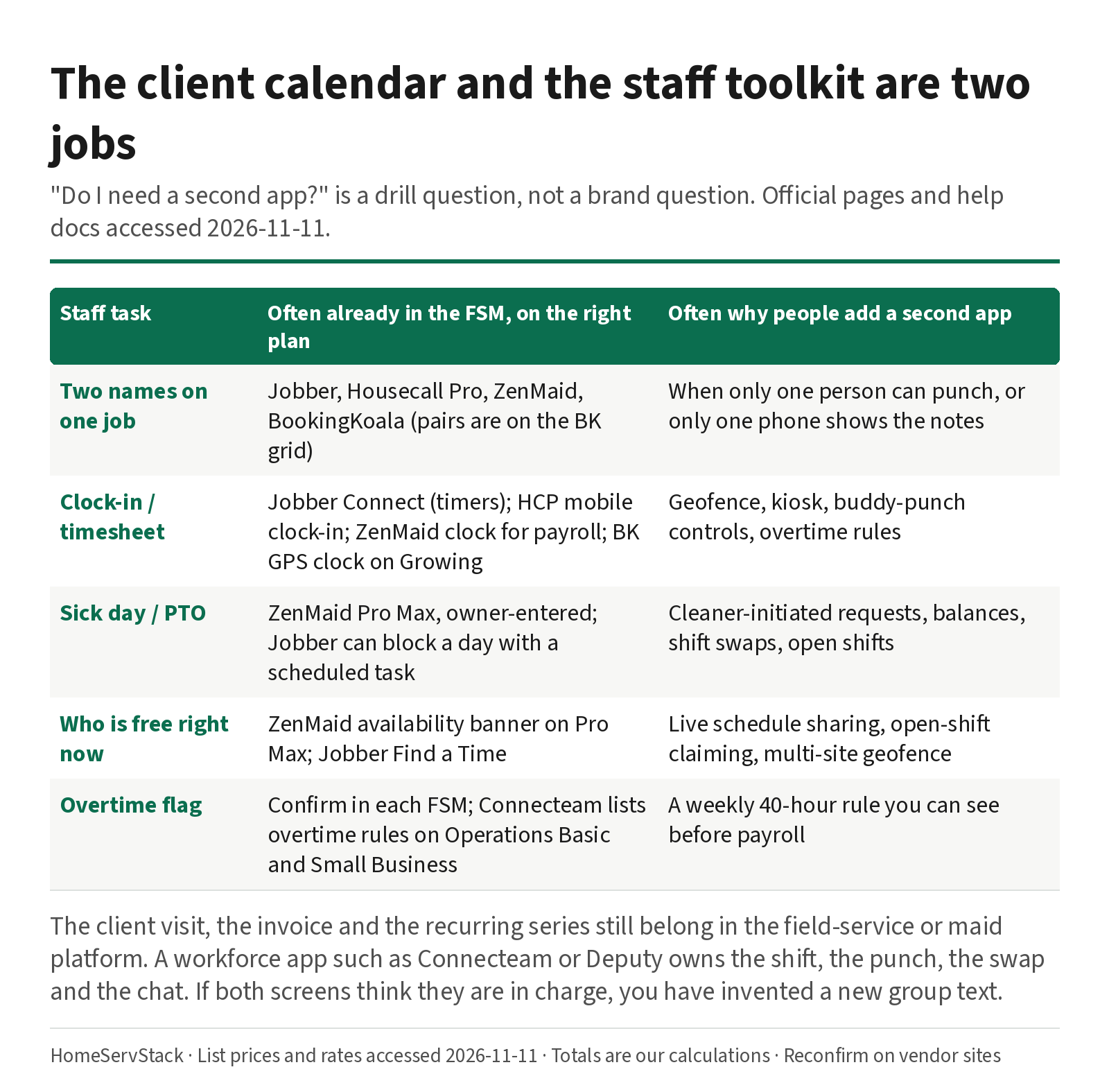
Cleaning Employee Scheduling and Time Clock Apps: When You Need a Second Tool
When a cleaning company needs a staff scheduling or time-clock app beside its FSM, with sick-day and two-cleaner drills.
Comments
Share a correction or an operator experience. Comments are plain text, held for review, and appear only after they are approved. A lasting email is required and is never shown. We may send a confirmation link once mail is configured.
No approved comments yet.