Watch a short briefing
Prices checked 2026-11-11. HomeServStack has no affiliate deals with any vendor named here. Totals below are our calculations from published list prices; they are not vendor quotes. We did not run paid accounts for this article (method).
Short answer: At five users, Jobber Connect and Housecall Pro Essentials are both $149 a month billed annually. The decision is the 6-to-15-user curve, the saved-card rate, where routes and service plans sit, and whether QuickBooks sync and a usable export will work.
That five-user tie is the whole reason this page exists. A search for “Jobber vs Housecall Pro cleaning” will show you two mid-plan stickers that match, and a pile of vendor pages happy to crown themselves. The sticker is not the decision. MaidCentral’s Professional Cleaning Index puts average revenue per cleaning at $217.91 in September 2026, across roughly 150,000 monthly cleanings in its customer base (a vendor dataset, not a government survey). One month of saved-card fees on a busy book is larger than the plan gap. One QuickBooks sync that has to be turned off is larger still.
So here’s the argument. At five users the published mid-plan prices match, so pick by the 6-to-15-user curve, the saved-card rate, the plan gates for routes and Recurring Service Plans, and whether QuickBooks and a usable export will actually work — not by the logo.
The all-in bill at more sizes, including processing and SMS, lives in our cleaning software cost guide. Path-by-path card rates, declined cards and skip-week invoices live in the autopay guide. This page is the pairwise fork for a cleaning shop that has already decided a general field-service tool might beat a maid-only calendar.
At five users the stickers match, and that is not a verdict
Both vendors will happily demo a top-shelf plan. The plan a recurring cleaning shop actually lives on is in the middle. Jobber Connect is the tier that adds automated client reminders, automatic payments, checklists, QuickBooks Online sync, and time tracking, per Jobber’s pricing page (accessed 2026-11-11). Housecall Pro Essentials is the published five-user plan, and the one that calls out routes and employee GPS. Recurring Service Plans and route optimization are marketed on MAX.
The framework for this page is work style × roster size. Work style is quote-led (you price the odd move-out, then keep a recurring round) versus booking-led (clients pick a slot and a price themselves). Roster size is the login count the vendor will charge for: 5, 6, 8, 10, 12 and 15. Those are the points where Jobber’s 1 / 5 / 10 / 15 bands and Housecall Pro’s 1 / 5 / 8 bands stop lining up.
| If you are… | Start the trial on | Why |
|---|---|---|
| Quote-led, heading for 6–15 logins | Jobber Connect | Flat $29 extras, and the mid plan already has autopay, reminders and QuickBooks |
| Booking-led, routes and GPS are Tuesday’s pain | Housecall Pro Essentials, then MAX if you need service plans or route optimization | Booking and reviews sit lower; routes are called out on Essentials |
| Six users and a tight software budget | Price both, then lean Jobber on published math | Essentials overage is not published; the next Housecall Pro band is MAX at eight users |
| Maid-only, you barely quote | Do not stop at this two-way page | Trial ZenMaid and read ZenMaid vs BookingKoala |
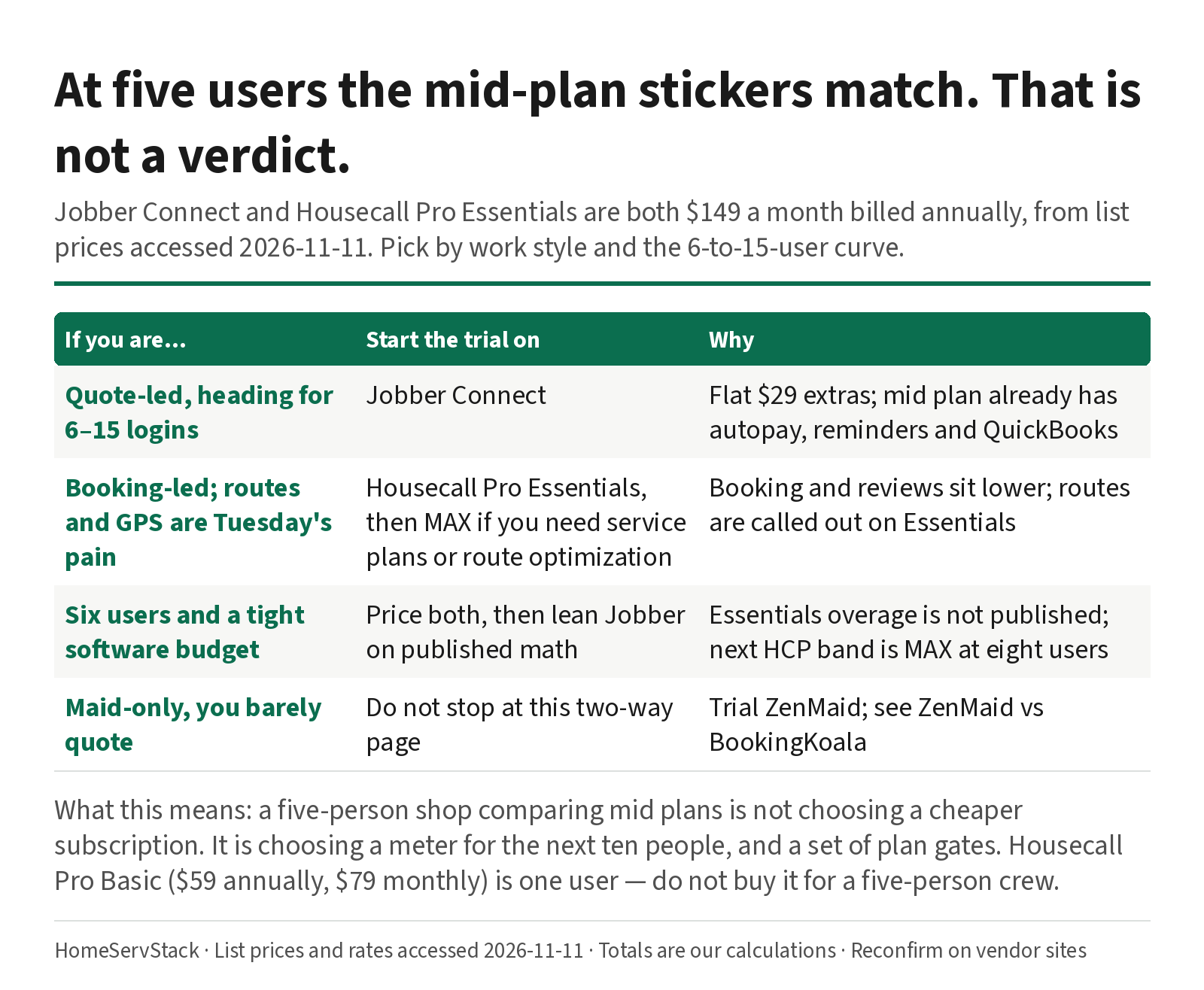
What this means: a five-person shop comparing mid plans is not choosing a cheaper subscription. It is choosing a meter for the next ten people, and a set of plan gates.
Maid-only teams should still leave this page for a moment. The calendar-versus-storefront fork is ZenMaid vs BookingKoala. The wider shortlist, including ServiceM8 and Automaid, is the scheduling guide.
The 6-to-15-user curve is where the bills actually diverge
Jobber sells Connect at 1, 5, 10 and 15 users, then $29 a month for each user above the band, on every plan. Housecall Pro sells Basic at one user, Essentials at five, and MAX at eight, then $35 a month for each user above eight on MAX. The extra-user rate on Essentials is not published. We will not invent it.
Assumptions, used throughout. List prices accessed 2026-11-11. “Annual” means the monthly equivalent when you prepay the year, as the vendors print it. “Monthly” means no-commitment month-to-month. Jobber totals use the cheaper published Connect path at each size: buy the next band when it beats stacking extras. Housecall Pro totals use Essentials at five users, and MAX from eight up, because that is the next published band. A sixth Essentials user has no published price, so that cell stays empty.
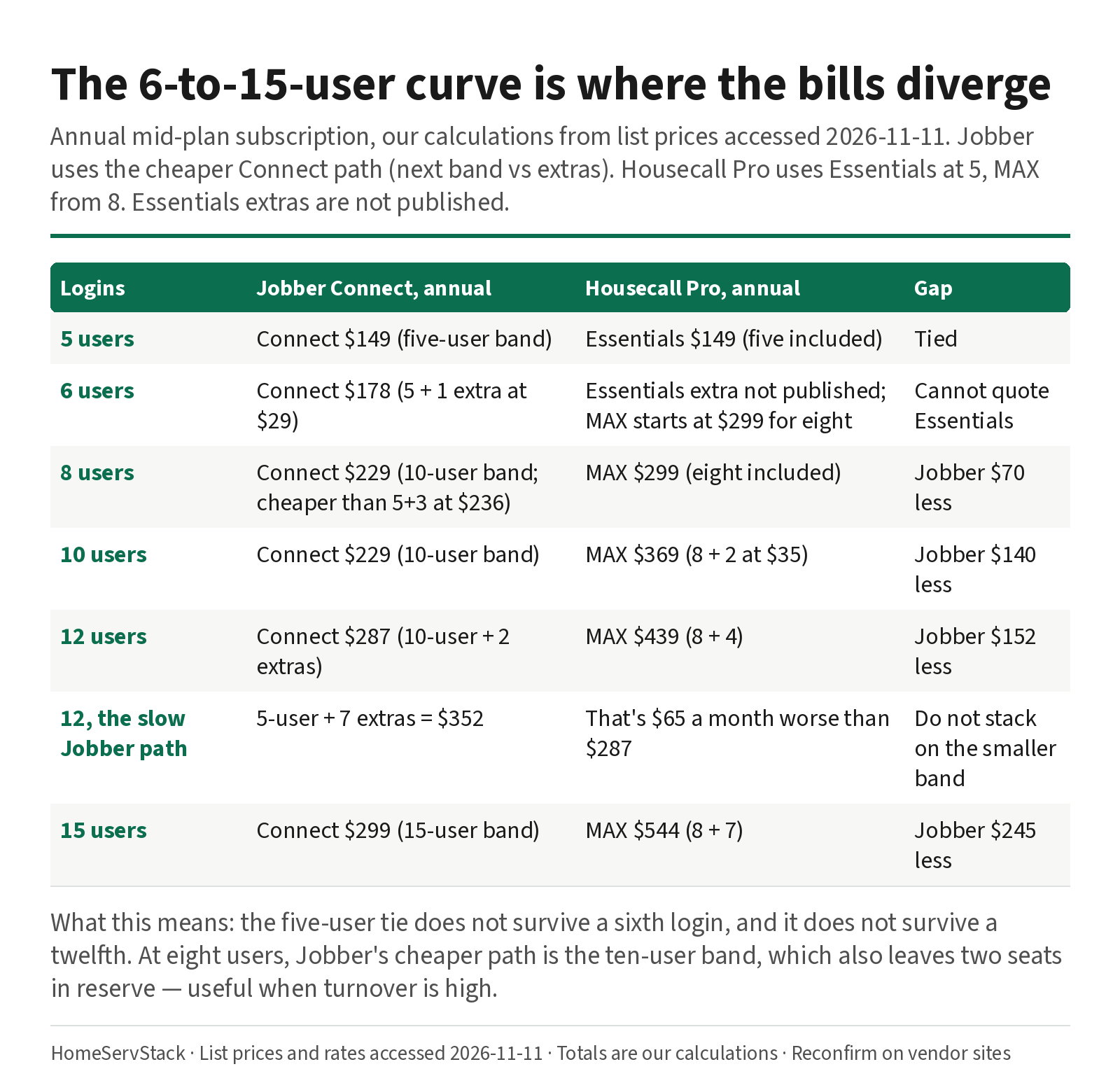
Annual mid-plan subscription, our calculations from list prices:
| Logins | Jobber Connect | Housecall Pro | Gap |
|---|---|---|---|
| 5 | $149 (five-user band) | Essentials $149 (five included) | $0 |
| 6 | $178 (five-user band plus one extra) | Essentials extra not published; MAX starts at $299 for eight | Cannot quote Essentials |
| 8 | $229 (ten-user band; cheaper than five plus three extras at $236) | MAX $299 (eight included) | Jobber $70 less |
| 10 | $229 (ten-user band) | MAX $369 (eight plus two at $35) | Jobber $140 less |
| 12 | $287 (ten-user band plus two extras) | MAX $439 (eight plus four) | Jobber $152 less |
| 15 | $299 (fifteen-user band) | MAX $544 (eight plus seven) | Jobber $245 less |
What this means: the five-user tie does not survive a sixth login, and it does not survive a twelfth. At eight users, Jobber’s cheaper path is the ten-user band at $229, which also leaves two seats in reserve — useful when MaidCentral’s same report puts annual turnover at 131.1% in its customer base. A login you pay for in March may belong to someone else in June. The median hourly wage for maids and housekeeping cleaners is $17.07, from O*NET OnLine’s BLS OEWS figures. The roster will move. Model it that way.
At 12 users, the slower Jobber path is the five-user band plus seven extras, which is $352. That is $65 a month worse than $287. It is how a 12-user bill used to get quoted. It is not the current cheaper path. The cost guide walks the same band-versus-extras rule at more sizes, and adds processing.
Housecall Pro at six users is the awkward seat. You can ask for a live Essentials quote, because the extra-user rate is not on the pricing page. You can jump to MAX and pay for eight seats. You cannot honestly fill a blog cell with a number the vendor did not publish.
Month-to-month costs more, and Jobber’s annual payment does not come back
Annual billing is a discount, not a different product. These are the no-commitment monthly prices, and our calculations for the same cheaper paths.
| Logins | Jobber Connect, monthly | Housecall Pro, monthly |
|---|---|---|
| 5 | $199 | Essentials $189 |
| 6 | $228 (five-user band plus one extra) | Essentials extra not published; MAX is $329 for eight |
| 8 | $286 (five plus three extras; cheaper than the ten-user monthly band at $299) | MAX $329 |
| 12 | $357 (ten-user band plus two extras) | MAX $469 |
| 15 | $399 | MAX $574 (eight plus seven extras) |
What this means: the cheaper Jobber path flips with the toggle. At eight users, annual billing favors the ten-user band; month-to-month favors stacking extras on the five-user band. Always run both. Housecall Pro’s MAX monthly premium at eight users is modest ($329 versus $299), and gets larger once extras pile on.
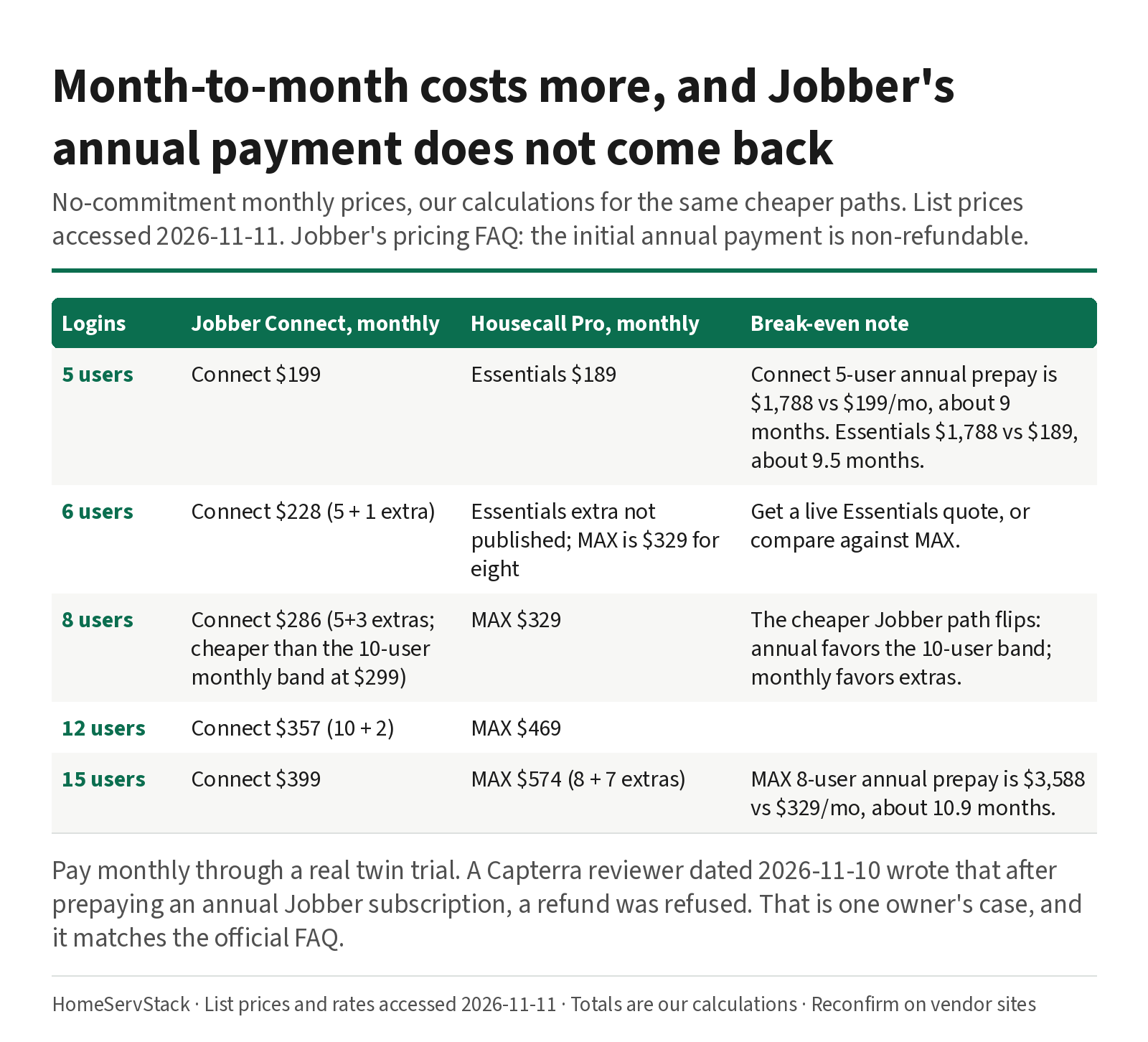
Break-even, our calculations, if you stay the whole year: Jobber Connect at five users is $1,788 prepaid versus $199 a month, about nine months ($1,788 ÷ $199). Housecall Pro Essentials at five is $1,788 prepaid versus $189 a month, about 9.5 months. Housecall Pro MAX at eight is $3,588 versus $329, about 10.9 months. Jobber’s pricing FAQ says the initial annual payment is non-refundable if you cancel mid-year. A Capterra reviewer titled Chase C., Owner, dated 2026-11-10, wrote that after prepaying an annual Jobber subscription for a promised integration, “they refused to offer a refund.” (Jobber reviews). That is one owner’s case, not a legal finding. It is a reason to pay monthly through a real trial.
Plan gates decide the week, once the stickers have tied
The mid-plan features that change a residential cleaning week, from each vendor’s pricing page and help docs, accessed 2026-11-11:
| Gate | Jobber | Housecall Pro |
|---|---|---|
| Automated client reminders | Connect and above | Confirm the plan cell in trial; booking sits on Basic |
| Automatic payments / service plans | Automatic payments on Connect and above | Recurring Service Plans marketed on MAX |
| Routes / GPS | Routing and GPS appear on the pricing grid; Jobber’s Connect plan help describes routing and map-based assignment. Confirm in trial. Automatic location timers are listed on Grow. | Routes and employee GPS called out on Essentials; route optimization called out on MAX. GPS help says the feature applies “if Employee GPS Tracking is included in your plan.” |
| QuickBooks Online | Listed on Connect and above | Listed on Essentials, in earlier published grids; confirm on the live compare table |
| Checklists | Connect and above | Checklist automations listed on Essentials |
| Time tracking | “Track time and expenses” on Connect; automatic (geofenced) time tracking on Grow; crew-wide clock-in documented on Plus (Timesheets help, updated 2026-10-29) | Time tracking is documented in help, with clock-in on the mobile app and a timesheet for payroll (Time Tracking Overview). Confirm the plan cell. |
| Marketing / reviews | A website is listed from Core. Marketing Suite is a $99-a-month add-on on lower plans, and is named in the Plus feature list. | Reviews and online booking are marketed on the lower tiers. One MAX user on Reddit wrote, “I hate that they hold my reviews hostage.” (u/Far-Manufacturer2834) — that is an exit-cost report, not a feature grid. |
| Card processing | 2.9% + 30¢ online; 2.7% + 30¢ Tap to Pay; 1% ACH | 2.59% in person; 2.99% online invoice; 3.49% card on file; 1% ACH |
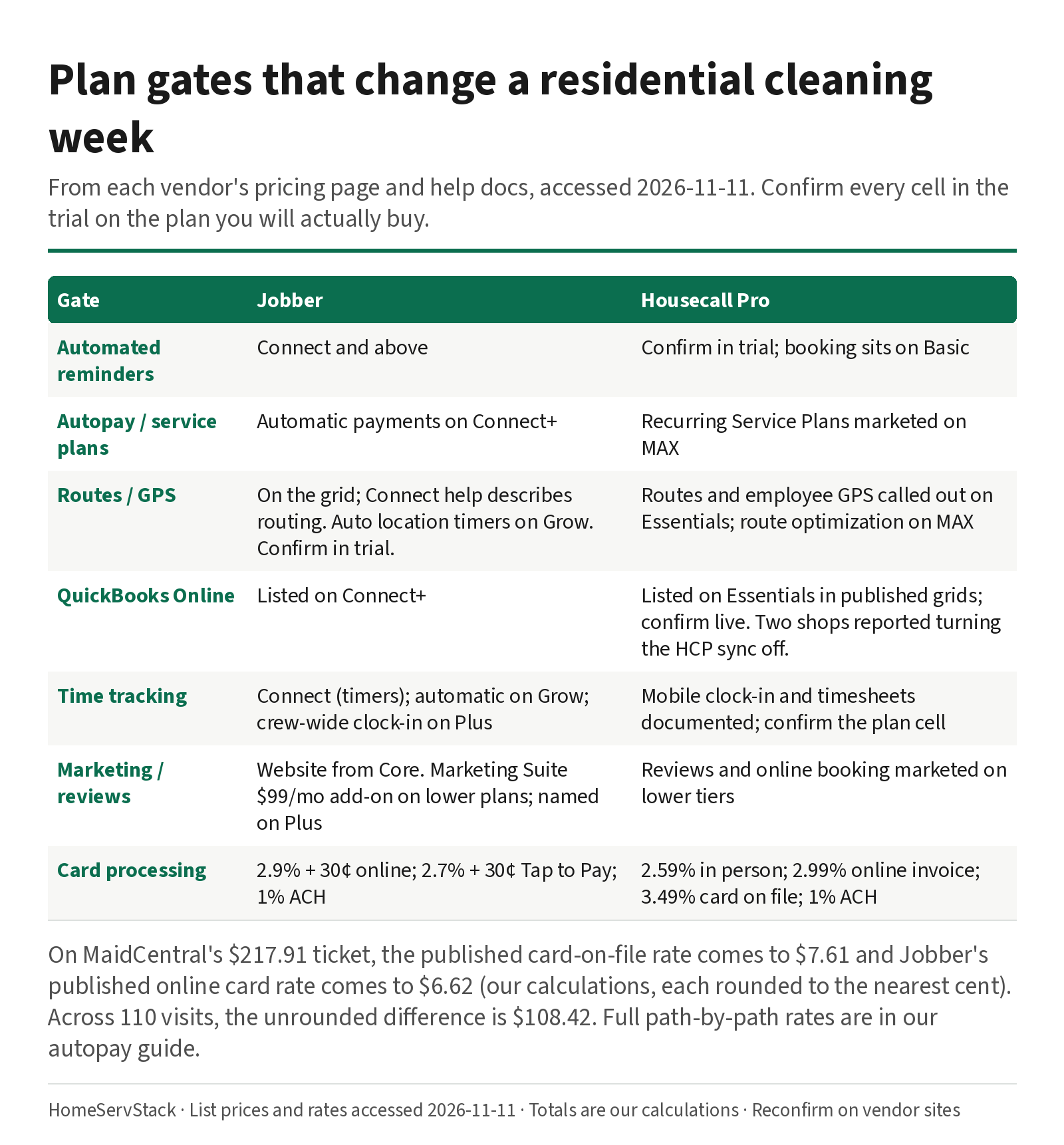
Two gates deserve a sentence and a link, not a second worksheet.
Automatic payments. Jobber puts them on Connect, and Jobber’s help says a failed automatic payment is attempted once — there is no automatic retry. Housecall Pro markets Recurring Service Plans on MAX. The decline path, the skip-week invoice, and the full rate worksheet are in the autopay guide. One labeled number belongs here so the five-user tie does not hide a fee gap: on MaidCentral’s $217.91 ticket, the published card-on-file rate comes to $7.61 and Jobber’s published online card rate comes to $6.62 (our calculations, each rounded to the nearest cent). Across 110 visits, the unrounded difference is $108.42 in the same month, next to a tied mid-plan subscription. Budget the path you will actually use.
Time and crews. If two cleaners share one house, you need two time entries, not a single “job started” tap. Jobber’s help documents crew-wide clock-in on Plus, with a Crew control setting. Connect will still let each person start a timer; Plus is the plan that lets a lead do it for the pair. The staff-side pair drill and the 7:40 a.m. callout, including when a second workforce app is the right answer, live in the employee scheduling and time-clock guide.
Owners praise the booking system, and report real pain on three other things
These are verbatim owner comments, accessed 2026-11-11. They are not test results. We did not run the syncs or the exports. Use them as trial prompts.
The booking side is why cleaning shops pick Housecall Pro. u/polloshermanoman, in a commercial-cleaning thread, wrote: “Housecall Pro has the best booking system out there but the way recurring jobs is set up drive me crazy. You can’t see how many recurring jobs there are, just the repeated instances of it and it gets clunky fast.” (comment, 2026-05-19). That is the cleaning-specific complaint: the series hides inside repeated visits. A different operator, u/Hey-bruhhh94, wrote: “We use Housecall Pro, 200 recurring cleaning monthly, and 400 recurring cleaning clients for another client” (comment, 2026-07-26). Volume is possible. The view is the thing to test. u/BrisnSpartan, whose teams do 4–8 houses a day, wrote that the main reason for switching was “to be able to give our teams an app they can use to see job notes and their jobs for the day.” (comment, 2025-06-03).
QuickBooks is the most serious reported problem. Two separate businesses in the same September 2025 thread said they had to turn the Housecall Pro sync off. u/nomsain919 wrote: “they will tell you that integrating with Quickbooks will be no problem. In our case the transition is borderline crippling from accounting and customer list perspectives.” (post, 2025-09-16). u/These-Acanthisitta99 wrote: “Overall we don’t have many complaints about Housecall pro. But we did have to disable quickbooks. It completely messed us up last year.” (comment). We cannot tell you whether the 2026 product still behaves that way. We can tell you to import a small client list, sync it, and involve your bookkeeper before you move the whole office.
Export and reviews are exit costs. u/AnxiousWay6424, a two-year Housecall Pro customer, wrote: “HCP will not export your historical data in a usable format.” (comment, 2025-08-10). Combined with the reviews-hostage line above, that is a “skip it if you might leave in a year” test: export a sample in week one of the trial, and open the file.
Switches go both ways, and they are not all about price. u/3qTp1 wrote: “Yeah I started with Jobber then switched to HCP, regretted it deeply and switched back after a couple months.” (comment, 2025-09-16). u/One-Change7400, who has used both, wrote: “I actually preferred using Jobber, mainly cause their mobile app is better” (comment, 2025-09-09). A Capterra reviewer titled Sales and Administrative Coordinator, dated 2026-07-23, who had switched from Housecall Pro to Jobber, wrote: “Sending estimates was a nightmare, it wasn’t customizable and didn’t have the features we really needed.” (Jobber reviews). Another Capterra reviewer, a cleaning-company Director of Operations dated 2025-12-09, landed on the other foot: “After using Vcita and Square, after testing HouseCall Pro, Zenmaid & others, Jobber is the best bang for your buck.” Same reviews page. The field app is mixed too. @deepj0hal, who owns cleaning companies, wrote in January 2025: “I use housecall pro - never had any issues with glitching or speed” (post). A 30-year cleaning owner, u/Willerz707, wrote that Housecall Pro “revolutionized my business in 2017.” (comment, 2025-06-26). That is a long-stay report, and it is nine years old as a starting date, so treat it as loyalty, not a 2026 feature audit.
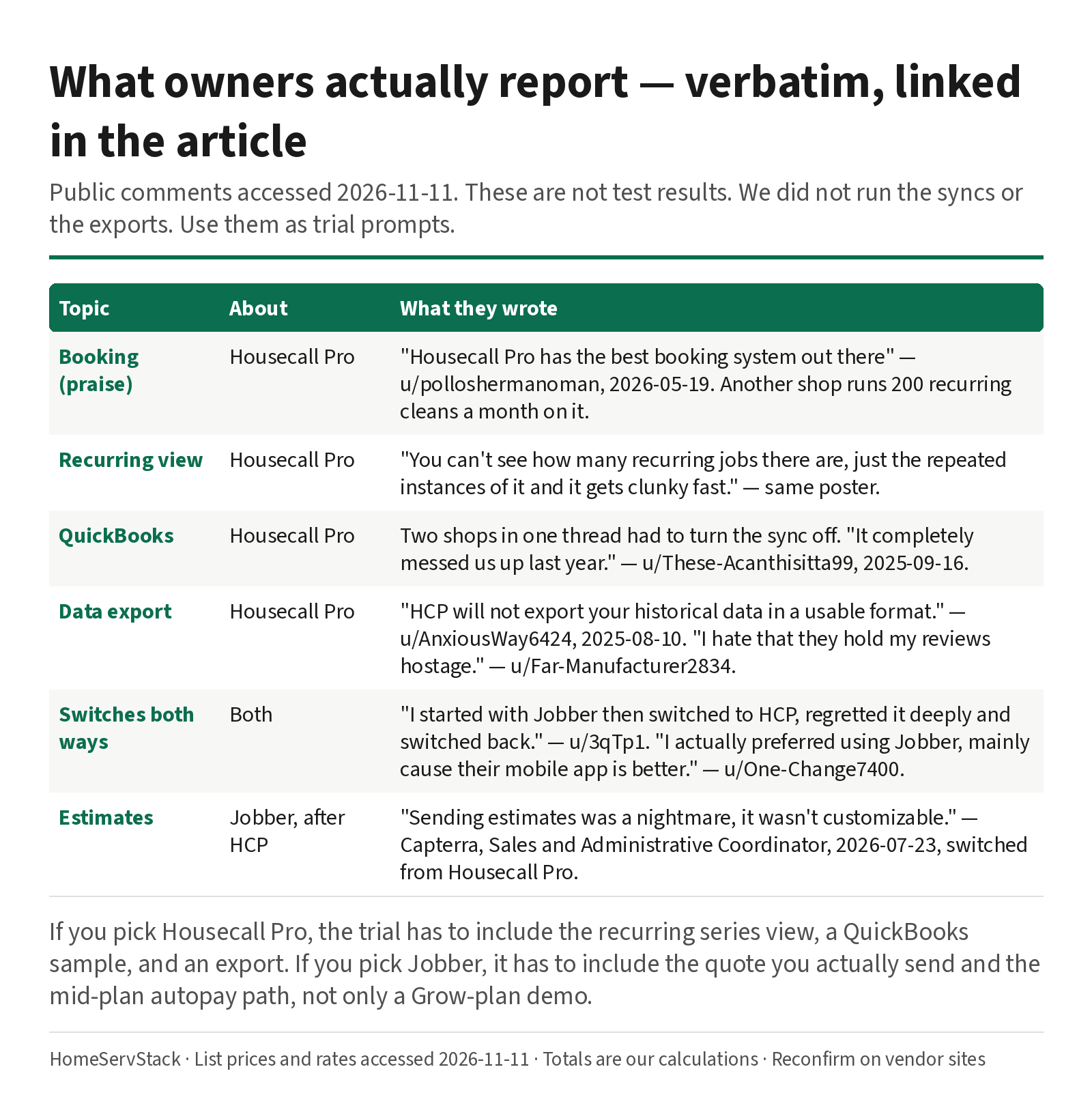
Jobber is not frictionless. A Capterra reviewer titled Director of Operations, dated 2025-12-09 — a different sentence on the same review — wrote: “We like least about Jobber that the application is very inconsistent.” Price complaints are in the cost guide. The point of this section is narrower: if you pick Housecall Pro, the trial has to include the recurring series view, a QuickBooks test, and an export. If you pick Jobber, the trial has to include the quote you actually send and the mid-plan autopay path, not only a Grow-plan demo.
A twin trial on the mid plan you will buy, not on the demo you were given
Both vendors give you 14 days, no card required. Jobber’s trial is a Grow-features trial. Housecall Pro’s is a MAX trial. Use that generosity to test mid-plan life. Write down, on day one, the plan you will actually pay for: Connect or Grow, Essentials or MAX.
A labeled week, steal this:
- Same biweekly, two cleaners. Create the identical reclean in both trials. Assign two people. Add a door-code note and a pet note. Log in as each cleaner, not as the owner. Confirm both phones show the notes and the partner’s name. The deep version of this staff-side drill is in the employee scheduling guide.
- Skip one week. Cancel a single occurrence. The next visit should keep the pair, the notes, and the billing rule, and should not invoice the gap. How each tool bills a skip is in the autopay guide; here you are checking that the series itself survives.
- A move-out quote for the same client. Send a one-off deep-clean quote without breaking the reclean series. Jobber lists visual quotes and optional line items on Grow; if you will buy Connect, notice what you will lose when the trial ends.
- The recurring view and a QuickBooks sample. On Housecall Pro, look at a client with four upcoming recleans and ask whether you can count the series, or only the visits. If you use QuickBooks Online, connect a sample file, sync a handful of invoices, and have your bookkeeper look at the result. On both tools, export a client or job list and open the file.
- A declined saved card, on the plan you will buy. Not only on the trial’s top shelf. Jobber’s help says a failed automatic payment is attempted once. Details in the autopay guide.
- Live pricing at 6, 12 and 15 logins. Open both pricing pages. Toggle annual and monthly. Write down the cheaper Jobber path (band versus extras) and the published Housecall Pro MAX total. For a sixth Essentials user, get a live quote or leave the cell blank.
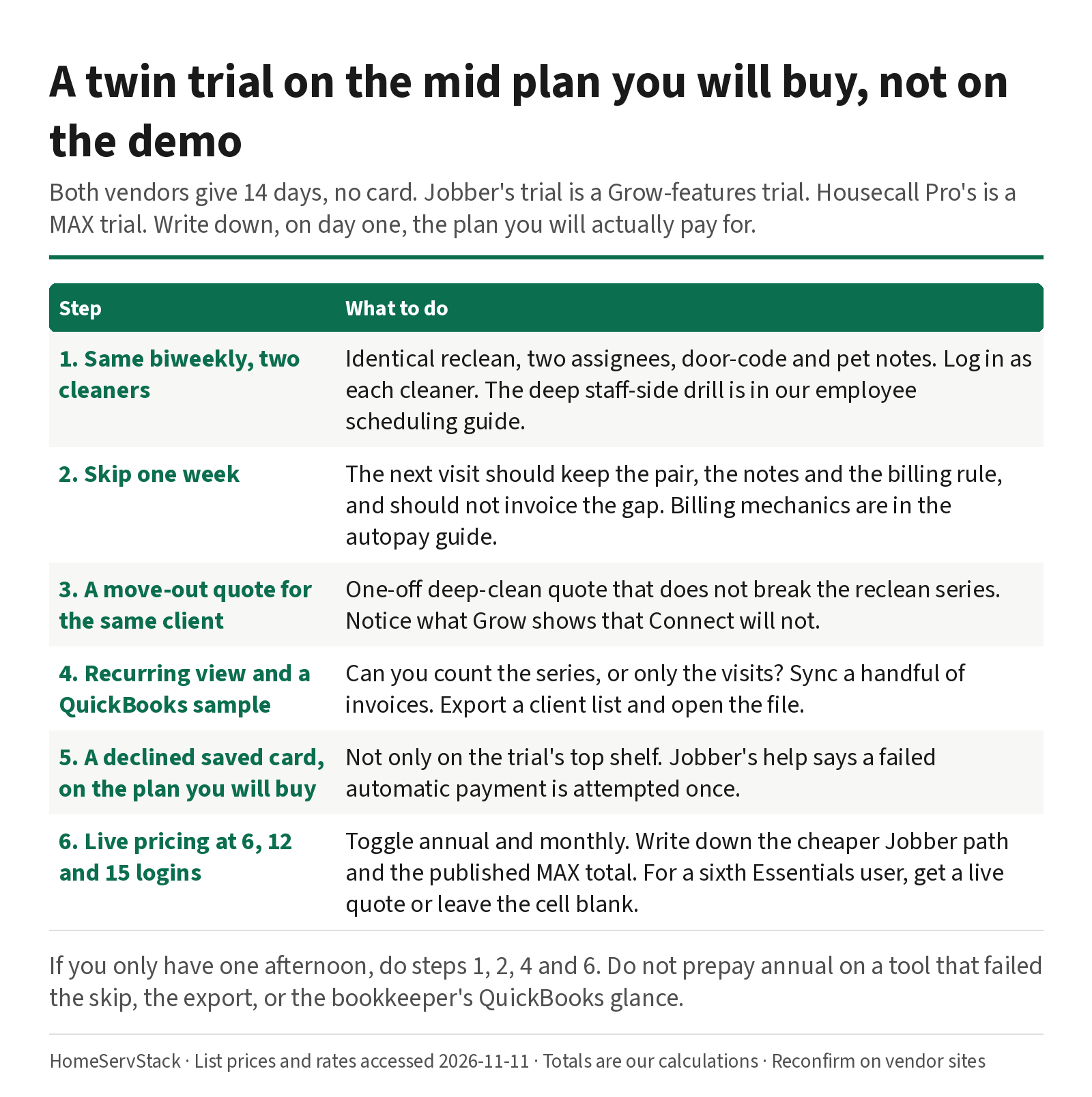
If you only have one afternoon, do steps 1, 2, 4 and 6. Do not prepay annual on a tool that failed the skip, the export, or the bookkeeper’s QuickBooks glance.
Verdicts, and who should skip which tool
- Quote-led residential round, roster heading past five. Jobber Connect, priced at your real user count, with the cheaper band-or-extras path from the table above. Use the Grow trial to see visual quotes and automatic time tracking, then default to Connect in production unless you have a written reason to need Grow or Plus.
- Booking-led, reviews matter, routes and GPS are the Tuesday pain. Housecall Pro Essentials if the live quote confirms the five-user band and the features you need. MAX if Recurring Service Plans or route optimization are why you came. Do not buy Basic for a five-person crew.
- Six to fifteen logins and a tight software budget. The published annual math favors Jobber, and the gap grows with headcount. Run the trial anyway. A cheaper seat that fails the callout or the QuickBooks test is not cheaper.
- You depend on a clean QuickBooks Online sync, or on a usable historical export. Do not take the marketing line as a guarantee. Run the sample sync and the export in week one. If Housecall Pro is otherwise the right product, go in with a bookkeeper and an exit plan. Skip Housecall Pro if those two tests fail and you have no workaround.
- Skip Jobber if you are maid-only, you barely quote, and a per-person maid calendar (ZenMaid) or a booking-led storefront (BookingKoala) is the actual job. Skip Jobber’s Core plan if you need automated reminders or autopay — those start on Connect. Skip a prepaid annual Jobber term until a month-to-month trial has passed the skip-week and pair tests; the initial annual payment is non-refundable.
Ways this decision goes wrong
- Treating the five-user tie as the answer. The sixth user, and the twelfth, are the answer.
- Budgeting Housecall Pro’s 2.59% in-person headline for a saved-card reclean book. Use the published card-on-file rate instead.
- Buying Basic for a crew. Basic is one user at $59 annually ($79 monthly). A five-person shop on Basic is an office with four people locked out.
- Inventing an Essentials extra-user price. It is not published. Get a quote, or compare against MAX.
- Paying Jobber’s five-plus-seven path at 12 users. That is the $352 line. The cheaper path is $287.
- Prepaying annual after a top-plan demo. You will live on Connect or Essentials. Test those gates, then look at Jobber’s non-refundable annual FAQ.
- Skipping the QuickBooks and export tests because the rest of the demo looked fine. Those are the reports that show up after you have already moved the office.
How we researched this
On 2026-11-11 we re-fetched Jobber and Housecall Pro pricing, plus Jobber’s Connect, Timesheets, and Automatic Payments help, and Housecall Pro’s payment-processing, card-on-file, service-plan, time-tracking and GPS help. Every subscription figure is a published list price or a HomeServStack calculation from those prices, labeled as such. We also read public owner comments from Reddit (via the Arctic Shift archive), Capterra and X, accessed the same day. Quotes are verbatim, with handles only. User-stated prices are their claims, not our list prices.
We did not run paid production accounts for this article, and we did not invent a Housecall Pro Essentials extra-user rate. We have no affiliate relationships with any vendor named here. We do not crown a single winner; we segment by work style and roster size.
Glossary
- Seat band. A published user count that comes with the plan: Jobber 1 / 5 / 10 / 15, Housecall Pro 1 / 5 / 8.
- Extra user. A login above the band: $29 a month on Jobber, $35 a month on Housecall Pro MAX. Essentials extras are not published.
- Billed annually. A monthly-equivalent price that assumes you prepay twelve months.
- Card on file. A saved card charged after a visit. Housecall Pro publishes a higher rate for this path than for a card taken in person; the numbers sit in the table above and in the autopay guide.
- Recurring Service Plans. Housecall Pro’s MAX-tier product for recurring work and its billing. Distinct from a calendar that simply repeats a visit.
- Connect / Essentials. The mid plans most recurring cleaning shops should price first: Jobber Connect, Housecall Pro Essentials.
- Grow trial / MAX trial. The 14-day trials run on a higher plan than many shops will buy. Test the mid-plan gates before you treat the demo as daily life.
- Usable export. A file you can open in a spreadsheet and actually migrate. A report that “HCP will not export your historical data in a usable format” is a reason to test this on day one.
Corrections and updates
- 2026-11-11: Rewritten as a pairwise cleaning comparison around the query “Jobber vs Housecall Pro cleaning.” The page now treats the five-user mid-plan tie as a starting point, not a verdict, and models the 6-to-15-user curve on published annual and monthly prices. Correction: Housecall Pro Basic and Essentials are published at $59 and $149 a month billed annually ($79 and $189 month to month); earlier versions of this page called those custom / not published. Correction: Jobber Connect at 12 users is $287 billed annually, not the $352 five-plus-seven path. Added sourced owner comments on Housecall Pro’s recurring-jobs view, QuickBooks sync, and data export, plus Jobber’s non-refundable annual payment. Card-rate worksheets now live in the autopay guide and are summarized here in one labeled comparison. Staff-side pair and callout drills now live in the employee scheduling guide.
- 2026-11-10: First published as a pairwise cleaning comparison. Superseded by the rewrite above.
Related guides
- How much cleaning business software costs — all-in bills at 1 to 20 people, band-versus-extras math, SMS and processing, annual break-even.
- Cleaning business autopay and card on file — path-by-path rates, decline and retry, skip-week billing.
- Cleaning employee scheduling and time-clock apps — the staff-side pair and sick-day drills, and when a second workforce app belongs beside the FSM.
- Best scheduling software for cleaning businesses — the work-start × meter shortlist, including ZenMaid, Automaid and ServiceM8.
- Jobber vs ZenMaid — the maid-calendar versus quote-led generalist fork, including the per-person versus band crossover.
- ZenMaid vs BookingKoala — office calendar versus storefront, if a maid-specific tool is still in the running.
Frequently asked questions
Is Jobber or Housecall Pro better for a cleaning company?
At five users they cost the same $149 a month billed annually, so the sticker does not decide it. Jobber Connect often fits a quote-led cleaning shop that wants a flat $29 extra-user rate and automatic payments on that mid plan. Housecall Pro often fits a shop that wants online booking and reviews early, then routes and GPS on Essentials and Recurring Service Plans on MAX. Maid-only teams that barely quote should still trial ZenMaid. Run both 14-day trials on the same biweekly job before you prepay.
How much do Jobber and Housecall Pro cost for five users?
From list prices accessed 2026-11-11, Jobber Connect with five users and Housecall Pro Essentials with five users are both $149 a month billed annually. Month to month, Connect is $199 and Essentials is $189. Housecall Pro Basic is $59 billed annually ($79 monthly) and includes one user. Card processing is separate, and path-by-path rates live in our autopay guide.
What does a sixth user cost on Jobber versus Housecall Pro?
Jobber adds users at $29 a month, so Connect at six users is $178 billed annually (our calculation: $149 plus $29). Housecall Pro Essentials includes five users; the extra-user rate on Essentials is not published. The next published band is MAX at $299 a month billed annually for eight users, plus $35 per extra user. Do not invent an Essentials-plus-one total.
How do the bills compare from 6 to 15 users?
On annual Connect and MAX list prices, our calculations are: 8 users, Jobber $229 (the ten-user band) versus Housecall Pro MAX $299; 10 users, $229 versus $369; 12 users, Jobber $287 (ten-user band plus two extras) versus $439; 15 users, $299 versus $544. The slower Jobber path at 12 users — five-user band plus seven extras — is $352, which is $65 a month worse than $287. All-in totals including processing are in our cost guide.
Which plan has routes, autopay, and QuickBooks?
Jobber lists automated reminders, automatic payments, checklists, QuickBooks Online sync, and time tracking on Connect and above. Automatic time tracking with location timers is listed on Grow. Crew-wide clock-in is documented on Plus. Housecall Pro calls out routes and employee GPS on Essentials, and route optimization plus Recurring Service Plans on MAX. Confirm every cell in the trial on the plan you will actually buy.
Is Housecall Pro's card rate really 2.59% for recurring cleaning?
2.59% is Housecall Pro's published rate for standard cards taken in person. A card charged on file is 3.49%. Jobber publishes 2.9% plus 30¢ for online cards and 1% for ACH. Full path-by-path rates, decline behavior and skip-week billing are in our autopay guide. Do not budget the in-person headline for a saved-card reclean book.
Sources
- Jobber Pricing — Accessed
- Jobber Help: The Connect Plan — Accessed
- Jobber Help: Timesheets (updated 2026-10-29) — Accessed
- Jobber Help: Timers and Timesheets in the Jobber App — Accessed
- Jobber Help: Automatic Payments (updated 2026-10-21) — Accessed
- Housecall Pro Pricing — Accessed
- Housecall Pro Help: Payment Processing Options — Accessed
- Housecall Pro Help: Card on File — Accessed
- Housecall Pro Help: Billing and Payments for Service Plans — Accessed
- Housecall Pro Help: Time Tracking Overview Guide — Accessed
- Housecall Pro Help: Employee GPS Tracking & HCP Map — Accessed
- MaidCentral: Professional Cleaning Index (PCI) Report, Cleaning Industry Statistics 2026 — Accessed
- O*NET OnLine: Local Wages for Maids and Housekeeping Cleaners (BLS OEWS data) — Accessed
- Reddit r/cleaningbusiness: Commercial cleaning CRMs (u/polloshermanoman) — Accessed
- Reddit r/smallbusiness: Welcome to hell, Housecall Pro (u/nomsain919, u/These-Acanthisitta99, u/3qTp1) — Accessed
- Reddit r/Contractor: Is anyone using Housecall Pro (u/AnxiousWay6424, u/One-Change7400, u/Far-Manufacturer2834, u/Willerz707) — Accessed
- Reddit r/cleaningbusiness: How are you tracking jobs (u/Hey-bruhhh94) — Accessed
- Reddit r/sweatystartup: Best system for my cleaning (u/BrisnSpartan) — Accessed
- Capterra: Jobber reviews (Sales and Administrative Coordinator, 2026-07-23; Director of Operations, 2025-12-09) — Accessed
- X: @deepj0hal on Housecall Pro app reliability — Accessed
Was this helpful?
One tap, no account, no personal data. We only keep a yes or no, counted with the other votes on this page.
Keep reading
More in Cleaning Software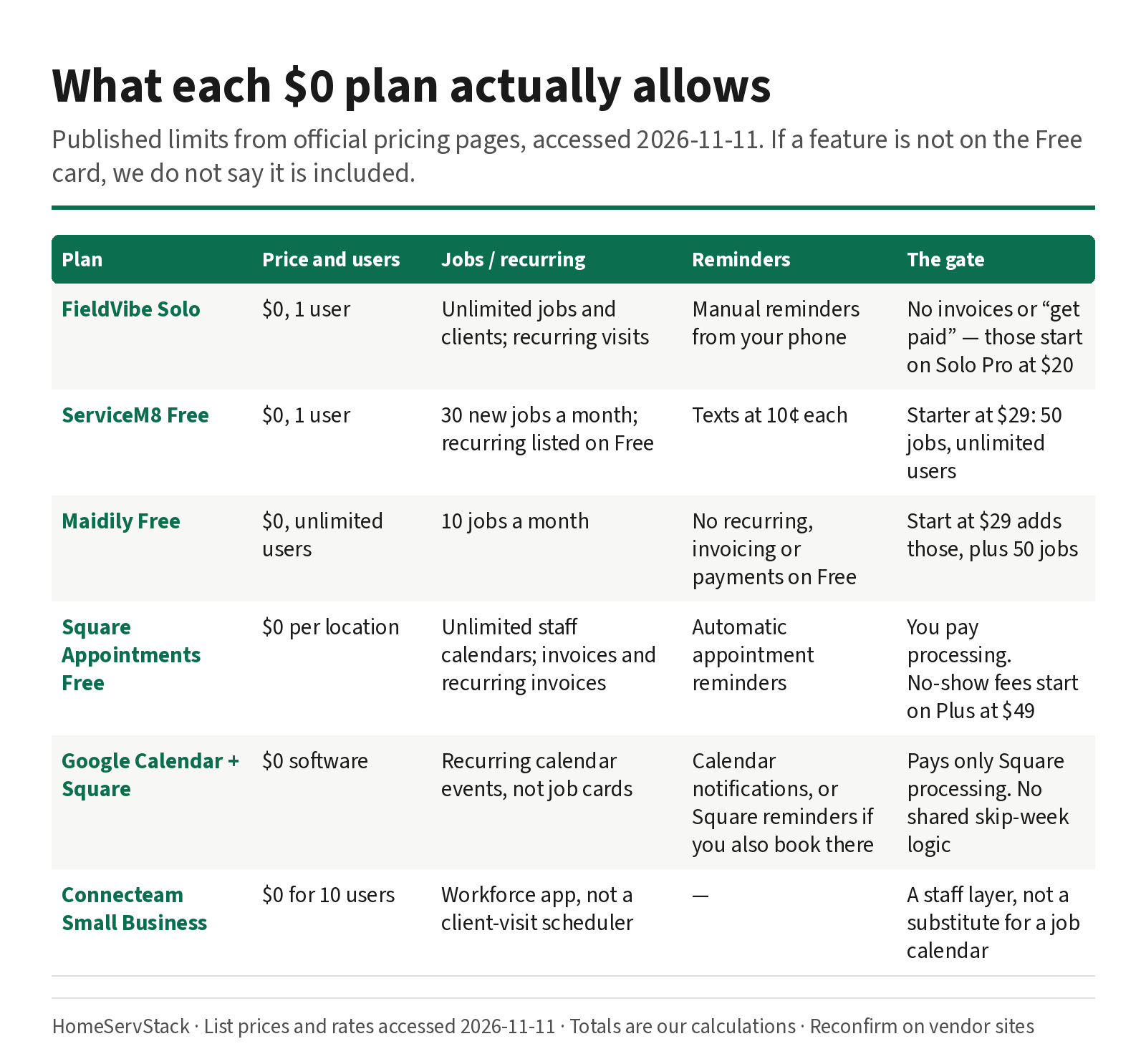
Free Cleaning Business Software: What Each $0 Plan Actually Allows
What free cleaning business software actually allows — FieldVibe, ServiceM8, Square, Maidily — and the limits that tell you it's time to pay.
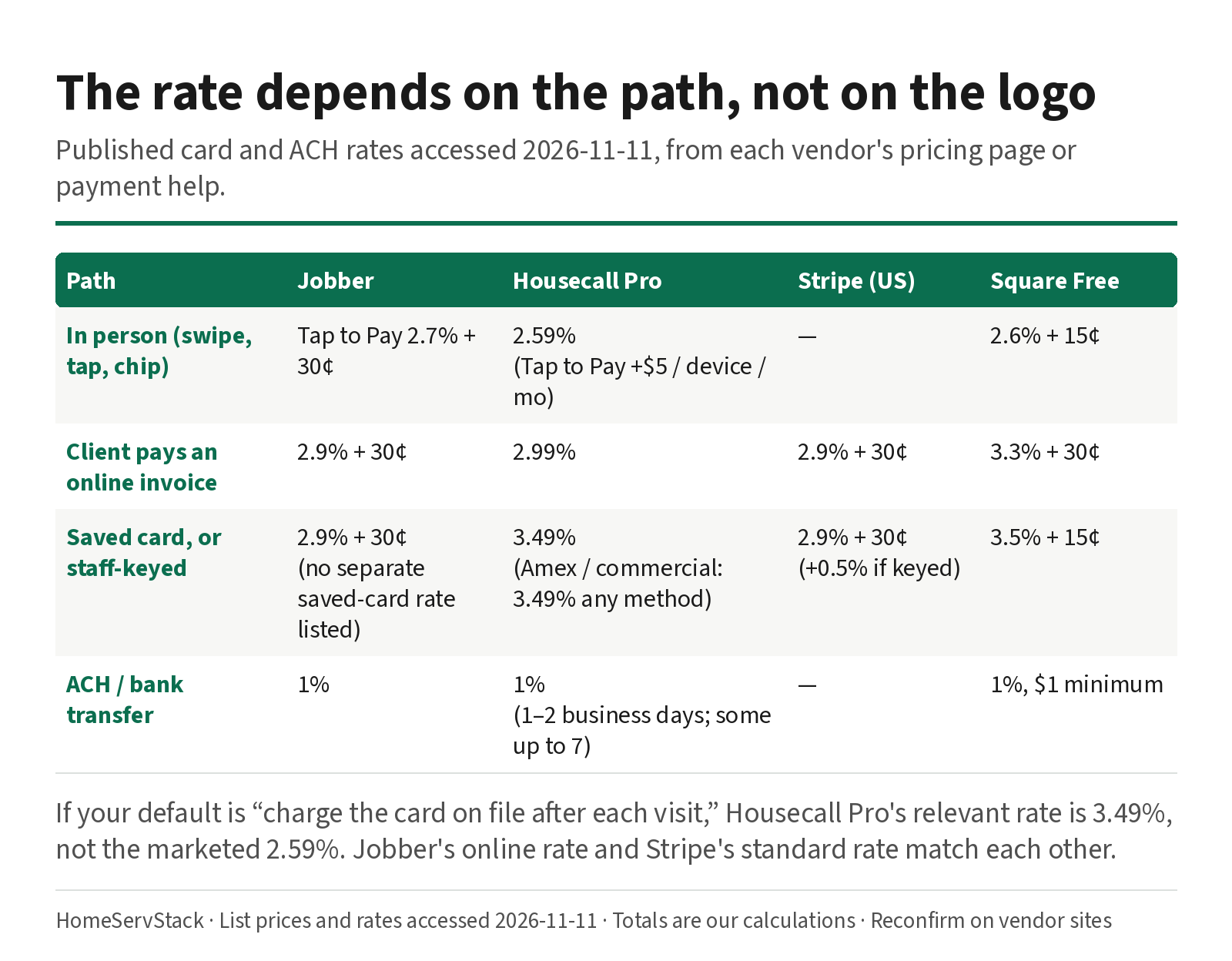
Cleaning Business Autopay: Card-on-File Rates, Declines, and Skip-Week Billing
Autopay and card-on-file rates for cleaning businesses, plus what Jobber, Housecall Pro and ZenMaid do when a card declines or a week is skipped.
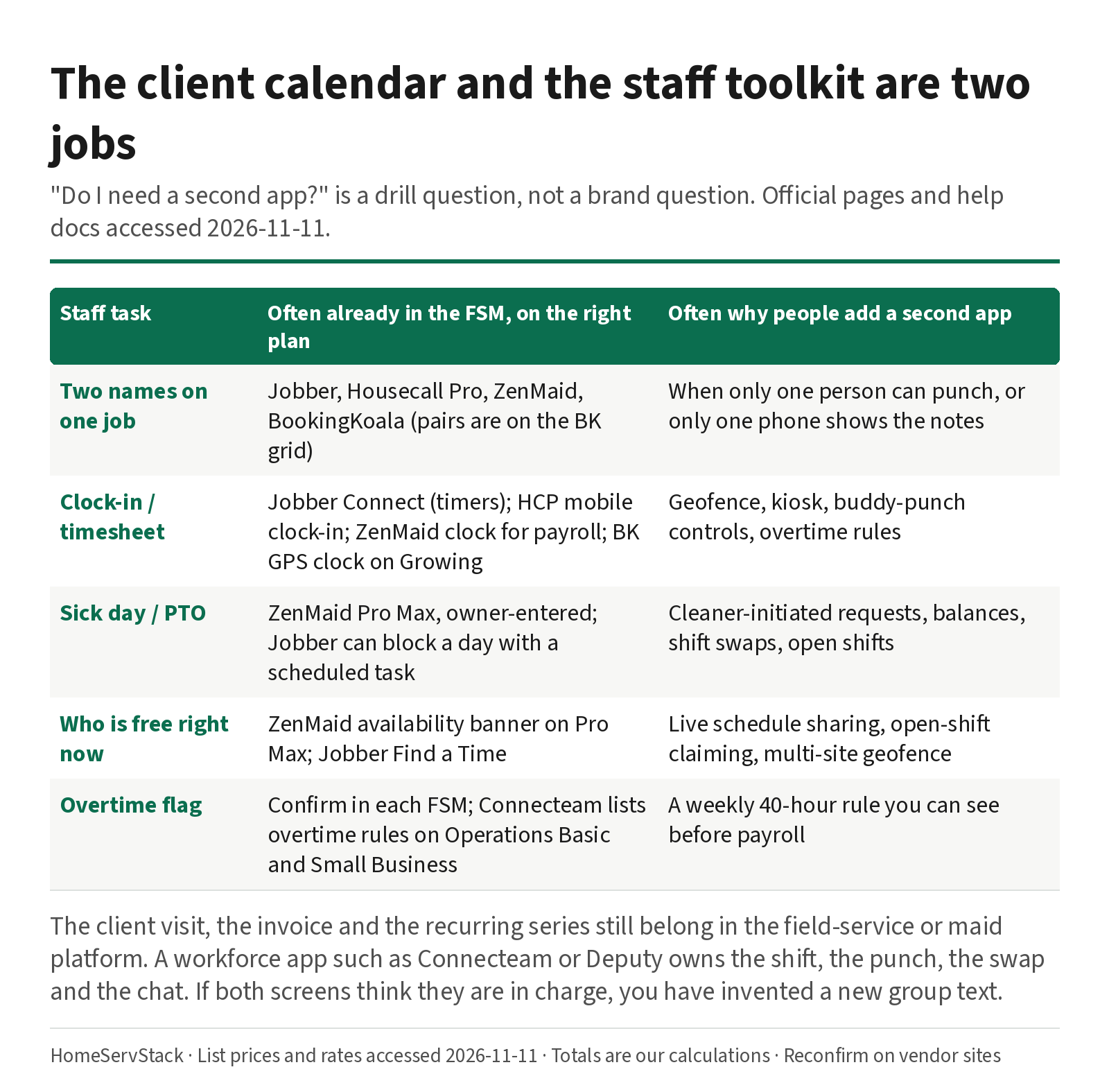
Cleaning Employee Scheduling and Time Clock Apps: When You Need a Second Tool
When a cleaning company needs a staff scheduling or time-clock app beside its FSM, with sick-day and two-cleaner drills.
Comments
Share a correction or an operator experience. Comments are plain text, held for review, and appear only after they are approved. A lasting email is required and is never shown. We may send a confirmation link once mail is configured.
No approved comments yet.