Watch a short briefing
Rates and help-center wording checked 2026-11-11. HomeServStack has no affiliate deals with any vendor named here. Fee totals are our calculations from published rates; they are not vendor quotes. We did not run paid accounts for this article (method).
Short answer: For a US residential cleaning round, bind billing to the visit and charge a saved card or bank account. Jobber automatic payments start on Connect and attempt a declined card once. Housecall Pro charges a saved card at 3.49% and, on service plans, emails a portal link if payment fails. ZenMaid invoices through Stripe or Square; recurring charges are set up in the processor, not in ZenMaid.
The word “automatic” on a pricing page does not tell you which rate will actually run, or what Tuesday looks like when a Visa expires. Housecall Pro markets card processing “as low as 2.59%” on its pricing page. The same company’s help center bills a saved card at 3.49%. On MaidCentral’s September 2026 average job of $217.91 (vendor customer data, about 150,000 cleanings a month), that gap is $1.97 a visit — our calculation, $7.61 versus $5.64. Forty visits later, it is $78.45. Subscription differences of that size are a whole plan tier; the cost guide is where those tiers live. This page is the payment path.
So here’s the argument. Autopay for a cleaning round lives or dies on three things: the rate on the path you actually use, what the software does when a card declines, and whether a skipped week still gets billed. Seat prices and the churn-versus-subscription stakes sit in the scheduling guide and the cost guide. They are not repeated here.
The rate depends on the path, not on the logo
Four paths show up in a residential cleaning week: the cleaner takes a card in the doorway, the client pays an invoice from an email, you charge a card already on file, or the client pays from a bank account (ACH). Vendors publish different rates for those paths. Using the pretty in-person number to budget a saved-card round is how a “2.59%” shop ends up paying 3.49%.
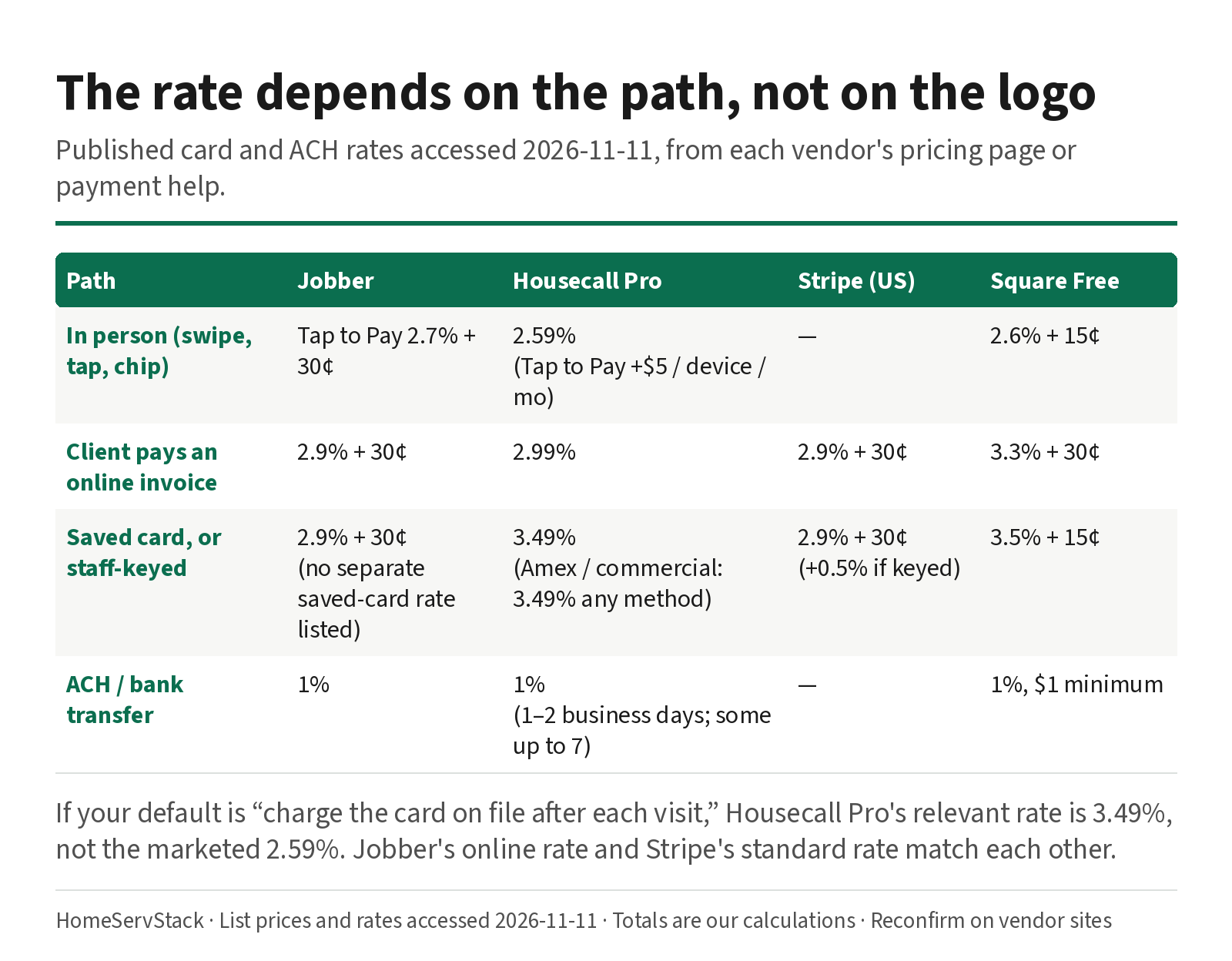
Published rates, accessed 2026-11-11, from each vendor’s pricing page or payment help:
| Path | Jobber | Housecall Pro | Stripe (US domestic) | Square Free |
|---|---|---|---|---|
| In person (swipe, tap, chip) | Tap to Pay 2.7% + 30¢ | 2.59% (Tap to Pay adds $5 per active device per month) | Not the in-person product we fetched | 2.6% + 15¢ |
| Client pays an online invoice | 2.9% + 30¢ | 2.99% | 2.9% + 30¢ | 3.3% + 30¢ |
| Saved card, or staff-keyed | 2.9% + 30¢ (online card rate on the pricing page; a separate saved-card rate is not listed) | 3.49% (card on file, manual entry, or scanned in the app). Amex and commercial cards are 3.49% on any method | 2.9% + 30¢, plus 0.5% if the card is entered manually | 3.5% + 15¢ |
| ACH / bank transfer | 1% | 1% (1–2 business days; some payments up to 7) | Not used as our Stripe figure here | 1%, $1 minimum (Square Checking can be $0, per Square’s fee page) |
What this means: if your default is “charge the card on file after each visit,” Housecall Pro’s relevant rate is 3.49%, not 2.59%. Jobber’s published online rate and Stripe’s standard rate match each other. Square’s Free plan is the expensive online path at 3.3% + 30¢; Square Plus drops online and invoice cards to 2.9% + 30¢, which is one reason a solo cleaner on Square might graduate. Plan prices for that graduation are in the free software guide and the cost guide.
What those rates cost on a real ticket
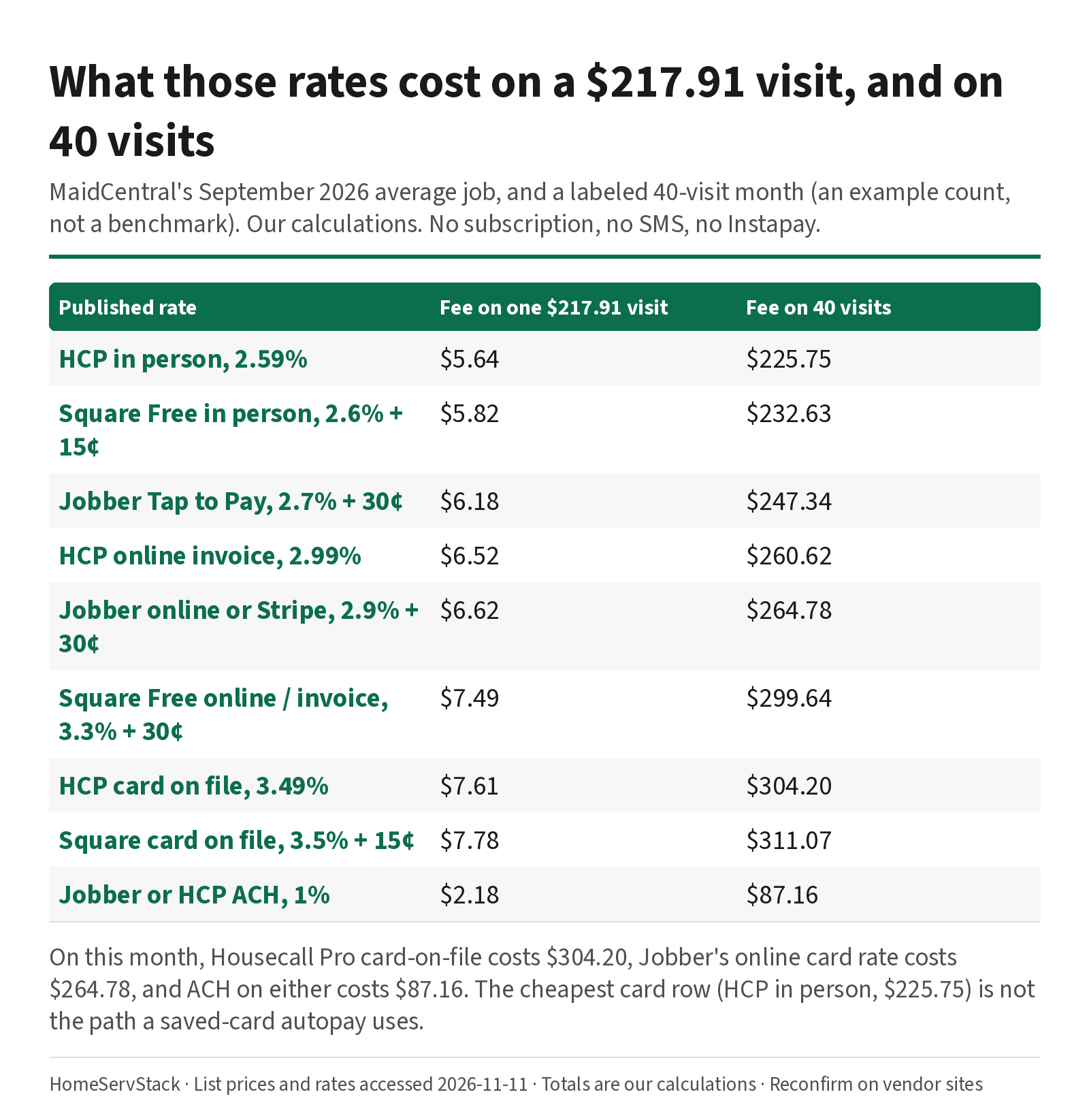
One visit at MaidCentral’s $217.91 average, and a labeled 40-visit month (an example count, not a benchmark). Our calculations from the rates above. No subscription, no SMS, no Instant-payout add-on.
| Rate | Fee on one $217.91 visit | Fee on 40 visits |
|---|---|---|
| Housecall Pro in person, 2.59% | $5.64 | $225.75 |
| Jobber Tap to Pay, 2.7% + 30¢ | $6.18 | $247.34 |
| Housecall Pro online invoice, 2.99% | $6.52 | $260.62 |
| Jobber online card or Stripe, 2.9% + 30¢ | $6.62 | $264.78 |
| Square Free in person, 2.6% + 15¢ | $5.82 | $232.63 |
| Square Free online / invoice, 3.3% + 30¢ | $7.49 | $299.64 |
| Housecall Pro card on file, 3.49% | $7.61 | $304.20 |
| Square card on file, 3.5% + 15¢ | $7.78 | $311.07 |
| Jobber or Housecall Pro ACH, 1% | $2.18 | $87.16 |
What this means: on this 40-visit month, Housecall Pro card-on-file costs $304.20, Jobber’s online card rate costs $264.78, and ACH on either of them costs $87.16. The in-person Housecall Pro path at $225.75 is the cheapest card row — and it is not the path a saved-card autopay uses. A lawn operator, u/woopig479, walked a similar Jobber example in January 2025: “A $100 invoice would cost $3.20 or 3.2%. A $1,000 invoice would cost $29.30 or 2.93%.” (comment). Those are the poster’s calculations on Jobber’s published 2.9% + 30¢, and they match the formula. We still use our own labeled totals above, not the poster’s.
The median hourly wage for maids and housekeeping cleaners is $17.07 (O*NET, BLS OEWS). An unpaid invoice that takes an hour of office time to chase has a labor cost near that wage, on top of the processor fee. We do not invent a collection-days average; we only note that the labor is real and the fee is published.
A declined card is a Tuesday procedure, and some tools will not retry it
Cards expire. Banks decline. The question is whether the software tells a human, keeps the invoice open, and tries again — or tries once and waits for you.
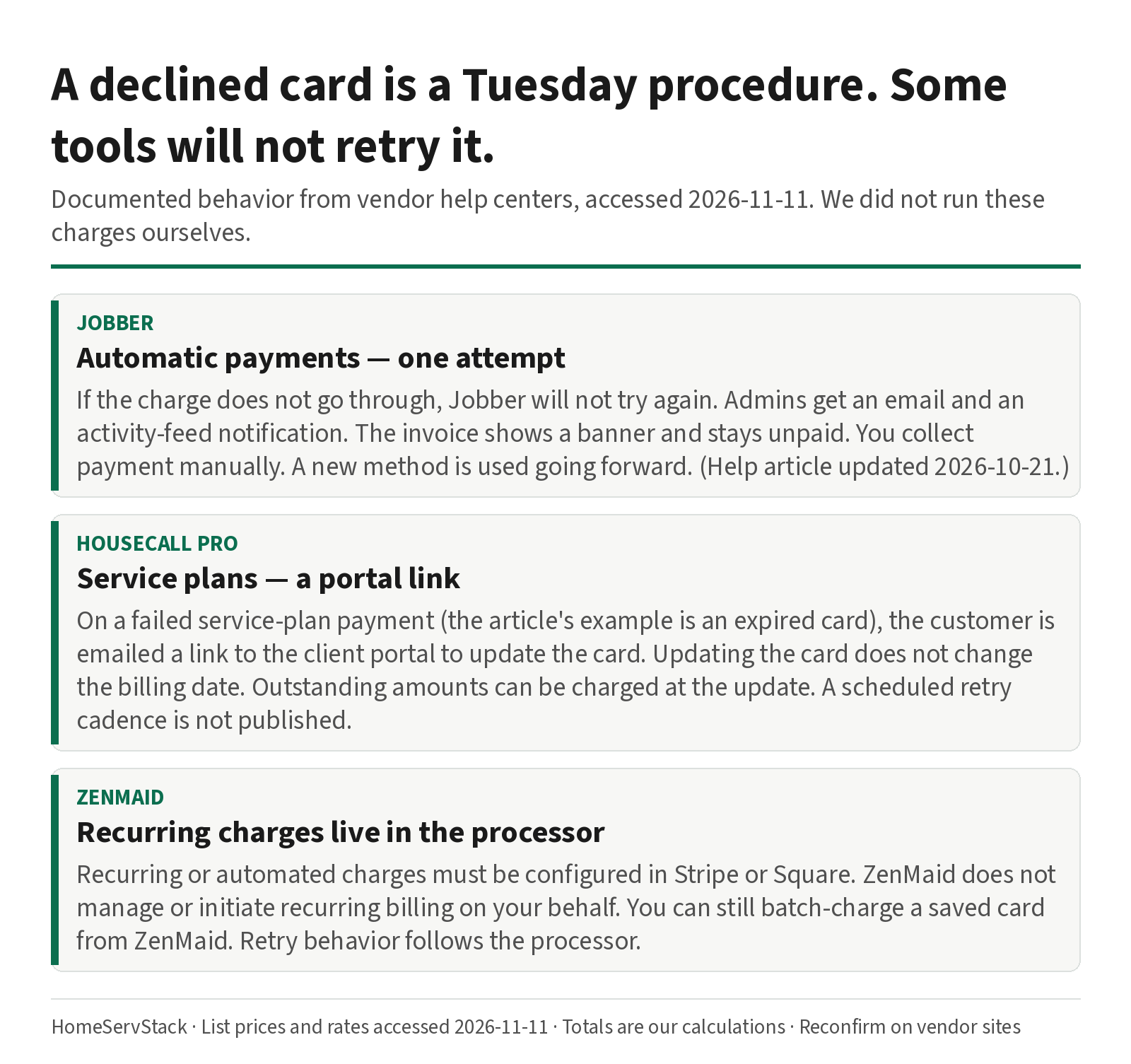
Jobber, per the Automatic Payments article, updated October 21, 2026. If an automatic payment does not go through, “Jobber won’t try to charge the client again. Automatic payments are only attempted once.” Admins are notified by email and with an activity-feed notification. The invoice shows a banner that the automatic payment was unsuccessful, and it stays unpaid, so you collect payment manually. If the client adds a new payment method, that method is used going forward. That is unusually plain wording for a help center, and it is a close-of-day task you have to staff. It is not, by itself, a reason to skip Jobber. It is a reason not to assume a silent retry.
Housecall Pro service plans, per billing and payments for service plans. If a credit-card payment fails (the article’s example is an expired card), the customer is emailed a link to the client portal to update the card. Updating the card does not change the billing date. Outstanding amounts can be charged to the new card at the time of the update. You also get an email. A scheduled retry cadence is not published in that article, so we do not pretend one exists. Card-on-file charging more generally is documented in Card on File help, at the 3.49% rate above. Recurring Service Plans themselves are marketed on MAX on the pricing page.
ZenMaid, per connecting a processor. “Any recurring or automated charges must be configured directly in Stripe or Square. ZenMaid does not manage or initiate recurring billing transactions on your behalf.” Retry behavior follows whatever you set up in the processor. What ZenMaid does document, in ways customers can be charged, is a manual or bulk charge of a card already saved on the customer profile. Marking an appointment paid does not charge the card. If you want a hands-off schedule, you build it in Stripe or Square and you test it twice.
Trial test, five minutes. Create a test client with a card that will decline (a processor test card, if the trial gives you one). Run the automatic or batch charge. Write down: who was notified, whether the invoice stayed open, and whether anything retried. If you cannot force a decline in the trial, read the help article out loud with whoever will close the day, and put the Jobber “once” rule on the afternoon checklist.
A related failure happens earlier: the processor refuses the account. An auto detailer, u/EarlyTravel8419, wrote in November 2025 that they “got told I didn’t pass the review to process credit card payments and to retry in 3 months so they refunded customer” (comment). Underwriting is not a published rate, and one comment is not a pattern. It is a reminder to activate payments during the trial, not after you have already promised clients a card-on-file program.
A skipped week must not raise an invoice
Thanksgiving, a cruise, a flu. The client stays on the every-other-Tuesday series. That one visit did not happen. If the software bills it anyway, you will refund it in December from a parking lot.
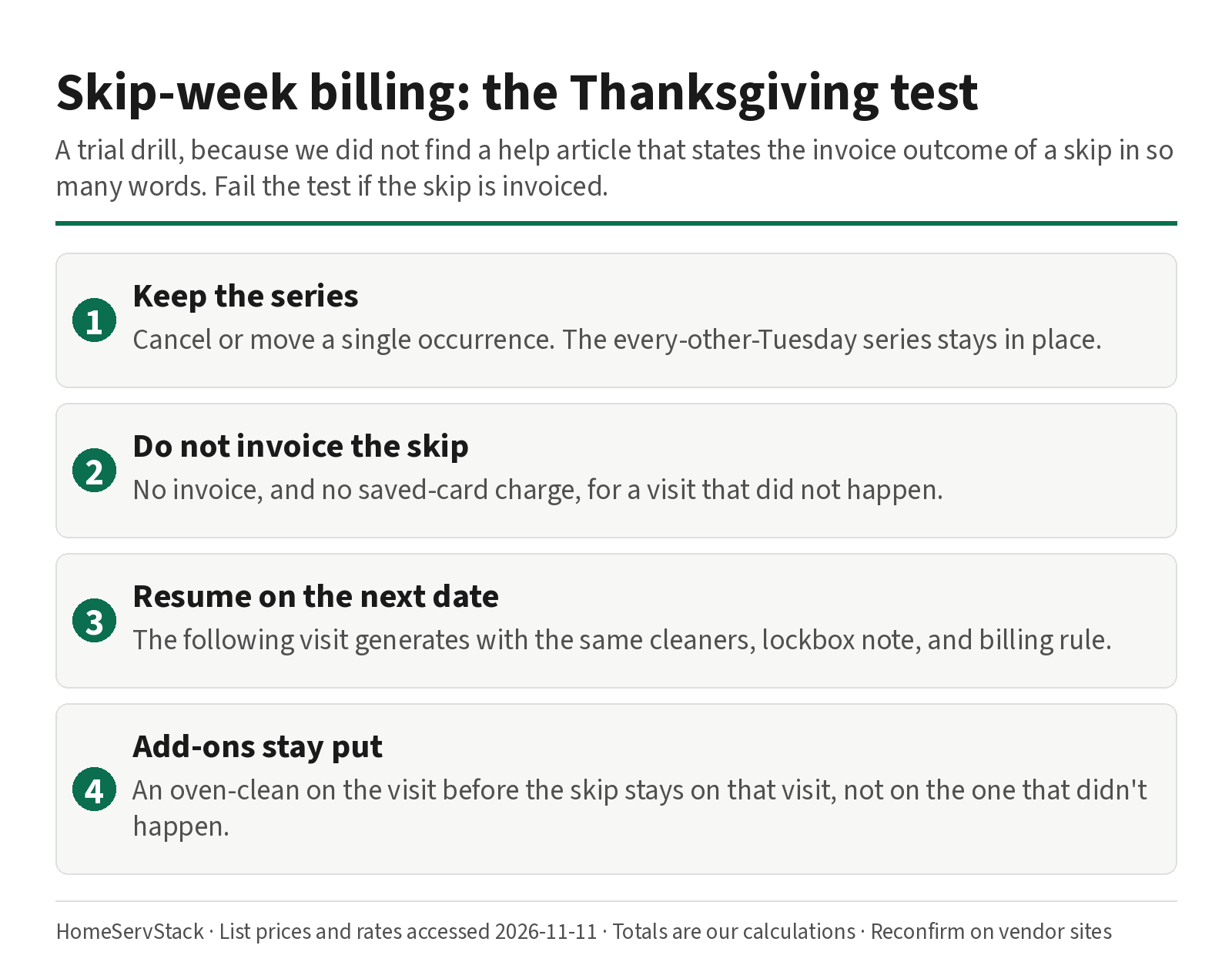
What good looks like. You cancel or move a single occurrence. The series remains. No invoice goes out for the skip. The following visit generates with the same cleaners, the lockbox note, and the same billing rule — per-visit charges including add-ons, or a fixed price, whichever you set. An oven-clean add-on that happened on the visit before the skip stays on that visit, not on the one that didn’t happen.
What the docs actually say. Jobber’s Automatic Payments article describes two invoice styles: per visit (line items from that visit, including add-ons) and fixed price (the same amount each invoice, pulled from the job). Invoices can go out after each completed visit, on a custom schedule, or on the last day of the month; “as needed — no reminders” is incompatible with automatic payments. The scheduling guide already covers Jobber’s rule that editing the job (not the single visit) can regenerate visits and overwrite custom instructions. We do not repeat that drill. We also did not find a sentence in the automatic-payments article that says, in so many words, “a skipped visit will not be invoiced.” That is why this is a trial test.
ZenMaid documents editing one appointment inside a recurring service. The processor-side recurring charge, if you built one in Stripe or Square, has to be told about the skip too. A ZenMaid-only cancel will not cancel a Stripe subscription you set up next door, unless you built it that way and proved it.
Housecall Pro service plans bill a schedule you set; the help article on failed payments does not, that we found, describe skip-week invoice behavior. Confirm it on the MAX trial if service plans are why you are shopping.
Trial test. Create a biweekly job with autopay or a saved-card rule on. Skip one occurrence. Open the next occurrence and the invoice list. Fail the test if the skip is invoiced, if the series rebuilds from scratch, or if the lockbox note is gone. Pass only if the next visit looks like the one you skipped, minus the visit itself.
A same-day add-on is the sister test: add an oven clean to the visit that is happening, complete the visit, and check that the charge includes the add-on and that the next visit does not.
Tips are on the receipt; no-show fees are a quieter feature
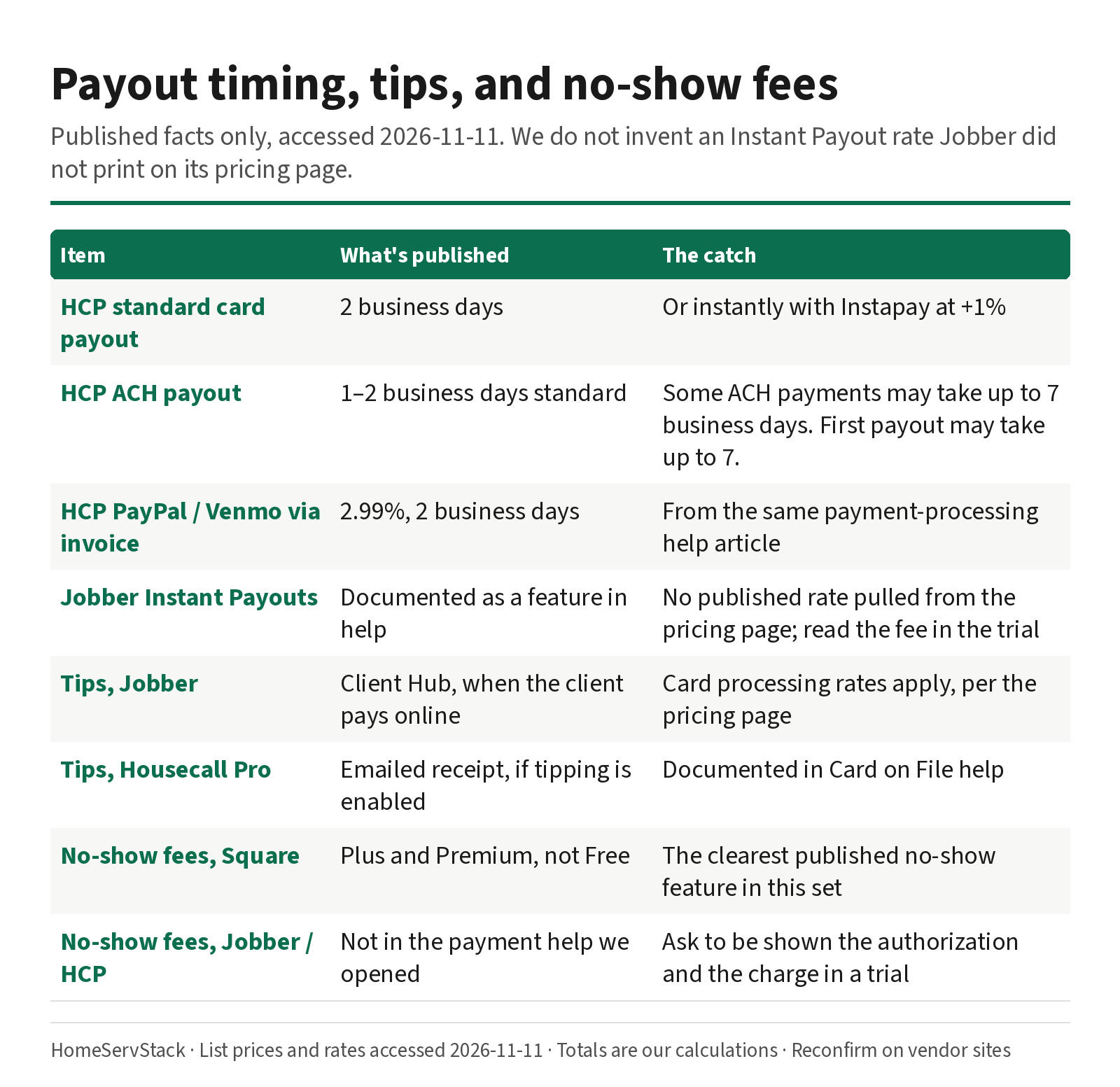
Tips. Jobber’s pricing page lists tip collection when clients pay online through Client Hub, and says credit-card processing rates apply. Housecall Pro’s Card on File help says a customer can add a tip from the emailed receipt when credit-card tipping is enabled for the account. BookingKoala lists tips among charges and payments, with more invoice-tip options on Premium. ZenMaid’s charge article does not, in the sections we read, describe a tip prompt; we will not invent one. Test the exact screen: who can tip (client only, after the visit), whether the tip hits the same rate as the clean, and how it lands in payroll. Payroll splits themselves belong in the crew dispatch guide.
No-show fees. Square Appointments’ pricing page lists “cancellation policy and no-show fees” among features on Plus ($49 per location) and Premium ($149), not on the Free plan. That is the clearest published no-show fee we found in this set. We did not find a published no-show fee feature in Jobber’s automatic-payments article or in Housecall Pro’s card-on-file article. If a no-show fee is a must-have, ask the vendor to show you the client-facing authorization and the charge that follows a missed visit, during the trial. Do not budget a feature we cannot cite.
Authorization. Before you charge a saved card, read the client-facing authorization text the vendor puts on the form. We quote none of that legal language here; it belongs on the screen the client sees, and it has to match what you actually do (a per-visit charge after completion is not the same as a monthly retainer). A soft-wash operator, @TheSoftWashPro, wrote on X in August 2026: “now every person that ever hires us we have their card on file automatically,” and “If the customer doesn’t pay and it’s getting too late, I just zap their card” (post). That is one operator’s practice, in exterior cleaning. It is not a procedure we recommend, and it is not a substitute for a written authorization.
Surcharging. Some operators pass card fees on. u/Friendly_Dance6237, in the same Jobber fees thread, wrote: “I just charged 4% now to clients playing with a card” (comment, 2025-04-25). That is the poster’s practice. Surcharging is regulated by state law and by card-brand rules. This is not legal advice. If you go down that road, get the rule for your state, and do not call a 4% surcharge “Jobber’s rate” — Jobber’s published online rate is 2.9% + 30¢.
Payout speed is a cash-flow line, and the first payout can be slower
Housecall Pro’s payment processing help is the most specific payout table we opened. Standard card payouts: 2 business days, or instantly with Instapay at +1%. ACH: 1–2 business days standard; some ACH payments may take up to 7 business days, and not all ACH payments are eligible for instant payouts. The first payout may take up to 7 business days. PayPal and Venmo via an invoice are listed at 2.99%, with a 2-business-day payout.
Jobber’s help center has articles on a payout window and on Instant Payouts. We did not pull a published Instant Payout percentage from the Jobber pricing page, so we do not invent one. If instant access to funds matters, open that help article during the trial and read the fee off the page.
A cleaning operator, u/jaquelinaa, described a different payout-adjacent benefit: when a client disputed a job, “Thankfully we have Jobber and we have all the time stamps of when we started/finished/invoice was sent/when they paid and told them to go ahead that we have all the proof.” (comment, 2026-07-29). Timestamps will not lower your rate. They are part of why a payments tool is more than a processor.
Plan gates: “autopay” is often one tier up
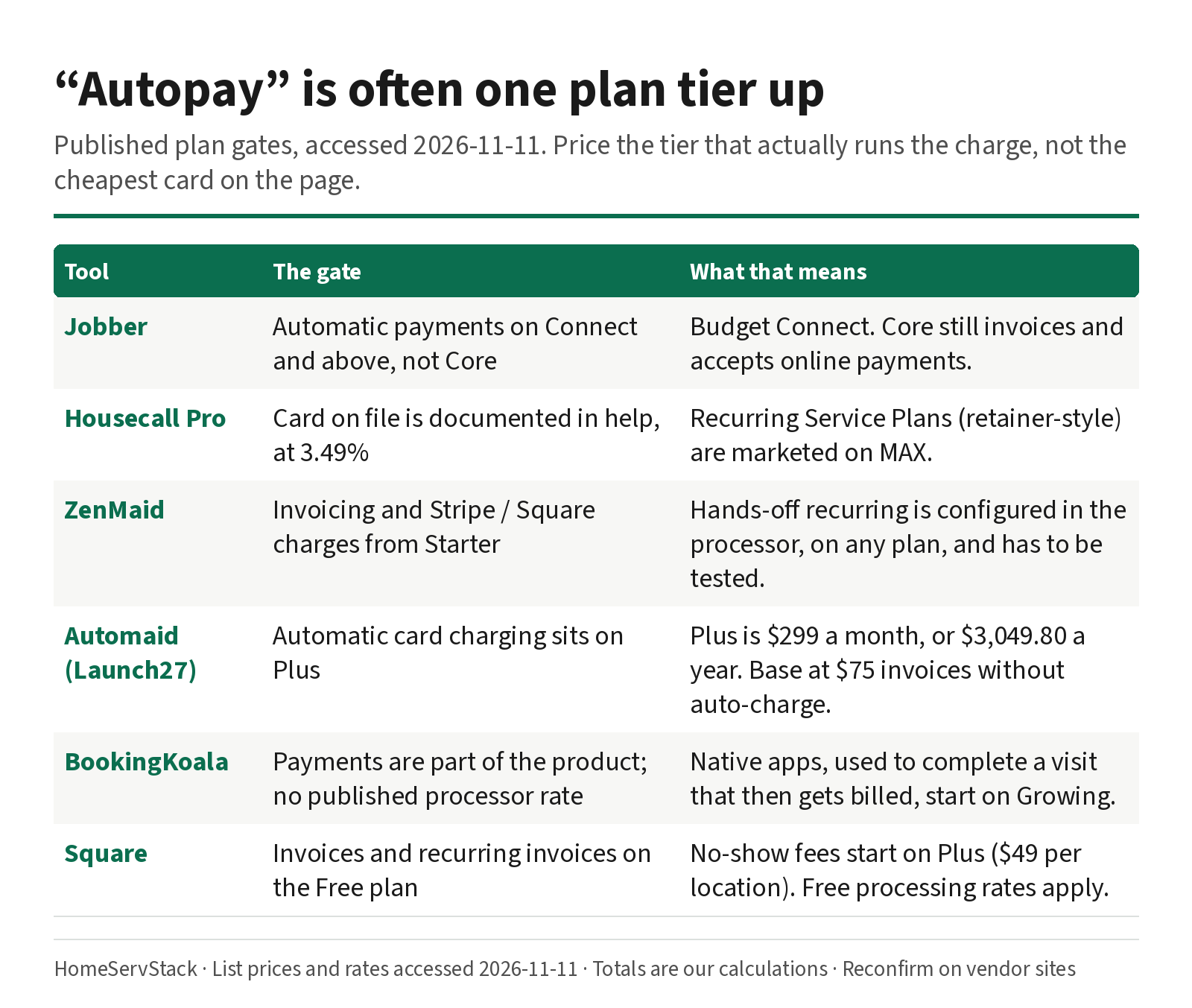
- Jobber. Automatic payments are listed on Connect and above, not Core, on the pricing page and in the Connect plan help. Core still invoices and accepts online payments. If a saved-card schedule is the point, budget Connect. What Connect costs at 1, 5, 12 and 20 users is in the cost guide.
- Housecall Pro. You can charge a saved card, at 3.49%, as documented in help. Recurring Service Plans (the retainer-style “same amount each month” product) are marketed on MAX. If that product is why you are shopping, budget MAX, including the $35 extra-user rate above eight logins.
- ZenMaid. Invoicing and Stripe or Square charges are available from Starter. Hands-off recurring charges are a processor setup, on any plan, and have to be tested.
- Automaid (formerly Launch27). Automatic card charging sits on Plus ($299 a month, or $3,049.80 a year). Base at $75 invoices; it is not the auto-charge plan.
- BookingKoala. Payments are part of the product; a published processor rate is not on the pricing page we opened. Native apps, which your cleaner would use to complete a visit that then gets billed, start on Growing. Confirm the charge trigger in a trial.
- Square. Invoices and recurring invoices are on the Free plan, at the Free rates in the table above. No-show fees start on Plus.
Verdicts, and who should skip which payments path
Jobber Connect, for quote-led and mixed shops that want visit-level autopay in the same system. The help docs are the clearest in this set on what happens when a charge fails: it fails once. Skip it if you need a scheduled retry series (Jobber will not provide one), or if you were about to buy Core and assumed “online payments” included automatic charges.
Housecall Pro, for shops that will use service plans on MAX and can live with the 3.49% saved-card rate. The portal-link decline path is documented. In-person work at 2.59% is cheaper, and it is a different path. Skip it if most of your volume is saved-card autopay and the 3.49% rate (versus Jobber’s 2.9% + 30¢) is a deal-breaker on your actual ticket, or if you need a published retry cadence.
ZenMaid plus Stripe or Square, for calendar-led maid services that will set up and own the processor-side schedule. Batch charging from ZenMaid is documented. Hands-off recurring is not ZenMaid’s job. Skip it if you want the scheduler itself to initiate the recurring charge, with no Stripe or Square configuration of your own.
Automaid Plus, for booking-led brands that sell online and want auto-charge at the booking layer. Skip it if you only need invoices; Base is the cheaper plan, and Plus is the auto-charge gate.
Square Free, for a solo cleaner who already takes Square payments and is not yet buying an operations tool. Skip it if you need no-show fees (those start on Plus), or if the 3.3% + 30¢ invoice rate is already louder than a paid operations plan would be, once you run the cost worksheet.
Ways this decision goes wrong
- Budgeting the in-person rate for a saved-card program. Housecall Pro’s 2.59% is real, and it is not the 3.49% card-on-file path.
- Buying the plan below the autopay gate. Jobber Core, Automaid Base, Housecall Pro below MAX if service plans are the reason you came.
- Assuming a declined card will retry. Jobber’s help article says it will not. Staff the afternoon accordingly.
- Skipping the skip-week test. A tool that invoices a Thanksgiving cancellation will cost more than its subscription in refunds and apology time.
- Turning on “zap the card” without a matching authorization. The charge has to match what the client agreed to. Read the form.
- Activating payments after you have already sold the program to clients. Underwriting can fail. Do it in the trial.
A two-tool payments trial
Pick two tools. Use the same fictional biweekly client on both — call them the Park household, with cleaner Ruben, if you need names; they are a labeled hypothetical. On each tool: save a card with the real authorization text visible; run a successful per-visit charge with a same-day add-on; force or simulate a decline; skip one week and read the next invoice; check the tip prompt; ask to be shown a no-show fee if you need one; read the payout-timing help. Pay monthly until that list is green. The annual-versus-monthly break-even, and the non-refundable fine print, are in the cost guide.
How we researched this
On 2026-11-11 we re-fetched official pricing and help pages for Jobber (Automatic Payments, updated 2026-10-21; the Connect plan), Housecall Pro (payment processing options, card on file, service-plan billing), ZenMaid (connecting a processor; ways to charge a card), Automaid, BookingKoala, Stripe, and Square (Appointments pricing and the fees help article), plus MaidCentral’s PCI report and O*NET’s BLS wage table. Every rate in the tables comes from those pages. Every dollar total is a HomeServStack calculation from those rates, on a $217.91 ticket and a labeled 40-visit month.
Owner comments are verbatim, with handles only, from the Arctic Shift Reddit archive, X, and Capterra, accessed the same day. User-stated fees and “4%” surcharges are their claims or their practices, not our list prices. We did not run paid production accounts, and we did not invent a retry series, a no-show feature, or an Instant Payout rate where the page we opened did not publish one. No affiliate relationships. We segment by payment path and documented behavior; we do not crown a single winner.
Glossary
- Card on file. A payment method the client has authorized you to keep and charge later, under the terms they agreed to.
- Autopay / automatic payments. A scheduled charge of that saved method, usually after a visit is completed or on a fixed billing day. The feature is often gated by plan.
- Keyed / card-not-present. A card number entered by staff, or a saved card charged without the card being swiped. Often a higher rate (Housecall Pro 3.49%; Square 3.5% + 15¢).
- ACH. A bank-account payment, published at 1% on Jobber, Housecall Pro and Square (Square has a $1 minimum on some ACH paths).
- Decline / retry. What happens when the processor rejects the charge. Jobber automatic payments: one attempt. Housecall Pro service plans: a portal link. ZenMaid recurring: the processor’s rules.
- Per-visit invoicing. The invoice lists what happened on that visit, including add-ons. Jobber’s term, contrasted with fixed-price invoicing.
- Fixed-price invoicing. The same amount each invoice, pulled from the job, not from the visit’s line items.
- Instapay / Instant Payouts. An optional faster payout. Housecall Pro publishes +1% for Instapay. Jobber documents the feature; we did not cite an unpublished rate.
- Authorization. The client-facing agreement that lets you store and charge a card. The wording has to match the charges you run.
- No-show fee. A charge for a missed visit, which needs its own authorization. Published on Square Appointments Plus and Premium in this set.
Corrections and updates
- 2026-11-11: Rewritten as a payments and autopay page for the queries “cleaning business autopay” and “card on file cleaning business.” Added a path-by-path rate table (including Housecall Pro’s 3.49% saved-card rate, 2.99% online invoice rate, Instapay at +1%, and Square’s Free and card-on-file rates), documented decline behavior, skip-week and add-on tests, tips, no-show fees, payout timing, and sourced owner comments. Subscription math and annual break-even now live in the cost guide and are not repeated here. Housecall Pro Basic and Essentials are published prices; this page no longer calls them custom / not published, and it does not use them as a payments argument.
- 2026-11-10: First published as a recurring-invoices decoder. Superseded by the rewrite above.
Related guides
- How much cleaning business software costs — all-in subscription, SMS and processing at 1 to 20 people, and annual break-even months.
- Best scheduling software for cleaning businesses — where work starts, the meter you pay on, and the skip-one-visit scheduling drill.
- Free cleaning business software — Square Free and other $0 plans, including the processing rates a solo cleaner actually pays.
Frequently asked questions
What is the best autopay setup for a cleaning business?
Bind billing to the recurring visit and charge a saved card or bank account. Jobber automatic payments start on Connect and attempt a declined card once. Housecall Pro charges a saved card at 3.49% and, on service plans, emails a portal link if payment fails. ZenMaid invoices and batch-charges through Stripe or Square; recurring charges are configured in the processor, not in ZenMaid. Confirm the plan gate and the path-specific rate before you buy.
What are cleaning business card-on-file processing rates?
From help pages and pricing pages accessed 2026-11-11: Housecall Pro charges 3.49% for a saved card, for manual entry, and for American Express or commercial cards on any method. Its in-person rate is 2.59%, and a customer-paid online invoice is 2.99%. Jobber lists 2.9% + 30¢ for online cards, 2.7% + 30¢ for Tap to Pay, and 1% for ACH. Stripe's standard US online rate is 2.9% + 30¢. Square Free invoices are 3.3% + 30¢ online, or 3.5% + 15¢ for card on file. ACH is 1% on Jobber, Housecall Pro and Square (Square has a $1 minimum).
Does Jobber automatically retry a declined autopay?
No. Jobber's Automatic Payments help article, updated October 21, 2026, says that if an automatic payment does not go through, Jobber will not try to charge the client again. Automatic payments are only attempted once. Admins get an email and an activity-feed notification, the invoice shows a banner and stays unpaid, and you collect payment manually. A new payment method is used going forward.
What happens if a client skips a week on autopay?
The tool has to cancel or move that one visit without deleting the series, and it must not invoice the skipped visit. The next biweekly should generate with the same cleaners, notes, and billing rule. Same-day add-ons belong on the visit that actually happened. Jobber and ZenMaid document how to edit a single occurrence; we did not find a help article that states the invoice outcome of a skip in so many words. Run this as a trial test before you prepay a year.
Can cleaning software collect tips and no-show fees?
Jobber's pricing page lists tip collection when clients pay online through Client Hub, with card rates applying. Housecall Pro help says a customer can add a tip from the emailed receipt when tipping is enabled. Square Appointments lists cancellation policy and no-show fees on Plus and Premium, not on the Free plan. We did not find a published no-show fee feature in Jobber's automatic-payments article or Housecall Pro's card-on-file article. Confirm the exact screen in a trial.
How fast do Jobber and Housecall Pro pay out?
Housecall Pro's payment-processing help, accessed 2026-11-11, says standard card payouts take 2 business days, or instantly with Instapay at an extra 1%. ACH is 1–2 business days standard, and some ACH payments may take up to 7 business days. The first payout may take up to 7 business days. Jobber's help center has separate articles on a payout window and Instant Payouts; we did not pull a published Instant Payout rate from the pricing page, so we do not invent one.
Sources
- Jobber Pricing — Accessed
- Jobber Help: Automatic Payments (updated 2026-10-21) — Accessed
- Jobber Help: The Connect Plan — Accessed
- Housecall Pro Pricing — Accessed
- Housecall Pro Help: Payment Processing Options — Accessed
- Housecall Pro Help: Card on File — Accessed
- Housecall Pro Help: Billing and Payments for Service Plans — Accessed
- ZenMaid Pricing — Accessed
- ZenMaid Help: Connecting a Credit Card Processor to ZenMaid — Accessed
- ZenMaid Help: Ways Customers Can Be Charged by Card in ZenMaid — Accessed
- Automaid (formerly Launch27) Pricing — Accessed
- BookingKoala Pricing — Accessed
- Stripe Pricing — Accessed
- Square Appointments Pricing — Accessed
- Square Support: Learn about Square fees — Accessed
- MaidCentral: Professional Cleaning Index (PCI) Report, Cleaning Industry Statistics 2026 — Accessed
- O*NET OnLine: Local Wages for Maids and Housekeeping Cleaners (BLS OEWS data) — Accessed
- Reddit r/LawnCarePros: Jobber payment processing fees (u/One_Description83, u/woopig479, u/Friendly_Dance6237) — Accessed
- X: @TheSoftWashPro on card on file — Accessed
- Reddit r/cleaningbusiness: chargeback timestamps (u/jaquelinaa) — Accessed
- Reddit r/Contractor: Housecall Pro underwriting (u/EarlyTravel8419) — Accessed
Was this helpful?
One tap, no account, no personal data. We only keep a yes or no, counted with the other votes on this page.
Keep reading
More in Cleaning Software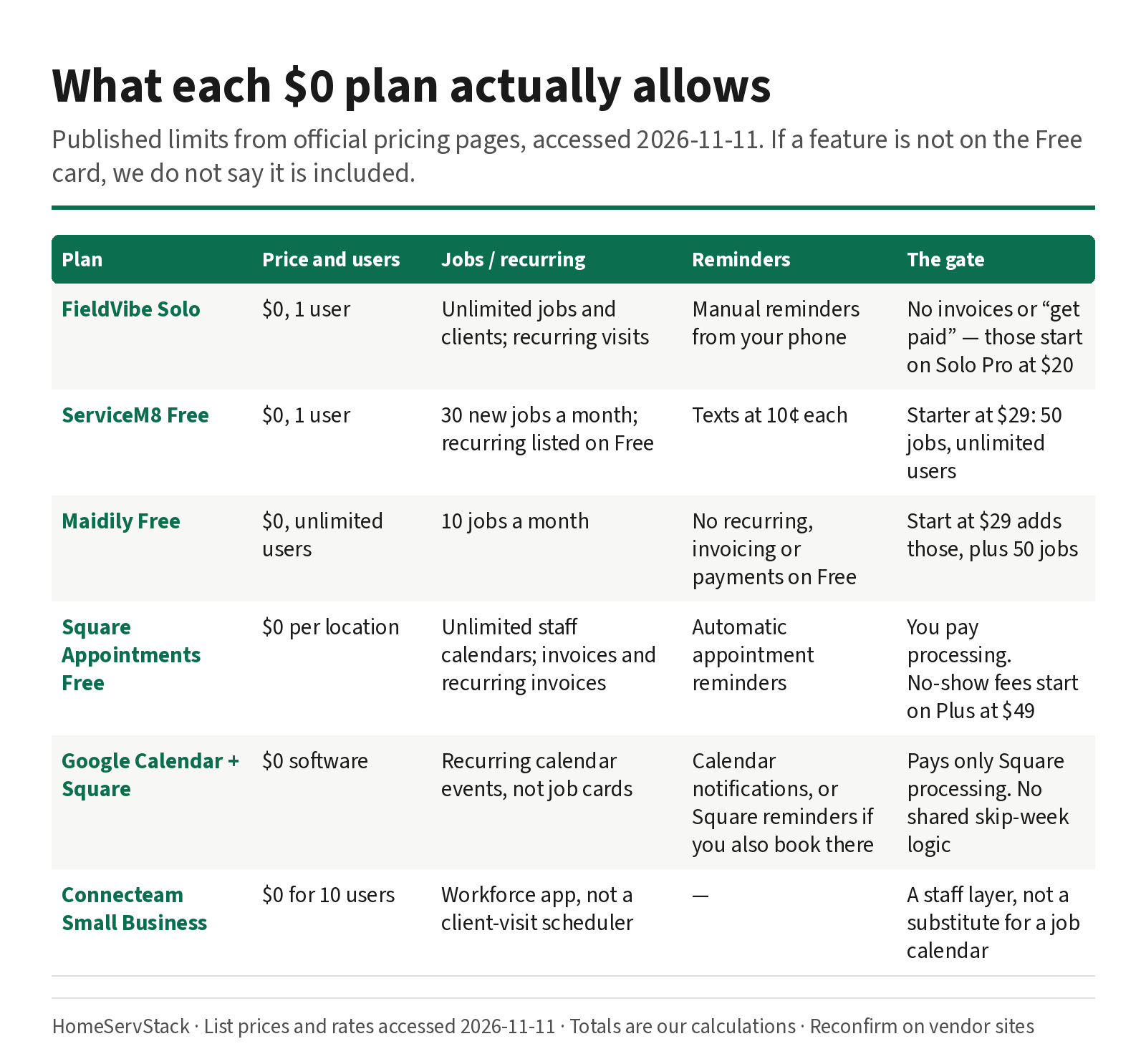
Free Cleaning Business Software: What Each $0 Plan Actually Allows
What free cleaning business software actually allows — FieldVibe, ServiceM8, Square, Maidily — and the limits that tell you it's time to pay.
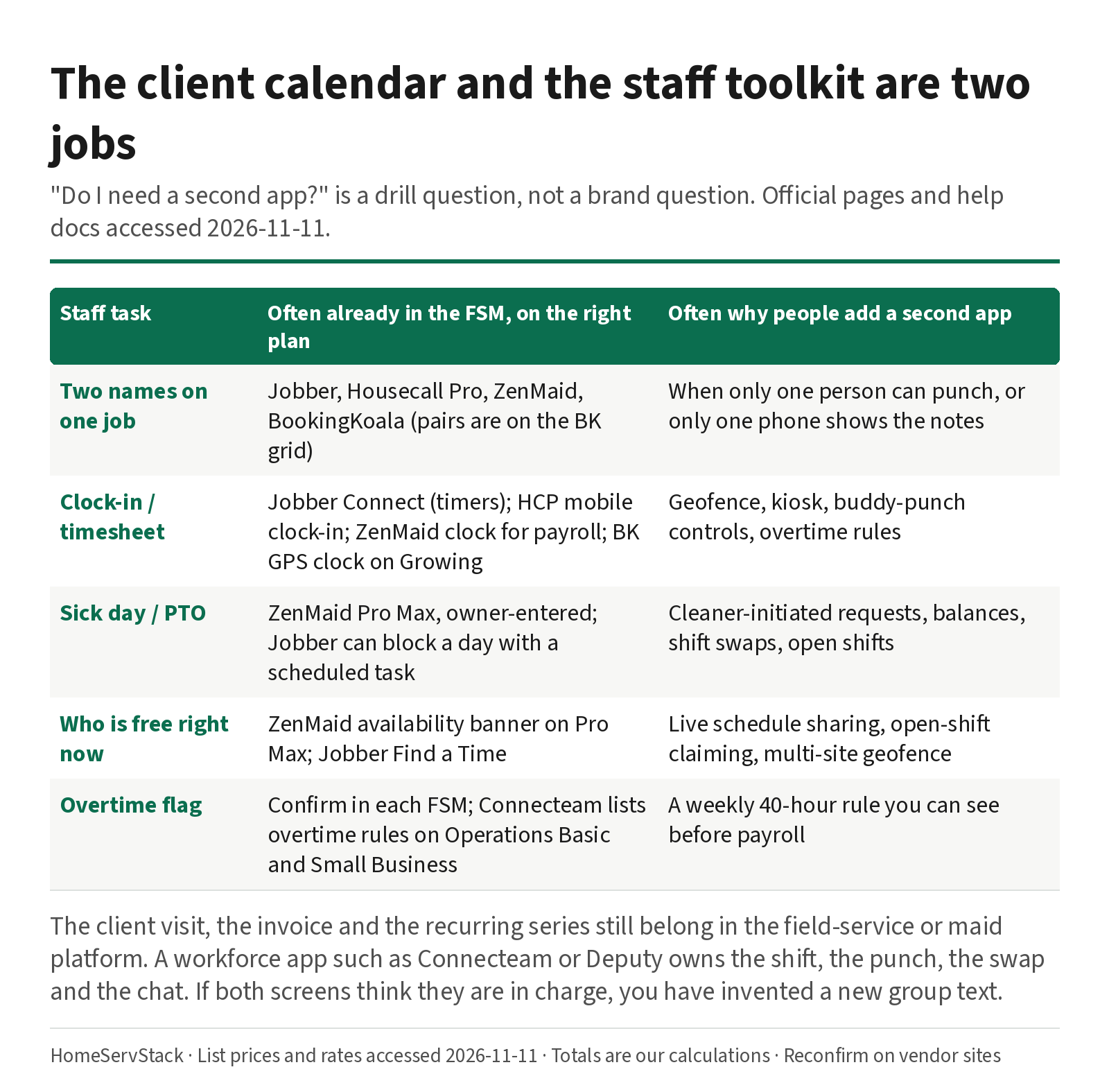
Cleaning Employee Scheduling and Time Clock Apps: When You Need a Second Tool
When a cleaning company needs a staff scheduling or time-clock app beside its FSM, with sick-day and two-cleaner drills.
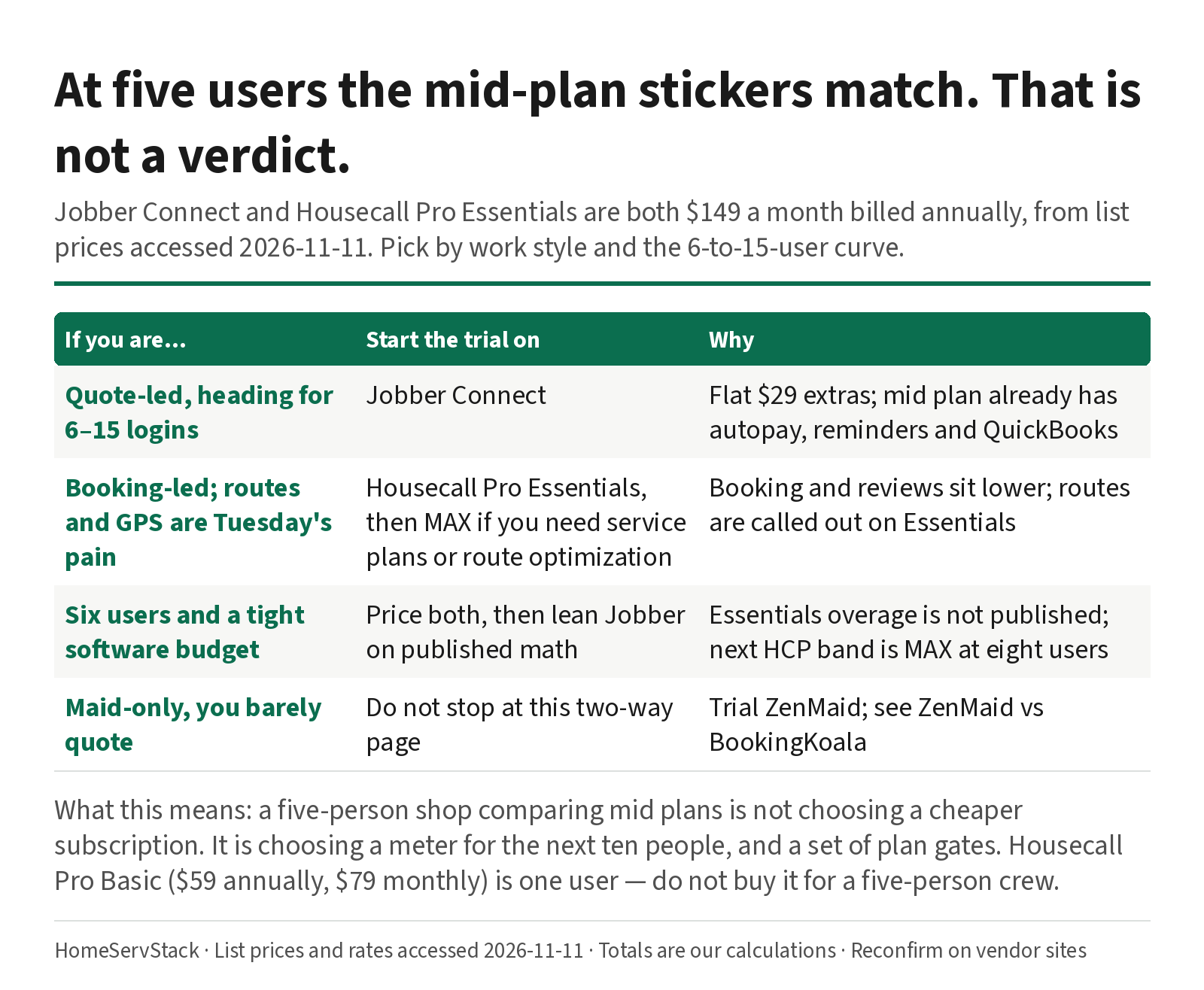
Jobber vs Housecall Pro for Cleaning: Same $149 at Five Users, Different After That
Jobber and Housecall Pro both cost $149 at five users annually. The 6–15 user curve, card rates, routes, and QuickBooks decide it.
Comments
Share a correction or an operator experience. Comments are plain text, held for review, and appear only after they are approved. A lasting email is required and is never shown. We may send a confirmation link once mail is configured.
No approved comments yet.