Watch a short briefing
Prices checked 2026-11-11. HomeServStack has no affiliate deals with any vendor named here. Totals below are our calculations from published list prices; they are not vendor quotes. We did not run paid accounts for this article (method).
Short answer: Your field-service app owns the client visit. A staff scheduling or time-clock app owns the punch, the sick day and the shift swap. Buy the second app only after the first fails a staff-side drill, and price it against upgrading the plan you already have. At 10 users or fewer, Connecteam’s Small Business plan is free. At 15, Operations Basic is $29 a month billed annually for 30 users.
Picture a Tuesday at 7:40 a.m. Ana calls out. Two houses still need a team. The Ortega job is a pair: Ana and Ben, door code in the grill, dog in the laundry room on alternate weeks. The client-visit scheduler can move the appointment and, if you test it, can skip a week without breaking the series — that drill lives in our scheduling guide. The staff questions are different. Can Ana be marked off for this one day? Does her phone drop both addresses? Can Carla, who is okay with dogs, pick up an open slot next to Ben? Do both people on the Ortega job get a time entry, or only the person who remembered to punch?
Those questions have a dollar figure attached. MaidCentral’s Professional Cleaning Index puts average revenue per cleaning at $217.91 in September 2026, across roughly 150,000 monthly cleanings in its customer base (a vendor dataset). Two uncovered visits are $435.82 at that ticket (our calculation). The same report puts annual turnover at 131.1%. The median hourly wage for maids and housekeeping cleaners is $17.07, from O*NET OnLine’s BLS OEWS figures. A payroll error that overpays two hours, for 15 people, is $512.10 at that wage (our calculation: 15 × 2 × $17.07). The U.S. Department of Labor requires overtime pay at one and a half times the regular rate after 40 hours in a workweek, for non-exempt employees. A time clock that cannot flag a 43-hour week is not a nice-to-have.
So here’s the argument. The client-visit scheduler and the staff toolkit are two jobs. Buy a second app only when the first fails a staff-side drill — a paired clock-in, a sick day, PTO, an overtime flag — and price that second app against simply upgrading the plan you already have.
The client calendar and the staff toolkit are two jobs
“Dispatch” is a muddy word, and searching “cleaning crew dispatch software” mostly returns vendor landing pages. The useful split is simpler.
The client-visit job is the appointment, the door code, the checklist, the invoice, and the recurring series. That is a field-service or maid platform: Jobber, Housecall Pro, ZenMaid, BookingKoala, FieldVibe. The skip-one-visit drill, and the shortlist by where work starts, live in the scheduling guide.
The staff job is the shift, the punch, the swap, the sick day, the overtime flag, and the “who is actually free at 9:00.” Some of that sits inside the FSM, on a higher plan. The rest sits in a workforce or time-clock app: Connecteam, Deputy, or a dedicated clock such as OnTheClock. Commercial night janitorial — site-based shifts, inspections, proof of presence — is a different lane (Swept, Janitorial Manager), and we will not pretend a 15-story office park is a biweekly residential Tuesday.
The framework for this page is staff task × what the FSM already offers × the cost of a second app versus a plan upgrade.
| Staff task | Often already in the FSM, if you buy the right plan | Often why people add a second app |
|---|---|---|
| Two names on one job | Jobber, Housecall Pro, ZenMaid, BookingKoala (pairs are on the BookingKoala grid) | When only one person can punch, or only one phone shows the notes |
| Clock-in / timesheet | Jobber Connect (manual/timers); Housecall Pro mobile clock-in; ZenMaid clock for payroll; BookingKoala GPS clock on Growing | Geofence, kiosk, buddy-punch controls, overtime rules |
| Sick day / PTO | ZenMaid Pro Max, owner-entered; Jobber can block a day with a scheduled task | Cleaner-initiated requests, balances, shift swaps, open shifts |
| Who is free right now | ZenMaid availability banner on Pro Max; Jobber Find a Time | Live schedule sharing, open-shift claiming, multi-site geofence |
| Overtime flag | Confirm in each FSM; Connecteam lists overtime rules on Operations Basic and on Small Business | A weekly 40-hour rule you can see before payroll |
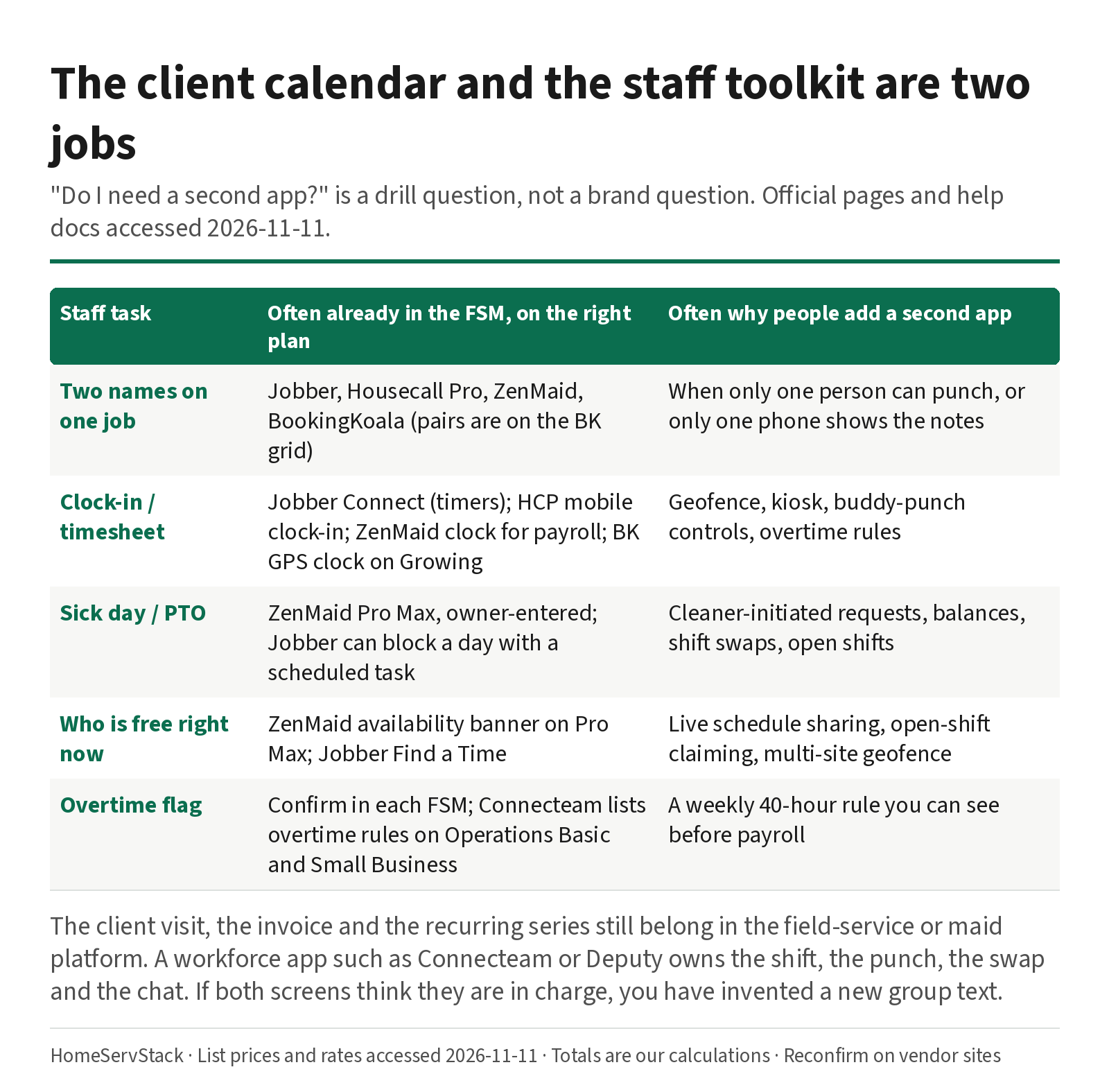
What this means: “Do I need a second app?” is not a brand question. It is a drill question. If Jobber or ZenMaid already passes the pair clock-in and the sick day on the plan you will buy, keep your money. If they fail, price a workforce app against the upgrade that would fix the same failure.
A commercial cleaner, u/Soilstone, described the split in practice, with 34 part-time W2 employees and two full-time: “we switched to connecteams and it’s been great so far. We run shifts/scheduling, onboarding, supply requests and inventory, and all team communications through it.” (comment, 2026-08-20). That is 36 people on the staff side. It is not a claim that Connecteam replaced the client calendar.
A second app is cheap next to a plan jump — until you buy the wrong one
Workforce tools are metered differently from Jobber’s seat bands or ZenMaid’s per-person add-ons. Connecteam charges a flat price for the first 30 users on a paid Operations plan, and offers a free Small Business plan for smaller teams. Deputy charges per user, with a $30 monthly minimum on monthly plans from 1 September 2025. OnTheClock charges $4 per employee plus a $5 monthly base.
Assumptions, used throughout. List prices accessed 2026-11-11. Connecteam annual figures are the monthly equivalent when you prepay the year, as printed ($29 versus $35 month-to-month for Operations Basic). Deputy Lite is $5 per user, subject to the $30 minimum; we take the greater of those two. OnTheClock totals are $4 times headcount, plus $5. Headcount is everyone who would punch, including the owner if the owner punches. ZenMaid totals include the owner in the base price and everyone else as a Pro or Pro Max add-on, from ZenMaid’s cost article. FSM seat-band totals belong in the cost guide and, for Jobber versus Housecall Pro, in the pairwise comparison; we only use them here as a foil for a plan-upgrade decision.
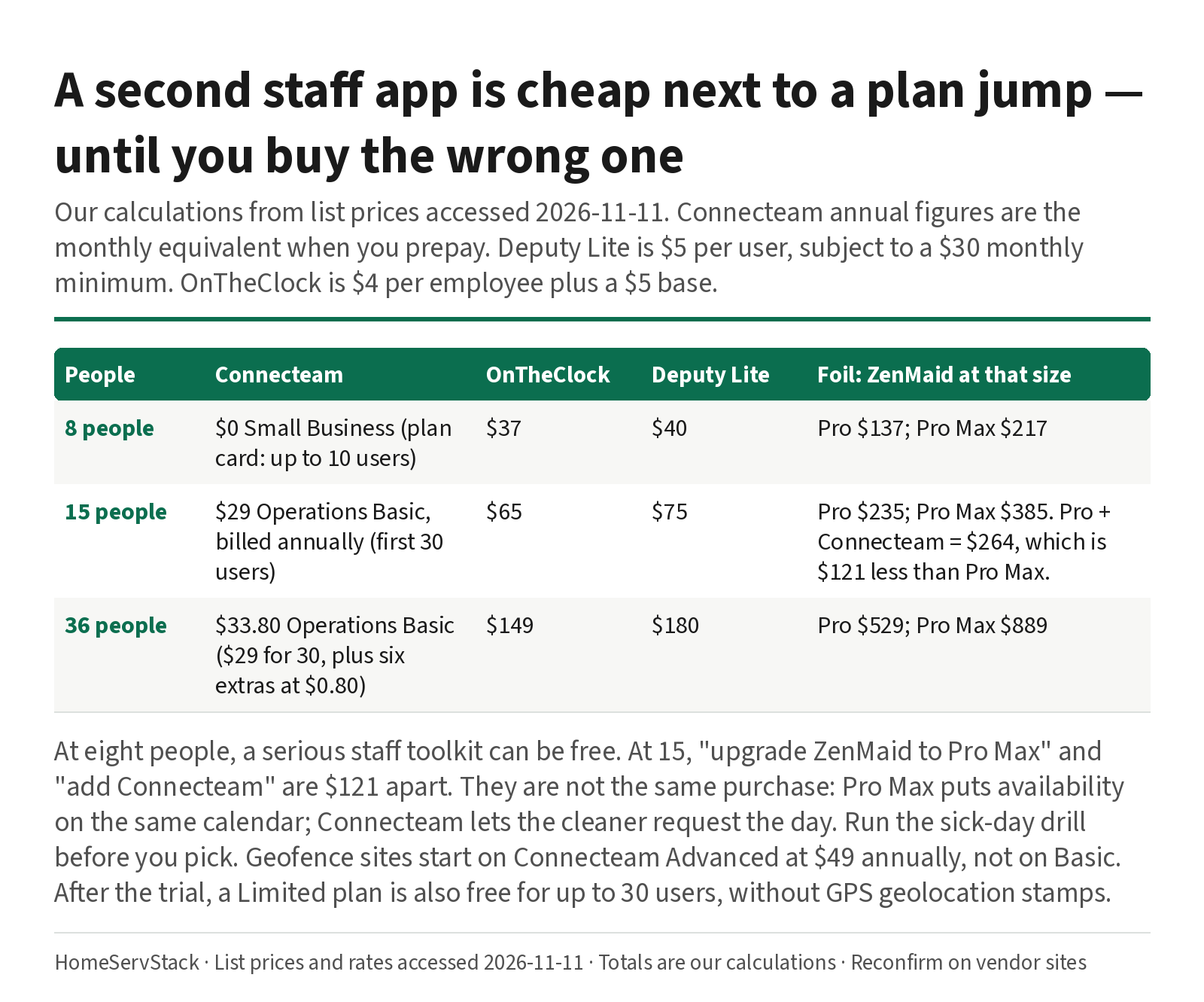
Staff-app subscription, our calculations:
| People | Connecteam | OnTheClock | Deputy Lite | Foil: ZenMaid plan at that size |
|---|---|---|---|---|
| 8 | $0 Small Business (plan card: up to 10 users) | $37 | $40 | Pro $137; Pro Max $217 |
| 15 | $29 Operations Basic, billed annually (first 30 users) | $65 | $75 | Pro $235; Pro Max $385 |
| 36 | $33.80 Operations Basic annual ($29 for 30, plus six extras at $0.80) | $149 | $180 | Pro $529; Pro Max $889 |
What this means: at eight people, a serious staff toolkit can be free. At 15, the “upgrade ZenMaid to Pro Max” decision and the “add Connecteam” decision are $121 apart — Pro Max at $385, versus Pro at $235 plus Connecteam at $29, which is $264 (our calculations). Pro Max still buys you availability on the same calendar the office already uses. Connecteam still buys you cleaner-initiated requests and a clock that is not tied to ZenMaid’s owner-only rule. They are not the same purchase. The gap is why you run the sick-day drill before you pick.
Deputy’s $30 minimum is a quiet threshold of its own. At five users, 5 × $5 is $25, so you pay $30. At six users the per-user math meets the minimum. OnTheClock has no published minimum like that; eight people is $37.
Connecteam’s annual Operations Basic is $29 a month equivalent, $348 prepaid, versus $35 month-to-month, $420 a year. Break-even is about 9.9 months ($348 ÷ $35), if you stay. Geofence sites, the feature people often think they just bought, start on Advanced at $49 annually ($59 monthly), for up to 10 sites. Unlimited geofence is Expert at $99. After the 14-day trial (which is an Expert-level trial), a Limited plan is also free for up to 30 users, with reduced features: the compare table does not list GPS geolocation stamps on Limited. Do not treat the trial as the product you will live on, and do not treat Limited as Small Business.
FieldVibe Crews is $50 a month for unlimited users, and its FAQ describes assigning jobs to specific technicians. That is an FSM with a flat crew price, not a second app. It belongs in a shortlist when seats are the pain; it is not a time-clock substitute for a shop that already lives in Jobber.
Drill one: two cleaners, one house, two punches
A labeled job. Ana and Ben clean the Ortega house together. One checklist, one door code, two pairs of hands, two paychecks.
What good looks like. Both names sit on one job, not on a shadow second job. Both phones show the notes, the code, and the partner. Both can punch, and the timesheet shows two entries. If a lead punches for the pair, each person still gets their own time. Completing a checklist item on one phone does not erase the other.
What the docs say, and where it breaks.
- Jobber. Assigning more than one user to a visit is core scheduling. Time tracking is listed on Connect. Automatic location timers are listed on Grow. Crew-wide clock-in — “Team leads can start and stop timers for the whole crew” — is documented on Plus, with a Crew control setting that is on by default for eligible Plus accounts (Timesheets help, updated 2026-10-29; app timers). On Connect, each person can still start their own timer. The failure mode is the lead punching once and assuming Ben is on the clock. Plus is the plan that makes the lead’s shortcut safe. Confirm in trial, and decide whether Plus is worth it versus a $29 Connecteam clock at this headcount — Plus prices start at $399 a month billed annually for five users, which is a different conversation.
- ZenMaid. Two cleaners on one appointment is normal dispatch. Payroll help (updated 2026-03-17) says hourly pay uses clocked times if they clock in and out, and scheduled appointment times if they do not. The failure mode is silent: Ben forgets to punch, and payroll pays the schedule. Tips are “not automatically added.” An AM/PM error can add about 12 hours; the same article recommends “Reset and Recalculate.” A 15-person operator, u/household_solutions, wrote: “When I tried using the numbers it pulled for payroll, they were incorrect and would have resulted in overpayment if I hadn’t double checked them.” (comment, 2026-09-27). We did not run those numbers. The help center already tells you to be careful. A crew of under five, u/Aromatic-Way4384, is on the other side: “I use ZenMaid and LOVE IT for our crew of under 5 staff!” and listed “GPS tracking, timekeeping features and basic payroll” (comment, 2026-07-24).
- Housecall Pro. Time-tracking help describes a clock-in widget on the mobile dashboard, a weekly timecard, and clock-in locations when device location is on. Employees clock in only from the mobile app. Employee GPS is called out on Essentials, with a help caveat that it applies “if Employee GPS Tracking is included in your plan.” The failure mode to test: two assignees, two punches, and whether the timesheet map shows both.
- BookingKoala. “Individuals, Teams & Pairs” is on the compare table. GPS and clock-in start on Growing at $57, not on Starter at $27. Both providers count against the 5 / 15 / 50 band. The worker-side complaint to test, from u/DaniDisaster424, is availability that can only be entered week by week (comment, 2026-05-18). That is a staff-input limit, and it belongs in this drill’s cousin: can Ben set a Thursday off, or only this week’s pattern?
- Connecteam, Deputy, OnTheClock. These will happily record two punches on a shared shift. They will not keep the Ortega invoice or the door code. If Priya runs the pair only in the workforce app, she will rebuild the office in a second screen.
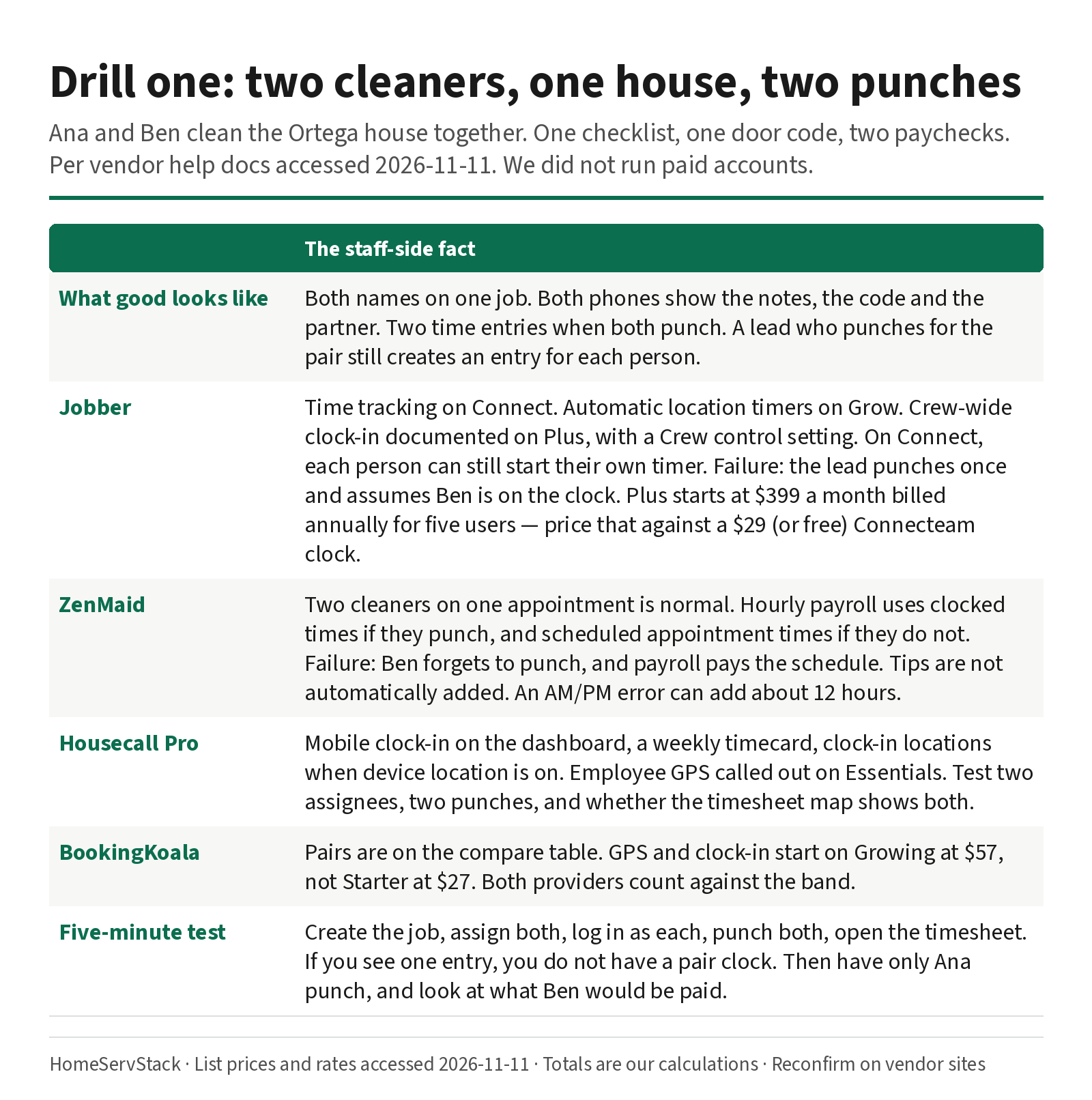
Five-minute trial test. Create the Ortega job. Assign Ana and Ben. Log in as Ana, as Ben, and as the owner. Punch both. Open the timesheet. If you see one entry, you do not have a pair clock. Then have only Ana punch, and look at what payroll or the timesheet would pay Ben. On ZenMaid, expect scheduled hours if Ben never clocked — and decide whether that is acceptable.
Drill two: the 7:40 a.m. sick day, from the staff side
Ana’s kid is sick. Two homes, twelve minutes, a dog-okay replacement.
What good looks like. Ana is off for this day, not for a rewritten weekly pattern. Her day sheet dies on the phone. The office can see who is actually free, including someone not yet scheduled. An open slot can be claimed or assigned. The partner, Ben, can see the new name. The client message is a separate step, and it still lives on the job card in the FSM — this drill does not replace that. It asks whether the staff layer kept up.
What the docs say, and where it breaks.
- ZenMaid. Cleaner Availability is a Pro Max feature. The help center (updated 2026-07-01) lets the owner set working hours and time off, “whether it’s a full day or specific hours,” with notes such as vacation or sick leave. “Currently, contractors or Cleaners can’t update their own availability.” “Currently, contractors or cleaners can’t request time off directly from their account. Everything needs to be manually set up by the Owner of the account.” The failure mode is the 7:40 call itself: Ana cannot enter the day; Priya has to. u/household_solutions, the same 15-person operator, wrote: “I couldn’t mark cleaners as “off” on a particular day, so I still had to keep an additional calendar.” We do not know which plan she was on. Current Pro Max docs describe exactly that full-day entry, owner-only. If you are on Pro, this is a reason to price Pro Max at $385 versus Pro plus a workforce app at $264, at 15 people, before you add a paper calendar.
- Jobber. Team help says a team member’s weekly availability for online booking is set per day of the week, and that a vacation should be a task (or visit) with start and end times assigned to that person, because “a calendar event won’t block the team member from being assigned with online booking.” The failure mode is a calendar note that looks like time off and does not block a booking. Test it. Pull Ana off both jobs, push the new day sheets, and look at Ana’s app.
- Housecall Pro. The staff move is on the job board: pull Ana, assign Carla, look at GPS if Essentials includes it. Time-off balances and cleaner-initiated requests are the question to ask in trial; we will not invent a PTO module the pricing page did not make unambiguous. Employee GPS updates have documented limits (Android about every 15 minutes, iOS on movement or when the schedule is opened), which matters if Priya is asking “who is near the Ortega house right now?”
- Connecteam. The Small Business and paid Operations plans include scheduling, a time clock, and time off (the Small Business column lists nine time-off policies with balance). Open shifts and claiming sit on paid Operations Basic and up, and on Small Business for several scheduling features; confirm claiming and approvals in trial. Shift replacements are listed on Advanced. This is the product designed for Ana to request the day and for Carla to take an open shift. It will not notify the Ortegas about a new cleaner. Priya still needs the FSM for that text.
- Deputy. Lite includes “Shift Swap & Find Replacement” and “Leave & Availability Management,” at $5 per user, subject to the $30 minimum. That is a direct hit on this drill, at a higher per-person price than Connecteam.
- OnTheClock. PTO requests, a shared PTO calendar, and a drag-and-drop schedule are included in the $4-plus-$5 rate. It is a clock and a scheduler. It is not a job card.
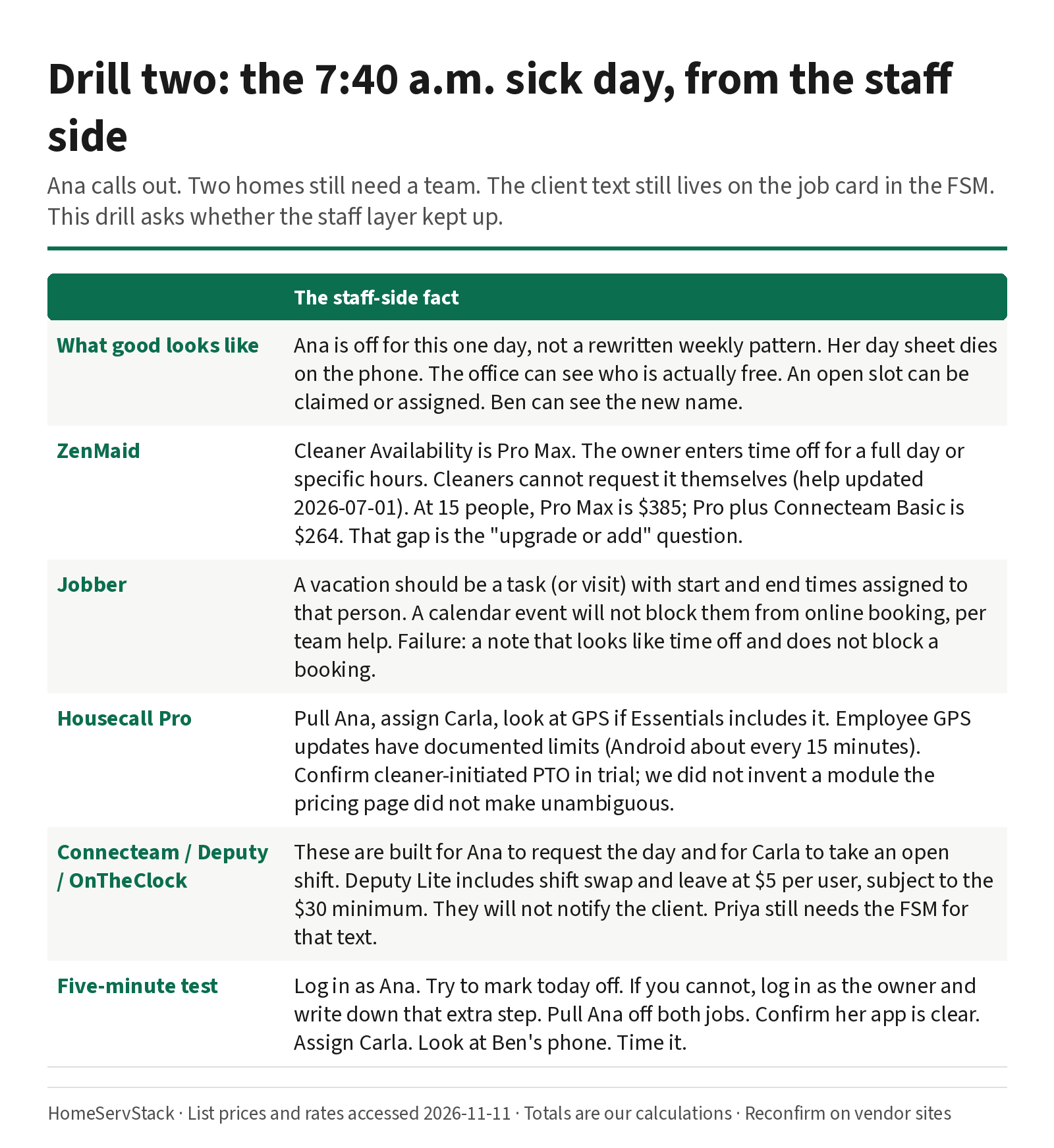
Five-minute trial test. Log in as Ana. Try to mark today off. If you cannot, log in as the owner and do it, and write down that extra step. Pull Ana off both jobs. Confirm her app no longer lists either address. Assign Carla to Ortega with Ben. Look at Ben’s phone. Time it. If this is slower than a group text, the software is not doing the staff job yet.
u/MissRaleigh, a cleaning-company owner who runs on Google Sheets, Quo and QuickBooks, put the larger point this way: “As the company grew, having clear processes mattered more than having everything inside one expensive platform.” (comment, 2026-09-29). A second app with a clear job is a process. Two apps that both think they own Tuesday morning is not.
Feature gates that change the staff week
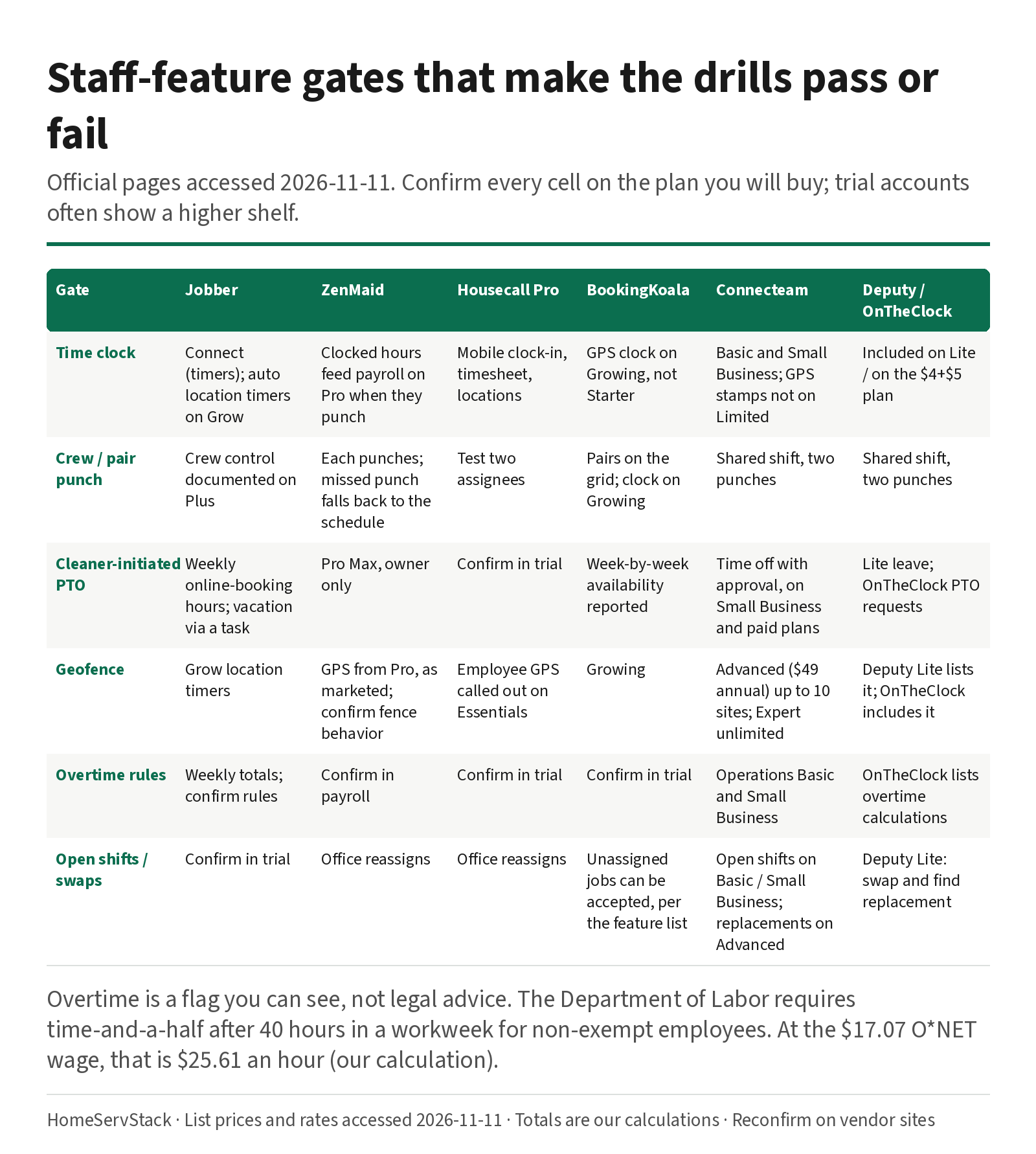
A compact map, from official pages accessed 2026-11-11, of the gates that make these drills pass or fail. Confirm every cell on the plan you will buy; trial accounts often show a higher shelf.
| Gate | Jobber | ZenMaid | Housecall Pro | BookingKoala | Connecteam | Deputy / OnTheClock |
|---|---|---|---|---|---|---|
| Time clock | Connect (timers); auto location timers on Grow | Clocked hours feed payroll on Pro when they punch | Mobile clock-in, timesheet, locations | GPS clock on Growing, not Starter | Basic and Small Business; GPS stamps not on Limited | Included on Lite / on the $4+$5 plan |
| Crew / pair punch | Crew control documented on Plus | Each cleaner punches; missed punch falls back to the schedule | Test two assignees | Pairs on the grid; clock on Growing | Shared shift, two punches | Shared shift, two punches |
| Cleaner-initiated PTO | Owner sets weekly online-booking hours; vacation via a task | Pro Max, owner only | Confirm in trial | Week-by-week availability reported by a worker | Time off with approval, on Small Business and paid plans | Lite leave; OnTheClock PTO requests |
| Geofence | Grow location timers | GPS from Pro, as marketed; confirm fence behavior | Employee GPS called out on Essentials | Growing | Advanced ($49 annual) for up to 10 sites; Expert unlimited | Deputy Lite lists geofencing; OnTheClock includes it |
| Overtime rules | Weekly timesheet totals; confirm rules | Confirm in payroll; not a DOL engine we can cite | Confirm in trial | Confirm in trial | Operations Basic and Small Business, per the compare table | OnTheClock lists overtime calculations as included |
| Open shifts / swaps | Confirm in trial | Office reassigns | Office reassigns | Unassigned jobs can be accepted, per the feature list | Open shifts on Basic / Small Business; replacements on Advanced | Deputy Lite: swap and find replacement |
The overtime row is about a flag you can see, not about legal advice. The Department of Labor’s overtime page is the rule; the software is a way to notice a 43-hour week before you pay it wrong. At $17.07, time-and-a-half is $25.61 an hour (our calculation). A clock that cannot show weekly totals makes that math a spreadsheet again.
Verdicts, and who should skip which tool
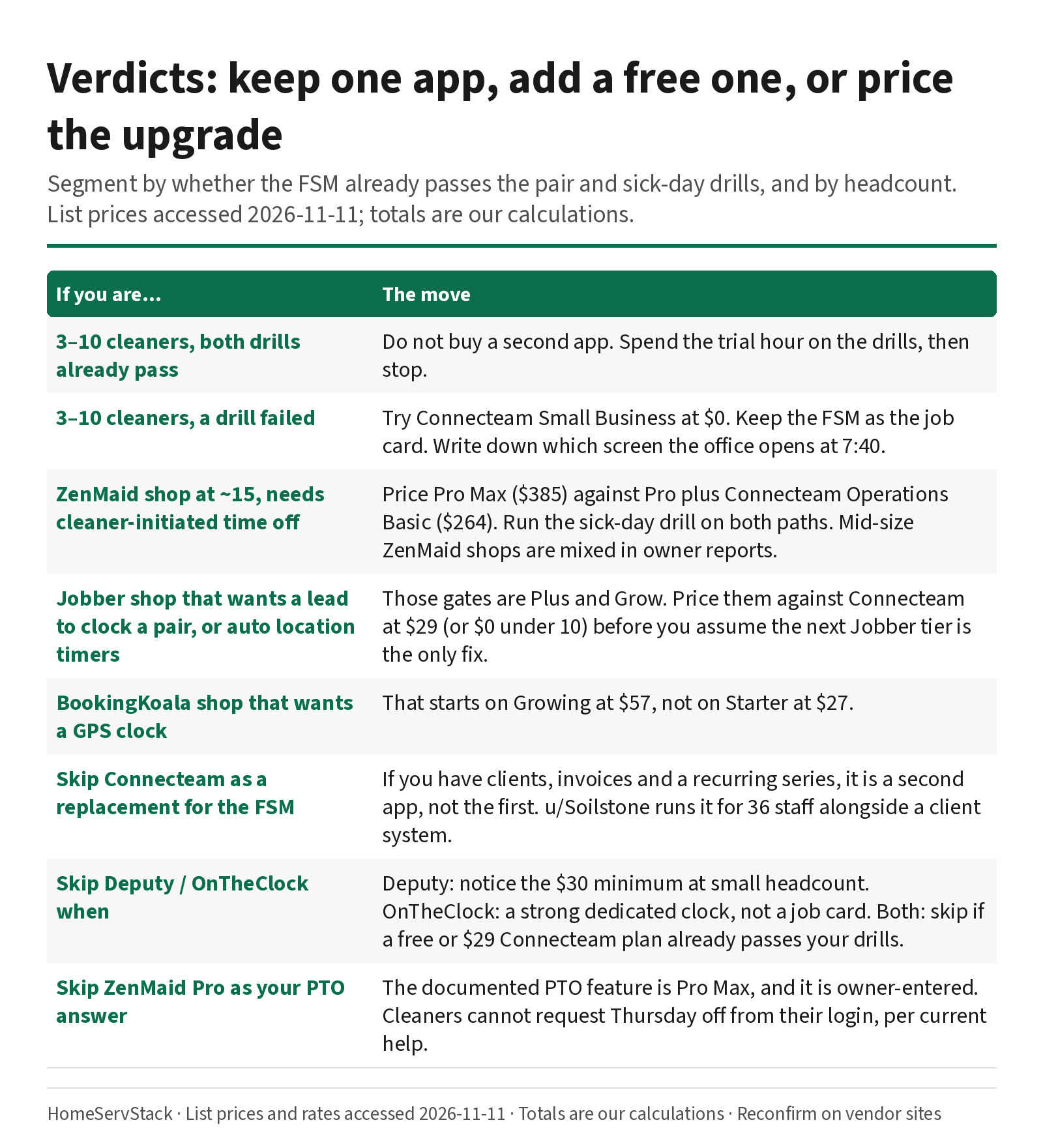
- Three to 10 cleaners, the FSM already passes both drills. Do not buy a second app. Spend the trial hour on the drills, then stop.
- Three to 10 cleaners, the FSM fails the sick day or the pair punch. Try Connecteam Small Business at $0. Keep the FSM as the job card. Write down which screen Priya opens at 7:40.
- A ZenMaid shop at around 15 people that needs cleaner-initiated time off. Price Pro Max ($385) against Pro plus Connecteam Operations Basic ($264). Run the sick-day drill on both paths. A 15–20 person family business, u/Ok_Committee_8576, is happy on ZenMaid at their own “300$ a month” bill and still routes by hand (post, 2026-08-20). A different 15-person shop left after a month. Mid-size is mixed; the drill is the judge.
- A Jobber shop that wants a lead to clock a pair in one tap, or automatic location timers. Those gates are Plus and Grow. Price them against Connecteam at $29 (or $0 under 10) before you assume the next Jobber tier is the only fix. Jobber versus Housecall Pro, including the 6-to-15-user curve, is the pairwise page.
- A BookingKoala shop that wants a GPS clock. That starts on Growing at $57, not on Starter at $27. The calendar-versus-storefront decision is ZenMaid vs BookingKoala.
- Skip Connecteam as a replacement for Jobber, ZenMaid or Housecall Pro if you have clients, invoices and a recurring series. Skip it as a second app if the FSM already passed both drills.
- Skip Deputy at very small headcount without noticing the $30 minimum, and skip it if Connecteam’s free or $29 tier already passes your drills; Deputy is the richer swap-and-compliance product, at a higher per-person rate.
- Skip OnTheClock if you need a client job card, or if a free Connecteam plan already covers the clock and PTO. It is a strong dedicated clock, not an FSM.
- Skip ZenMaid Pro as your PTO answer. The documented PTO feature is Pro Max, and it is owner-entered. Skip assuming a cleaner can request Thursday off from their login. They cannot, per current help.
- Skip a commercial janitorial platform for a residential multi-stop Tuesday, and skip a maid calendar for a night crew at a 15-story building.
Ways this decision goes wrong
- Buying a second app because the first one failed a client job — a skip-week invoice, a quote, a booking form. That is the wrong aisle. Use the scheduling, autopay, or cost guides.
- Making two systems of record. If Ana’s sick day lives in Connecteam and the Ortega job still lists Ana in Jobber, Ben will meet an empty house or a surprise partner.
- Testing only as the owner. The 7:40 question is whether Ana can enter the day.
- Assuming geofence came with Connecteam Basic at $29. It comes with Advanced at $49, annually, for up to 10 sites.
- Jumping to ZenMaid Pro Max, or to Jobber Plus, without pricing a $0 or $29 staff app that might fix only the staff failure.
- Treating a 14-day Connecteam Expert trial, or a Jobber Grow trial, as the plan you will live on.
- Ignoring a missed punch. On ZenMaid, that missed punch can become scheduled hours on the payroll. Look at the timesheet.
A 30-minute staff-side trial, steal this
- Minutes 0–8, the pair. Ortega, Ana and Ben, both phones, both punches, one checklist, the door code.
- Minutes 8–18, the sick day. Ana off, phone cleared, Carla on Ortega, Ben’s app updated, stopwatch running.
- Minutes 18–25, PTO as the cleaner. Log in as Ana and try to request Thursday. Write down who is allowed to do it, and which plan that sits on.
- Minutes 25–30, the bill. Price the FSM upgrade that would pass the same drills, and the second-app price at your real headcount, including Deputy’s minimum and Connecteam’s 10-user line. If both paths pass, pick the one Priya can explain in one sentence.
If you also need the skip-one-visit and the invoice, that is a different half hour, in the scheduling and autopay guides. Do not mix the two into one muddy demo.
How we researched this
On 2026-11-11 we re-fetched official pricing for Connecteam, Deputy, OnTheClock, Jobber, ZenMaid, Housecall Pro, BookingKoala and FieldVibe, plus Jobber’s timesheets, timers and team-management help, ZenMaid’s payroll and availability help, Housecall Pro’s time-tracking, GPS and payroll-from-timesheets help, the Department of Labor overtime page, MaidCentral’s PCI report, and O*NET’s BLS wage table. Every subscription figure is a published list price or a HomeServStack calculation from those prices, labeled as such. We also read public owner comments from Reddit (via the Arctic Shift archive), accessed the same day. Quotes are verbatim, with handles only. User-stated prices are their claims, not our list prices.
We did not run paid production accounts for this article, and we did not invent GPS accuracy or drive-time savings. We have no affiliate relationships with any vendor named here. We do not rank a single winner; we segment by whether the FSM already passes the staff drills, and by headcount.
Glossary
- FSM. Field-service management software: the client-visit system (Jobber, Housecall Pro, and cousins). ZenMaid and BookingKoala play this role for maid businesses even though they are more specialized.
- Workforce app. A staff-scheduling, time-clock and chat tool such as Connecteam or Deputy. It is not a replacement for the job card.
- Geofence. A virtual boundary around a site. A punch can be blocked or auto-stopped when the phone is outside it. Plan gates vary.
- Crew control. Jobber’s Plus-plan setting that lets a lead start and stop timers for the whole crew, with a separate time entry for each person.
- Owner-entered time off. ZenMaid’s documented Pro Max path: the account owner inputs availability and PTO; cleaners cannot request it themselves.
- Scheduled versus clocked hours. ZenMaid’s payroll rule: hourly cleaners are paid on punches when they punch, and on the appointment times when they do not.
- Small Business plan. Connecteam’s free plan, described on the plan card as free for up to 10 users, with a FAQ that also says “less than 10 employees.” Confirm at the line.
- Operations Basic / Advanced. Connecteam’s paid Operations tiers: $29 and $49 a month billed annually, for the first 30 users. Geofence starts on Advanced.
- Minimum monthly spend. Deputy’s $30 floor on monthly Lite, Core and Pro plans, in effect from 1 September 2025.
Corrections and updates
- 2026-11-11: Rewritten and re-scoped around the queries “cleaning employee scheduling app” and “time clock app for cleaning company.” The page now separates the client-visit scheduler from the staff toolkit, owns the pair and sick-day drills from the staff side, and prices Connecteam, Deputy and OnTheClock against FSM plan upgrades. Correction: Housecall Pro Basic and Essentials list prices are published ($59 and $149 billed annually); earlier versions of this page called those custom / not published. Correction: BookingKoala GPS and clock-in, and native apps, start on Growing, not Starter. Added sourced owner comments (Connecteam at 36 staff, ZenMaid payroll and single-day-off reports, week-by-week availability). Client-side skip-visit and billing drills now live in the scheduling and autopay guides.
- 2026-11-10: First published as a residential dispatch comparison (pairs, callouts, routes). Superseded by the rewrite above.
Related guides
- Best scheduling software for cleaning businesses — the client-visit shortlist, the work-start × meter framework, and the skip-one-visit drill.
- How much cleaning business software costs — all-in FSM bills at 1 to 20 people, including Jobber bands and ZenMaid per-person totals.
- Jobber vs Housecall Pro for cleaning — the 6-to-15-user curve, routes versus MAX, QuickBooks and export.
- Jobber vs ZenMaid — payroll and Pro Max availability versus Jobber quotes and QuickBooks, if the staff tools sit inside the calendar.
- ZenMaid vs BookingKoala — office calendar versus storefront, payroll and PTO versus the booking site, and what happens if you cancel.
- Cleaning business autopay and card on file — the billing side of a skip week, which this page does not own.
Frequently asked questions
Do I need a separate employee scheduling or time-clock app for a cleaning company?
Only if your field-service or maid platform fails a staff-side job your week actually requires: two people clocked on one house, a 7:40 a.m. sick day that updates the cleaner's phone, a PTO request, an overtime flag, or a geofenced punch. At 10 users or fewer, Connecteam's Small Business plan is free. At 15 users, Connecteam Operations Basic is $29 a month billed annually for the first 30 users, which can be cheaper than jumping a ZenMaid shop from Pro ($235 at 15 people) to Pro Max ($385). The client visit, the invoice and the recurring series still belong in the FSM.
What is the best time clock app for a cleaning company?
If you already run Jobber, Housecall Pro, ZenMaid or BookingKoala, try that tool's own clock first, on the plan you will buy. Jobber lists time tracking on Connect, automatic location timers on Grow, and crew-wide clock-in on Plus. Housecall Pro documents mobile clock-in and GPS on a timesheet, with employee GPS called out on Essentials. ZenMaid uses clocked times for hourly payroll when cleaners punch, and scheduled times when they do not. BookingKoala lists GPS and clock-in on Growing, not Starter. If those fail the pair and sick-day drills, shortlist Connecteam (free up to 10 users), then OnTheClock ($4 per employee plus a $5 base) or Deputy ($5 per user on Lite, $30 monthly minimum).
Can two cleaners clock in on the same job?
They should, and you must test it. Assign two people to one address, log in as each, and confirm two time entries exist when both punch. Jobber's help documents a Crew control setting that lets a lead clock the whole crew at once, on Plus. ZenMaid's payroll help says hourly pay uses clocked times if they clock in, and scheduled appointment times if they do not — so a missed punch can silently pay the schedule instead. A workforce app can record two punches on a shared shift; it will not, by itself, keep the door code and the invoice.
Can a cleaner mark themselves off for a single sick day?
It depends on the tool and the plan, and this is a 7:40 a.m. question. ZenMaid's Cleaner Availability feature is Pro Max, and the help center (updated 2026-07-01) says the owner enters time off for a full day or specific hours; cleaners cannot request it from their own account. Jobber's team help describes blocking online booking for a vacation by adding a task on that person's schedule. Connecteam and Deputy are built around leave requests and shift swaps. Test as the cleaner, not only as the owner.
How much does a second workforce app cost next to Jobber or ZenMaid?
From list prices accessed 2026-11-11, our calculations: at eight people, Connecteam Small Business is $0 (the plan card says up to 10 users), OnTheClock is $37 ($4 × 8 plus a $5 base), and Deputy Lite is $40 (the $30 minimum is already passed). At 15 people, Connecteam Operations Basic is $29 billed annually for the first 30 users, OnTheClock is $65, and Deputy Lite is $75. Compare those figures to a plan upgrade on the FSM you already have, especially ZenMaid Pro Max at $385 for 15 people versus Pro at $235 plus Connecteam at $29, which is $264.
Should Connecteam replace Jobber, ZenMaid or Housecall Pro?
No, not if you have client visits, quotes, recurring series or invoices to run. A commercial cleaner with 36 staff, u/Soilstone, uses Connecteam for shifts, onboarding, supplies and team chat — alongside, not instead of, a client system. Use the FSM as the system of record for the job card, and the workforce app for the shift, the punch and the chat. If both screens think they are in charge, you have invented a new group text.
Sources
- Connecteam Pricing — Accessed
- Deputy Pricing — Accessed
- OnTheClock Pricing — Accessed
- Jobber Pricing — Accessed
- Jobber Help: Timesheets (updated 2026-10-29) — Accessed
- Jobber Help: Timers and Timesheets in the Jobber App — Accessed
- Jobber Help: The Connect Plan — Accessed
- Jobber Help: Manage Team — Accessed
- ZenMaid Pricing — Accessed
- ZenMaid Help: How to Run Payroll in ZenMaid (updated 2026-03-17) — Accessed
- ZenMaid Help: Cleaner Availability Feature (updated 2026-07-01) — Accessed
- Housecall Pro Pricing — Accessed
- Housecall Pro Help: Time Tracking Overview Guide — Accessed
- Housecall Pro Help: Employee GPS Tracking & HCP Map — Accessed
- Housecall Pro Help: How to Run Payroll Using Time Tracking — Accessed
- BookingKoala Pricing — Accessed
- FieldVibe Pricing — Accessed
- U.S. Department of Labor, Wage and Hour Division: Overtime Pay — Accessed
- MaidCentral: Professional Cleaning Index (PCI) Report, Cleaning Industry Statistics 2026 — Accessed
- O*NET OnLine: Local Wages for Maids and Housekeeping Cleaners (BLS OEWS data) — Accessed
- Reddit r/cleaningbusiness: Advice? Zenmaid alternatives (u/Soilstone, u/Ok_Committee_8576) — Accessed
- Reddit r/cleaningbusiness: Cleaning business owners with a team (u/household_solutions) — Accessed
- Reddit r/cleaningbusiness: Jobber alternatives (u/Aromatic-Way4384) — Accessed
- Reddit r/cleaningbusiness: Starting residential cleaning (u/DaniDisaster424) — Accessed
- Reddit r/cleaningbusiness: Help automating scheduling and payroll (u/household_solutions, u/MissRaleigh) — Accessed
Was this helpful?
One tap, no account, no personal data. We only keep a yes or no, counted with the other votes on this page.
Keep reading
More in Cleaning Software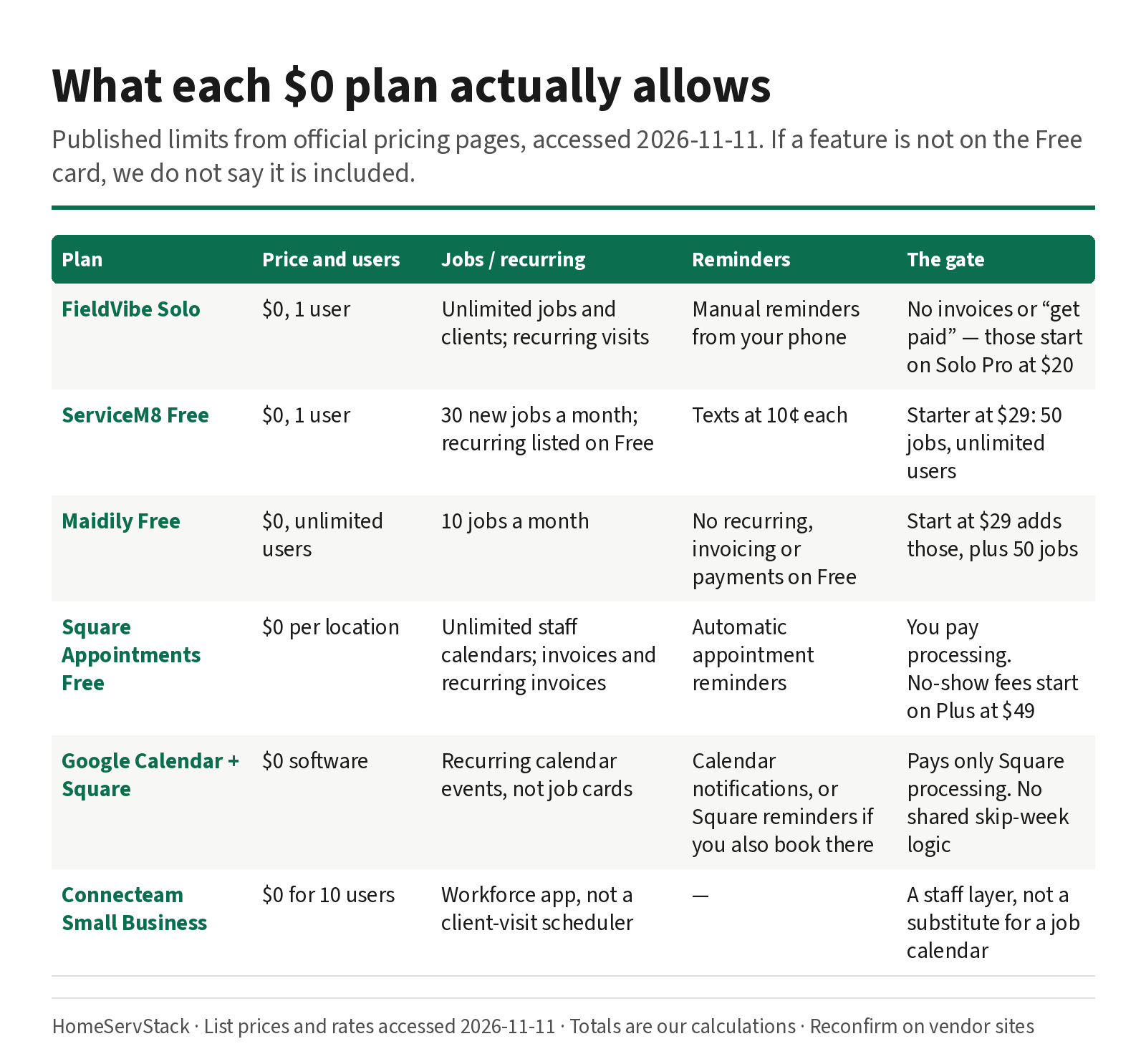
Free Cleaning Business Software: What Each $0 Plan Actually Allows
What free cleaning business software actually allows — FieldVibe, ServiceM8, Square, Maidily — and the limits that tell you it's time to pay.
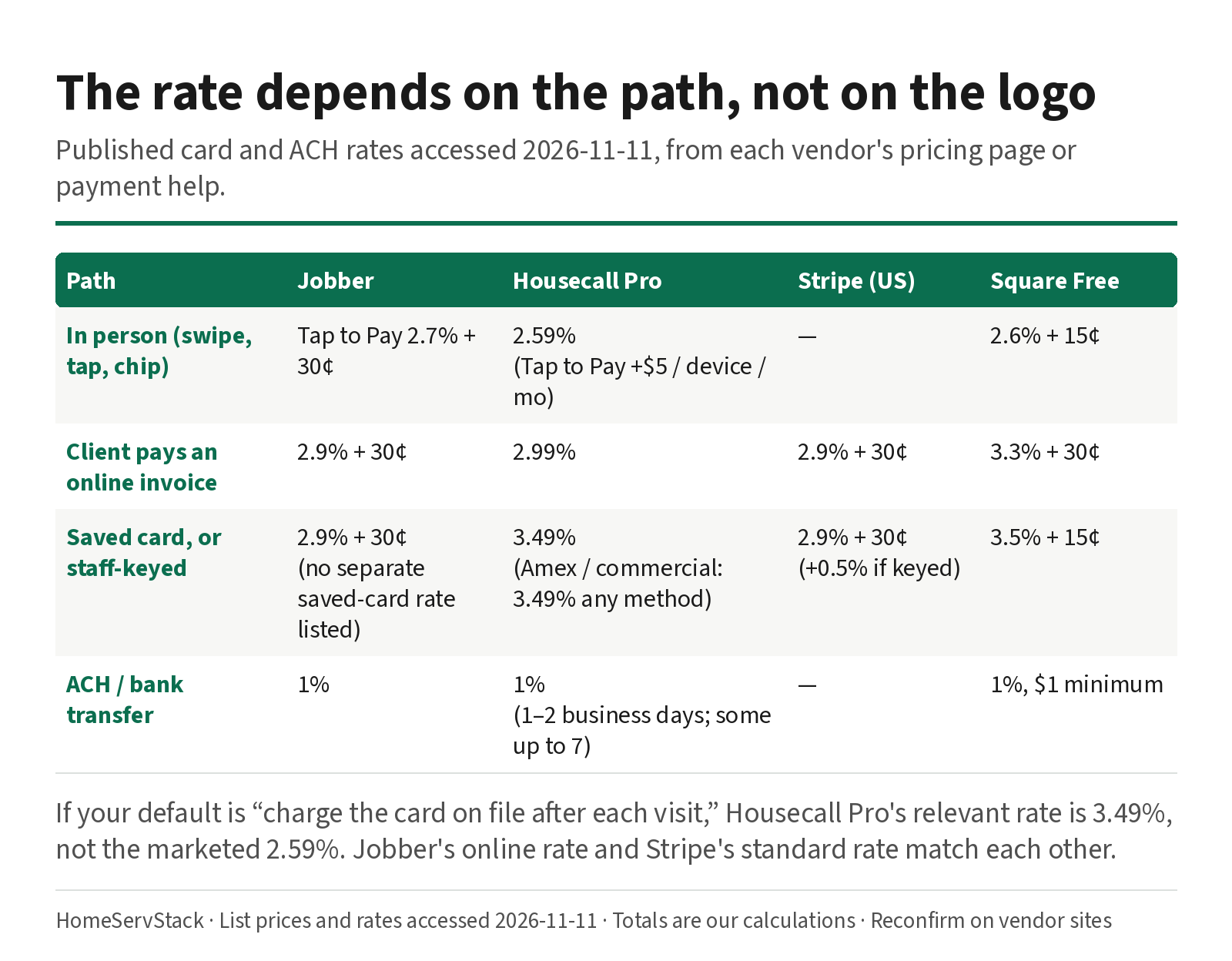
Cleaning Business Autopay: Card-on-File Rates, Declines, and Skip-Week Billing
Autopay and card-on-file rates for cleaning businesses, plus what Jobber, Housecall Pro and ZenMaid do when a card declines or a week is skipped.
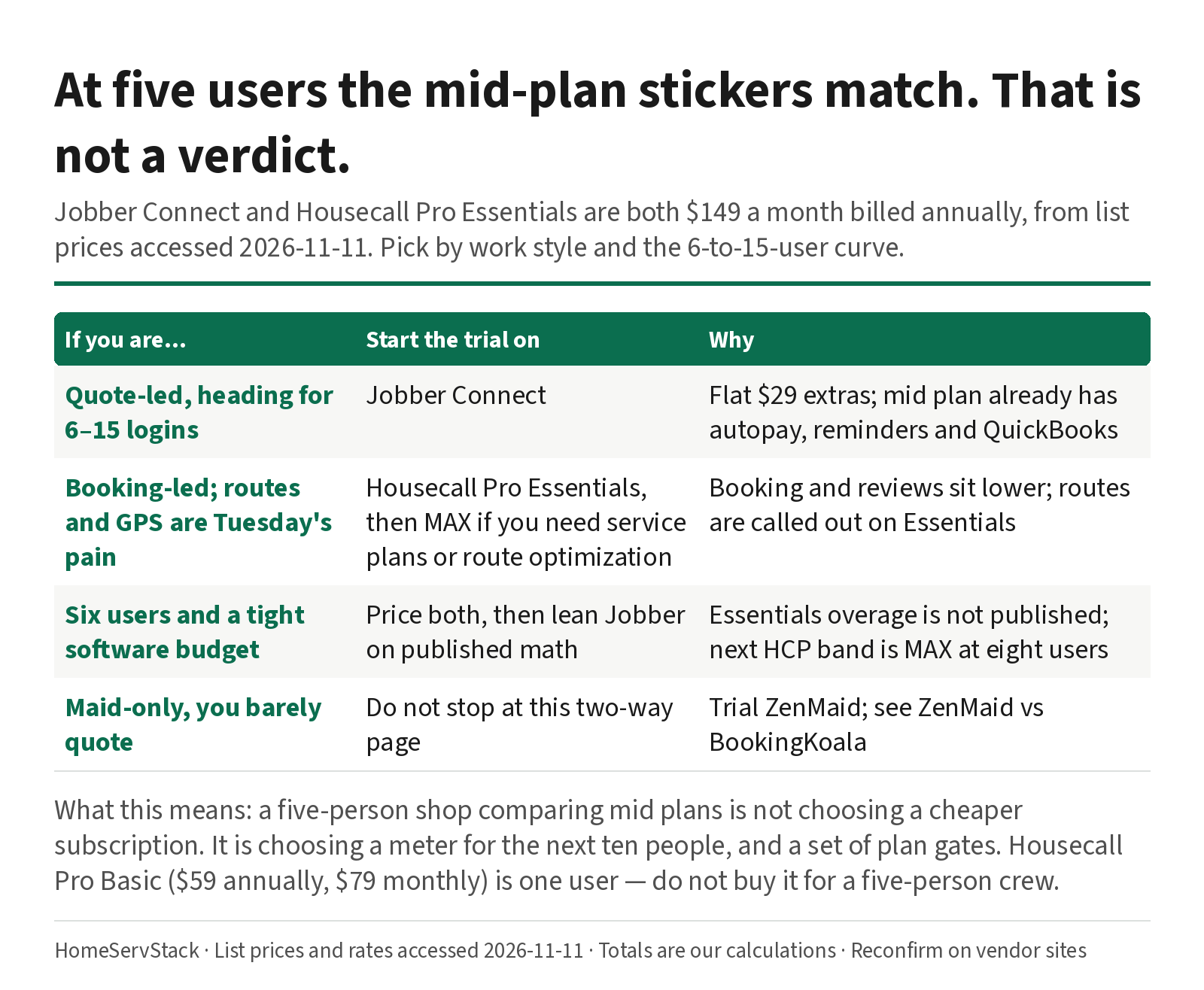
Jobber vs Housecall Pro for Cleaning: Same $149 at Five Users, Different After That
Jobber and Housecall Pro both cost $149 at five users annually. The 6–15 user curve, card rates, routes, and QuickBooks decide it.
Comments
Share a correction or an operator experience. Comments are plain text, held for review, and appear only after they are approved. A lasting email is required and is never shown. We may send a confirmation link once mail is configured.
No approved comments yet.